Change to default appeal search field - Batch processing





Hi,
I'm trying to find the setting that changes the default search in the Appeal tab within a batch.
Currently I can type the number of the appeal and select, but I want to start typing the appeal description with the suggestions to come up.
Example:
If I search 1687, the Appeal result is 1687
If I select the drop down then type “beq" (1687 is Bequest), nothing comes up, I need to scroll through the list to find it. Then once selected the column will show me the ID (1687), not the description.
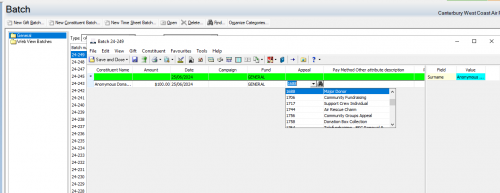
Any ideas on where and what setting to change to enable the appeal description to be my default?
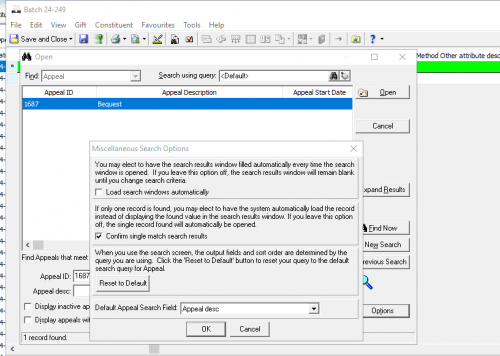
I did find the below option and chnaged to what I though was show appeal by description rather than number, but this hasn't worked.
A co-worker of mine has the setting I'm after but no one is able to tell me where this was changed.
Thanks 
Comments
-
@Tasha Mikoz Not 100% sure if it affects batch but I think you need to go to Tools (top of RE window - not in a module) > User Options > Records > Funds. Bottom option on that screen is how to display - fund format. I'm guessing you have Fund ID and want to change that to Description.
Note it will change how it displays system wide for you when you are working with fund.0 -
@Tasha Mikoz
What JoAnn said, you will find the same option available in User Options for Appeal as well1 -
0








Categories
- All Categories
- 6 Blackbaud Community Help
- 211 bbcon®
- 1.4K Blackbaud Altru®
- 402 Blackbaud Award Management™ and Blackbaud Stewardship Management™
- 1.1K Blackbaud CRM™ and Blackbaud Internet Solutions™
- 15 donorCentrics®
- 360 Blackbaud eTapestry®
- 2.6K Blackbaud Financial Edge NXT®
- 655 Blackbaud Grantmaking™
- 576 Blackbaud Education Management Solutions for Higher Education
- 3.2K Blackbaud Education Management Solutions for K-12 Schools
- 941 Blackbaud Luminate Online® and Blackbaud TeamRaiser®
- 84 JustGiving® from Blackbaud®
- 6.7K Blackbaud Raiser's Edge NXT®
- 3.7K SKY Developer
- 248 ResearchPoint™
- 120 Blackbaud Tuition Management™
- 165 Organizational Best Practices
- 240 Member Lounge (Just for Fun)
- 34 Blackbaud Community Challenges
- 37 PowerUp Challenges
- 3 (Open) PowerUp Challenge: Grid View Batch
- 3 (Closed) PowerUp Challenge: Chat for Blackbaud AI
- 3 (Closed) PowerUp Challenge: Data Health
- 3 (Closed) Raiser's Edge NXT PowerUp Challenge: Product Update Briefing
- 3 (Closed) Raiser's Edge NXT PowerUp Challenge: Standard Reports+
- 3 (Closed) Raiser's Edge NXT PowerUp Challenge: Email Marketing
- 3 (Closed) Raiser's Edge NXT PowerUp Challenge: Gift Management
- 4 (Closed) Raiser's Edge NXT PowerUp Challenge: Event Management
- 3 (Closed) Raiser's Edge NXT PowerUp Challenge: Home Page
- 4 (Closed) Raiser's Edge NXT PowerUp Challenge: Standard Reports
- 4 (Closed) Raiser's Edge NXT PowerUp Challenge: Query
- 796 Community News
- 3K Jobs Board
- 54 Blackbaud SKY® Reporting Announcements
- 47 Blackbaud CRM Higher Ed Product Advisory Group (HE PAG)
- 19 Blackbaud CRM Product Advisory Group (BBCRM PAG)