How to import Alias in individual relationship on a constituent record.





I have imported new incoming students along with their parent/s information. I need to add power school id in RE, which I was able to import on the student record but did not find any option to import or update aliases on parent/s in relationship tab without being a constituent by themselves.
Also need to know if address on individual relationship can be imported at the same time when importing the new student record. I had to do the import without address on relationship tab and later update the address but it did not update the address city, wondering why?
Thanks,
Naila
Comments
-
I have imported new incoming students along with their parent/s information. I need to add power school id in RE, which I was able to import on the student record but did not find any option to import or update aliases on parent/s in relationship tab without being a constituent by themselves.
Also need to know if address on individual relationship can be imported at the same time when importing the new student record. I had to do the import without address on relationship tab and later update the address but it did not update the address city, wondering why?
Thanks,
Naila
@Naila Asif it has been a little while since I've done imports like these, but I checked the knowledgebase and found this article. It implies that you can import relationships and their addresses at the same time you import a new constituent.
Relationship Alias is not a field that can be imported.0 -
@Karen Diener, Thank you Karen. I have to add the relationship Alias manually.
The article you shared (thanks) there is sample data showing IRImpID filled in already, how would I get that for a new constituent record that needs to be created along with relationship address.
ImportID Titl1 FirstName LastName OrgName IRImpID IRTitl1 IRFirstName Mr. Bob Smith IR001 Mrs. Nancy Quick Fix Repair Shop IR002 Mr. John I was able to import the new constituents with all other relationship information besides address. It imported the phone and emails etc but not the address. I had to do it as a second step once I have the IRImpID.
Thanks,
Naila
0 -
@Naila Asif
when importing new relationship… relationship import id is not required.it is only needed when you import an “update” option that RE needs to know which relationship record you want to update therefore the need for relationship import id
1 -
@Alex Wong, so if I have to import new constituent along with Individual relationship, it can import the relationship address in the same import if I keep a blank column with header IRImpID?
0 -
@Naila Asif
same import you can do new constituent that has a new invidiaual relationship.. don't need the import id column unless you want to specify you own (I advise against this usually).First Name Last Name Address City State Zip Rel First Name Rel Last Name Rel Type Rel Address Rel City Rel State Rel Zip John Smith 123 Smith Rd New York NY 11111 Mary Jones Cousin 456 Jones St Brooklyn NY 11888 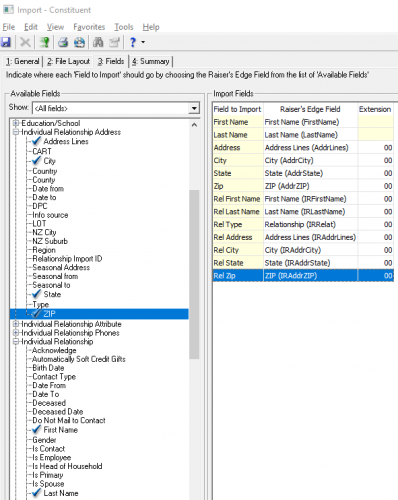 0
0 -
@Naila Asif
It appears in theory it should work, sorry I should have tried it first.But it seems you will need to specify relationship import id, but you have none to start with, this is when you can use the “define your own” relationship import id.
KeyInd Code First Name Last Name Address City State Zip Rel First Name Rel Last Name Rel Type Rel Import ID Rel Address Rel City Rel State Rel Zip Rel Import ID I New York John Smith 123 Smith Rd New York NY 11111 Mary Jones Cousin RelImportID11111 456 Jones St Brooklyn NY 11888 RelImportID11111 I was missing a few column needed to test this, so added KeyInd and Code (constituent code), Rel IMport ID, and and 2nd Rel Import ID.
the TWO column of Rel Import ID is the same, RelImportID11111. The import will create the constituent, then then relationship using the import id specified, and then create the relkationship address mapping to the relationship import id specified.
I tested this to be working.
The question then becomes, you will need to use a naming convention that will make sure your Relationship Import ID is always unique. You have 20 characters to work with.
0







Categories
- All Categories
- 6 Blackbaud Community Help
- 213 bbcon®
- 1.4K Blackbaud Altru®
- 402 Blackbaud Award Management™ and Blackbaud Stewardship Management™
- 1.1K Blackbaud CRM™ and Blackbaud Internet Solutions™
- 15 donorCentrics®
- 360 Blackbaud eTapestry®
- 2.6K Blackbaud Financial Edge NXT®
- 655 Blackbaud Grantmaking™
- 576 Blackbaud Education Management Solutions for Higher Education
- 3.2K Blackbaud Education Management Solutions for K-12 Schools
- 939 Blackbaud Luminate Online® and Blackbaud TeamRaiser®
- 84 JustGiving® from Blackbaud®
- 6.6K Blackbaud Raiser's Edge NXT®
- 3.7K SKY Developer
- 248 ResearchPoint™
- 119 Blackbaud Tuition Management™
- 165 Organizational Best Practices
- 241 Member Lounge (Just for Fun)
- 34 Blackbaud Community Challenges
- 34 PowerUp Challenges
- 3 (Open) PowerUp Challenge: Chat for Blackbaud AI
- 3 (Closed) PowerUp Challenge: Data Health
- 3 (Closed) Raiser's Edge NXT PowerUp Challenge: Product Update Briefing
- 3 (Closed) Raiser's Edge NXT PowerUp Challenge: Standard Reports+
- 3 (Closed) Raiser's Edge NXT PowerUp Challenge: Email Marketing
- 3 (Closed) Raiser's Edge NXT PowerUp Challenge: Gift Management
- 4 (Closed) Raiser's Edge NXT PowerUp Challenge: Event Management
- 3 (Closed) Raiser's Edge NXT PowerUp Challenge: Home Page
- 4 (Closed) Raiser's Edge NXT PowerUp Challenge: Standard Reports
- 4 (Closed) Raiser's Edge NXT PowerUp Challenge: Query
- 792 Community News
- 2.9K Jobs Board
- 54 Blackbaud SKY® Reporting Announcements
- 47 Blackbaud CRM Higher Ed Product Advisory Group (HE PAG)
- 19 Blackbaud CRM Product Advisory Group (BBCRM PAG)