SKY API Error




Hi all,
I'm trying to use the built-in “Try-it” feature, but whenever I try to add authorisation flow, after I login and authorise, it gives me a popup saying “Unable to authenticate due to internal error”.
Any ideas?
Comments
-
Hi @Jonah Kleinman, when selecting the Authorize option in the Try it fly out, is it showing you logged in in the upper right of your screen?
Also after authorizing in the pop up window and completing is the pop up closing and is the authorization token added to the header information?I tested a few endpoints now with the try it feature and they are all working as expected.
0 -
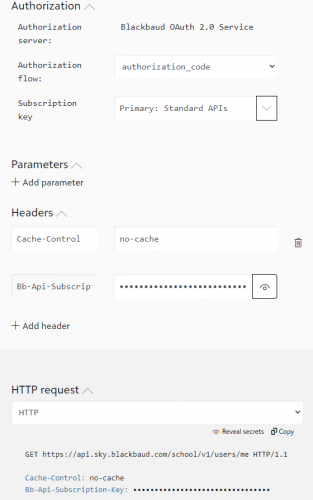
Yes, it shows that I'm logged in. When I authorise in the popup, the popup closes, and then I get a notification with the error. It shows that the authorisation code was selected, but it's not added to the request.
If it helps, this is with the Users Get Me endpoint.0 -
@Jonah Kleinman
did you connect this app:0 -
@Alex Wong Yep. It's worked before, it only broke recently
0 -
Hey @Jonah Kleinman,
This has come up before. Did you recently install any browser extensions? We have found that some browser extensions don't play nice with the Try It console. You can either disable those extensions on ‘developer.sky.blackbaud.com’ or use another browser. Sorry about this. Our developer portal platform vendor is aware of the issue, but I don't have an ETA on the fix. This is unfortunately the only workaround in the meantime.
1 -
Hey @Chris Rodgers,
Switching to Firefox did the trick, thanks for the help!
1










Categories
- All Categories
- 6 Blackbaud Community Help
- 213 bbcon®
- 1.4K Blackbaud Altru®
- 403 Blackbaud Award Management™ and Blackbaud Stewardship Management™
- 1.1K Blackbaud CRM™ and Blackbaud Internet Solutions™
- 15 donorCentrics®
- 360 Blackbaud eTapestry®
- 2.6K Blackbaud Financial Edge NXT®
- 656 Blackbaud Grantmaking™
- 577 Blackbaud Education Management Solutions for Higher Education
- 3.2K Blackbaud Education Management Solutions for K-12 Schools
- 939 Blackbaud Luminate Online® and Blackbaud TeamRaiser®
- 84 JustGiving® from Blackbaud®
- 6.6K Blackbaud Raiser's Edge NXT®
- 3.7K SKY Developer
- 249 ResearchPoint™
- 119 Blackbaud Tuition Management™
- 165 Organizational Best Practices
- 241 Member Lounge (Just for Fun)
- 34 Blackbaud Community Challenges
- 37 PowerUp Challenges
- 3 (Open) PowerUp Challenge: Grid View Batch
- 3 (Closed) PowerUp Challenge: Chat for Blackbaud AI
- 3 (Closed) PowerUp Challenge: Data Health
- 3 (Closed) Raiser's Edge NXT PowerUp Challenge: Product Update Briefing
- 3 (Closed) Raiser's Edge NXT PowerUp Challenge: Standard Reports+
- 3 (Closed) Raiser's Edge NXT PowerUp Challenge: Email Marketing
- 3 (Closed) Raiser's Edge NXT PowerUp Challenge: Gift Management
- 4 (Closed) Raiser's Edge NXT PowerUp Challenge: Event Management
- 3 (Closed) Raiser's Edge NXT PowerUp Challenge: Home Page
- 4 (Closed) Raiser's Edge NXT PowerUp Challenge: Standard Reports
- 4 (Closed) Raiser's Edge NXT PowerUp Challenge: Query
- 794 Community News
- 3K Jobs Board
- 54 Blackbaud SKY® Reporting Announcements
- 47 Blackbaud CRM Higher Ed Product Advisory Group (HE PAG)
- 19 Blackbaud CRM Product Advisory Group (BBCRM PAG)