Sharing my Power Automate template: Large Gift Notification+Appeal/Fund





- Description: An update to Blackbaud large gift notification template to include Gift Split info: appeal lookup ids and fund description, where duplicated appeal and fund are removed
- Required connections: Blackbaud Raisers Edge NXT Constituents, Fundraising, Gifts, Mail
- Suggested skill level required to use this template: Beginner
- Configuration details: None that is too specific, see Instructions below
- Category: Automation, Notification
- Instructions:
- Update trigger how often for sending
- Update Store time since the last run action reflecting the same change in trigger
- Update variable for what is consider large gift
- Update email address to receive notification
If Appeal Description is desired
- DO NOT change the variable name Appeal Lookup IDs, the name doesn't affect the flow
- in the Append Array Var Appeal Lookup IDs action, remove Lookup ID and add the Description dynamic content from the Get an appeal action
If Fund ID is desired
- DO NOT change the variable name Fund Descriptions, the name doesn't affect the flow
- in the Append Array Var Fund Descriptions action, remove Description and add the Lookup ID dynamic content from the Get a fund action
Comments
-
@Alex Wong this is great, I can't wait to give it a try! I've just cracked how to get the appeal lookup ID in the email, but not how to stop it sending the email once for each split. Thank you for putting this together!
1 -
@Alex Wong This worked perfectly! I also added the Fund ID to the flow and that worked too. I've been trying on my own for weeks to add the Fund to notification emails without any luck. Grateful for your help! Thank you.
2 -
@Heather McLean I did not take note of Renee's last name, so can't @her. Do you know?
1 -
@Alex Wong
This works great. Is there a way that I could filter the gifts so not all large gifts are included in the notification? For example, I don't want to include appeals that are connected to Events.0 -
@Susan Fioribello
This will depend on how you “identify” gift you do not want to include.Your example of “appeals that are connected to Events”, how do you identify appeals that are connected to Events in RE NXT?
1 -
@Alex Wong
I have an Appeal Categories:- Events
- Third-Party
0 -
@Susan Fioribello
Do you use split gift? can a gift be split to 2 different appeals where one would be events or third-party and another that is not? if so, will those gift counts1 -
@Alex Wong
We don't split gifts across appeals. We do split gifts across packages and Funds.0 -
@Susan Fioribello
an easy way to do this would be to add a Boolean variable that will signify if notification should be sent for the gift. After the “Get an appeal" step, set variable for the boolean variable.not(or(equals(body('Get_an_appeal')?['category'], ‘Events’), equals(body('Get_an_appeal')?['category'], ‘Third-Party’)))
then after the apply to each appeal system id loop, Condition on the boolean variable = true, then do the rest of the actions,
1 -
@Mark Warner Can you share your flow with me that includes the fund ID? Thanks in advance.
0 -
@JR Barden
The post has been updated to include fund description. Read description on how to replace with fund id if that's what is desired.3 -
@Erik Leaver is it possible to update the title and description on an already submitted template?
Title: Change to Large gift notification includes gift split appeal IDs and fund descriptions0 -
@Alex Wong
This is awesome—I just implemented it0 -
This looks great! Where is the zip file associated with this that I'd need to update?
0 -
@Crystal Bruce Any idea why the template's zip file is not here, is it b/c of the migration? can we get it back from the old community?
1 -
Was about to ask that :-D
0 -
@Lamia Benyamine @Sa'id Kolapo
I recreated the template, not going to work on a new instruction for now, will do that another time. I left a LOT of note so you can try to figure it out for now.
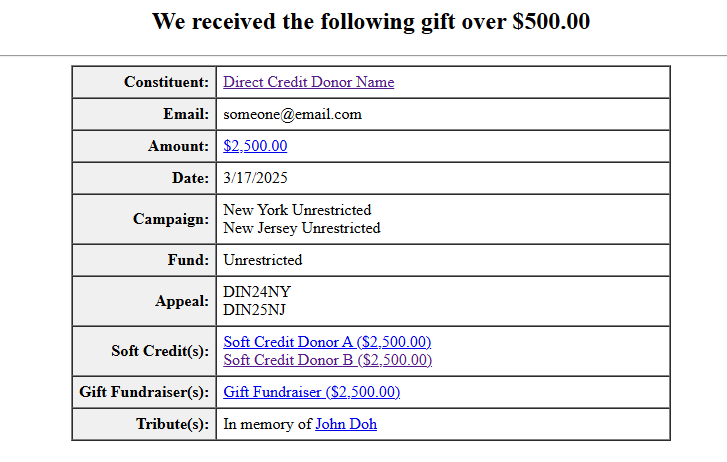
New template added: Campaign, Fund, Appeal, Soft Credit, Gift Fundraiser (solicitor), and Tribute info. You can add or remove stuff as you don't want to show it. Here's a look at what the email would have look like:
 3
3 -
Thanks @Alex Wong - I'm checking with Crystal to see what happened in the migration. Apologies for the extra work.
0


















Categories
- All Categories
- 6 Blackbaud Community Help
- 211 bbcon®
- 1.4K Blackbaud Altru®
- 403 Blackbaud Award Management™ and Blackbaud Stewardship Management™
- 1.2K Blackbaud CRM™ and Blackbaud Internet Solutions™
- 15 donorCentrics®
- 360 Blackbaud eTapestry®
- 2.6K Blackbaud Financial Edge NXT®
- 659 Blackbaud Grantmaking™
- 579 Blackbaud Education Management Solutions for Higher Education
- 3.2K Blackbaud Education Management Solutions for K-12 Schools
- 943 Blackbaud Luminate Online® and Blackbaud TeamRaiser®
- 84 JustGiving® from Blackbaud®
- 6.7K Blackbaud Raiser's Edge NXT®
- 3.8K SKY Developer
- 250 ResearchPoint™
- 120 Blackbaud Tuition Management™
- 165 Organizational Best Practices
- 241 Member Lounge (Just for Fun)
- 36 Blackbaud Community Challenges
- 37 PowerUp Challenges
- 3 (Open) PowerUp Challenge: Grid View Batch
- 3 (Closed) PowerUp Challenge: Chat for Blackbaud AI
- 3 (Closed) PowerUp Challenge: Data Health
- 3 (Closed) Raiser's Edge NXT PowerUp Challenge: Product Update Briefing
- 3 (Closed) Raiser's Edge NXT PowerUp Challenge: Standard Reports+
- 3 (Closed) Raiser's Edge NXT PowerUp Challenge: Email Marketing
- 3 (Closed) Raiser's Edge NXT PowerUp Challenge: Gift Management
- 4 (Closed) Raiser's Edge NXT PowerUp Challenge: Event Management
- 3 (Closed) Raiser's Edge NXT PowerUp Challenge: Home Page
- 4 (Closed) Raiser's Edge NXT PowerUp Challenge: Standard Reports
- 4 (Closed) Raiser's Edge NXT PowerUp Challenge: Query
- 798 Community News
- 3K Jobs Board
- 56 Blackbaud SKY® Reporting Announcements
- 47 Blackbaud CRM Higher Ed Product Advisory Group (HE PAG)
- 19 Blackbaud CRM Product Advisory Group (BBCRM PAG)