Error when trying to save export to certain folder





Good morning everyone! I have been encountering a mildly inconvenient issue with trying to export any files from database view to my local downloads folder. This is the error message I get:
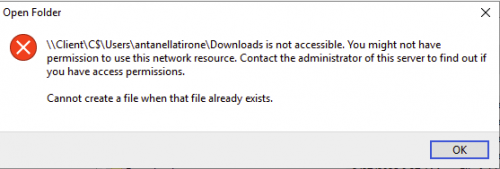
It only happens with the downloads folder, I can export files to every other folder without issue. My IT department and I worked yesterday changing settings on my computer to allow for Read & Write Access with Citrix. I did borrow a coworker's workstation and sign into my RE account there and did a test export to their computer's download folder without any issues, but as far as we could tell, all of our permission settings were identical.
This does not happen with the webview export, mind you. It's exclusively on database view, and exclusively the Downloads folder. I am using a Macbook rather than Windows on a hosted environment, if that makes any difference.
Has anyone else encountered this that might have some insight?
Comments
-
@Antanella Tirone
you are using Mac is definitely a reason why.I doubt your Mac has C:\\Users\\antanellatirone\\Downloads folder, as this is a Windows folder structure for a user's download folder.
when you say you went to another coworker's workstation, is that person using Windows? or Mac?
What I would suggest you do is, first try to “browse” your way from the network remote folder into your networked local drive on Mac and then go to the folder you want to save your file. If this successfully save, you want want to update your user setting for export file location doing the same “browse through”
0 -
@Alex Wong
Hi Alex, thanks for the reply! Coworkers workstation was also a Macbook, everyone in my organization has one (no Windows computers at all).When you say “browse through” do you mean selecting the three dot icon on the ‘Export file name:’ line before exporting? If so, that is what I'm doing, as the default file path leads to the hosted file location which I am not currently able to access.
0 -
@Antanella Tirone
Yes, the 3 dots on export file name. When you click on it, you are on the hosted file location: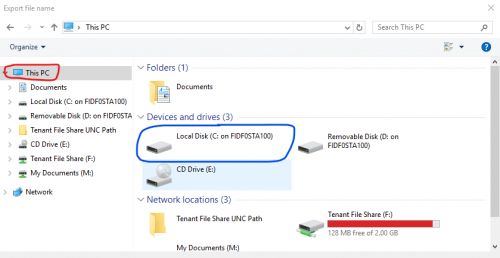
click on This PC and you should see what I have in the screenshot above. Locate the blue circle
You should find the one that has the name of your Mac
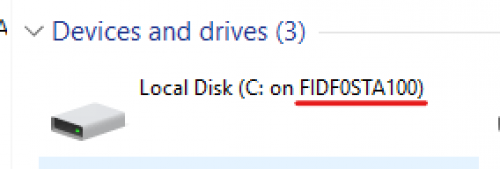
This is the network mapped drive from hosted to your local Mac. then drill through the sub folders to your download folder.
0 -
Thank you for the response! That is what I have been doing that unfortunately results in the error message. I have checked the permissions for the folder itself and everything has been set to “Read & Write” as well. Insofar as I can tell, there is no difference between the permissions of the downloads folder to the other folders I am able to save to, so I'm not sure why this specific error message continues popping up.
0 -
@Antanella Tirone
I would try to uninstall citrix and reinstall if it hasn't already been done.0 -
@Alex Wong
That was our first thought as well, and unfortunately it made no difference ?0 -
@Antanella Tirone
Then I guess maybe the only thing else to do is contact Blackbaud support, though I see very little they can do there.You have done everything I would have checked already and I guess the easy thing to do is just create a new folder just for RE exports.
0 -
I had reached out to BB support and they were the ones who suggested trying to log in on another workstation and see if the problem persisted there. At this point, I think I've exhausted pretty much all my options on ‘fixing’ the folder itself, so I went ahead and followed your advice and made a new folder specifically for RE exports.
Thanks so much for all your help!
0





Categories
- All Categories
- 6 Blackbaud Community Help
- 211 bbcon®
- 1.4K Blackbaud Altru®
- 403 Blackbaud Award Management™ and Blackbaud Stewardship Management™
- 1.2K Blackbaud CRM™ and Blackbaud Internet Solutions™
- 15 donorCentrics®
- 360 Blackbaud eTapestry®
- 2.6K Blackbaud Financial Edge NXT®
- 659 Blackbaud Grantmaking™
- 579 Blackbaud Education Management Solutions for Higher Education
- 3.2K Blackbaud Education Management Solutions for K-12 Schools
- 943 Blackbaud Luminate Online® and Blackbaud TeamRaiser®
- 84 JustGiving® from Blackbaud®
- 6.7K Blackbaud Raiser's Edge NXT®
- 3.8K SKY Developer
- 250 ResearchPoint™
- 120 Blackbaud Tuition Management™
- 165 Organizational Best Practices
- 241 Member Lounge (Just for Fun)
- 36 Blackbaud Community Challenges
- 37 PowerUp Challenges
- 3 (Open) PowerUp Challenge: Grid View Batch
- 3 (Closed) PowerUp Challenge: Chat for Blackbaud AI
- 3 (Closed) PowerUp Challenge: Data Health
- 3 (Closed) Raiser's Edge NXT PowerUp Challenge: Product Update Briefing
- 3 (Closed) Raiser's Edge NXT PowerUp Challenge: Standard Reports+
- 3 (Closed) Raiser's Edge NXT PowerUp Challenge: Email Marketing
- 3 (Closed) Raiser's Edge NXT PowerUp Challenge: Gift Management
- 4 (Closed) Raiser's Edge NXT PowerUp Challenge: Event Management
- 3 (Closed) Raiser's Edge NXT PowerUp Challenge: Home Page
- 4 (Closed) Raiser's Edge NXT PowerUp Challenge: Standard Reports
- 4 (Closed) Raiser's Edge NXT PowerUp Challenge: Query
- 798 Community News
- 3K Jobs Board
- 56 Blackbaud SKY® Reporting Announcements
- 47 Blackbaud CRM Higher Ed Product Advisory Group (HE PAG)
- 19 Blackbaud CRM Product Advisory Group (BBCRM PAG)