Error message with Add-in Button Letter Flow tutorial





I am trying to execute this tutorial, but when I try to import the flow, I get this error message:
"Flow save failed with code 'DynamicOperationRequestClientFailure' and message 'The dynamic operation request to API 'wordonlinebusiness' operation 'GetFileSchema' failed with status code 'NotFound'. This may indicate invalid input parameters. Error response: { "status": 404, "message": "The selected file doesn't exist, please select a valid file and drive.\\r\\nclientRequestId: 0bbc6ebf-9dfc-4ebd-822f-387611ffc89d", "error": { "message": "The selected file doesn't exist, please select a valid file and drive." }, "source": "wordonlinebusiness-eus2.azconn-eus2-003.p.azurewebsites.net" }'."
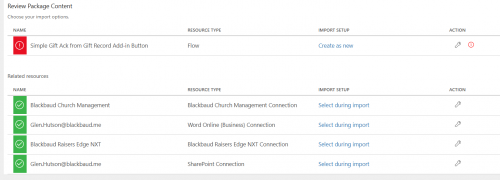
This is what the page looks like. I can't figure out what could be wrong, as I know I have Word for Business (double checked). I don't have Blackbaud Church Management but added it anyway for fun and that part seems ok.
Thanks for any ideas you might have!
Comments
-
@Sarah Woodard
The error is in area where the flow uses a word template that you do not have in your environment. As long as you “select” all the connection, click import, you will get an error, but somewhere near the top.. it will say “open the flow”, which allows you to go into the flow and make editing before save. This is where you will follow the rest of instruction to change the word template that you have in your environment.2 -
@Sarah Woodard Also, if you don't see the Open the flow/Save as a new flow hyperlink that Alex mentioned, try importing in a different browser. I've seen before where this option didn't appear in one browser after importing but did appear in others.
2 -
@Alex Wong thanks you so much - I couldn't find that but I found “save as a new flow” and that seemed to work. I am struggling though w getting it to work. It's a little tricky because the videos and instructions don't match what I am looking at.
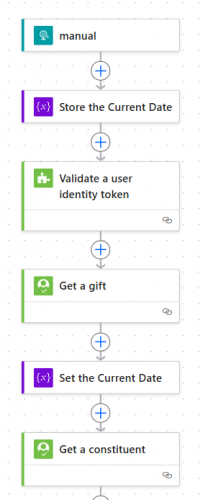
I don't have Blackbaud Church and I think that is where the validation was happening based on the videos, so I added a step using the SKY connector to do that.
But I'm getting an error message on the NXT screen that says “The web request action returned an error response: 401” when I try to run it. The Power Automate flow itself is not showing any runs in the run history, so it seems like it's not even getting started.
 0
0 -
@Sarah Woodard
if your flow does not have any “run history”, then 2 possibilities:- your flow is “off”, turn it on
- your flow is not properly connected to an application on your Blackbaud developer account.
So if it's not #1, then post your screenshot of your application screen's Add-in tile where you added your flow. The issue maybe how you config the URL.
0 -
@Alex Wong Thank you! I was able to fix the URL by going outside the tutorial and using URL builder from Blackbaud. The flow is mostly working, although I'm having a permissions error on the sharepoint side that I'm working with IT on.
Another question about this tutorial: I want to add different fields to the template but can't figure out how to add or edit them. Is this template locked somehow? I'm pretty handy with google and none of what it is turning up is allowing me to edit. (Should I be posting this as a new question?)
0 -
@Sarah Woodard
If you are trying to add additional “dynamic info" into the word merge template, the file you saved in your environment, so it is not locked and you can edit it. Are you asking “how” to add additional “field” that flow can dynamically update in the word doc?I don't know what you trying to say when you reference “google”. Is any part of the flow is more “google related”?
0 -
@Alex Wong I just meant that I googled first before asking as I feel guilty for asking so many questions!
I did find the instructions on how to change the fields in this section - I was confused that it was not acting like a typical Word merge document.
That said, I can't figure out how to add conditions (such as don't leave a blank line if the field is blank) - not sure if that is possible here.
0 -
@Sarah Woodard
Yes, using word template for power automate (content control) is different than using word template for manual mail merge (merge field). Since you went through the tutorial, I assume you are ok now and have added the new content control for the new field. NOTE: power automate can only work with Plain Text Content Control. (Rich Text Content Control cannot be done)condition is not going to be done in the word template (unlike mail merge's merge field). condition is done within power automate using expressions: if()
as for specifically condition on using “new line” or not, you need to make sure your content control has the “allow arriage returns” checked.
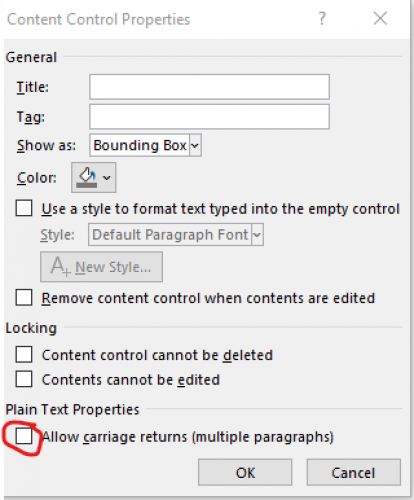
then in power automate when you fill out the content, you will include a “new line” character if the line of text is to be displayed, otherwise nothing.
0 -
@Alex Wong Thank you!! Appreciate it so much.
0 -
@Ashley Moose I'm having the same issue as Sarah, except that selecting "Create as new" under Import Setup leads to the error. In addition, I've followed your advice and attempted to import the flow on Firefox, Chrome, and Edge, yet the hyperlink you mentioned doesn't appear on any of these browsers. Do you have any other ideas for what might fix the issue? Thanks!
Edit: Nevermind! The "Save as new flow" hyperlink finally showed up.
2









Categories
- All Categories
- 6 Blackbaud Community Help
- 211 bbcon®
- 1.4K Blackbaud Altru®
- 403 Blackbaud Award Management™ and Blackbaud Stewardship Management™
- 1.2K Blackbaud CRM™ and Blackbaud Internet Solutions™
- 15 donorCentrics®
- 360 Blackbaud eTapestry®
- 2.6K Blackbaud Financial Edge NXT®
- 659 Blackbaud Grantmaking™
- 579 Blackbaud Education Management Solutions for Higher Education
- 3.2K Blackbaud Education Management Solutions for K-12 Schools
- 943 Blackbaud Luminate Online® and Blackbaud TeamRaiser®
- 84 JustGiving® from Blackbaud®
- 6.7K Blackbaud Raiser's Edge NXT®
- 3.8K SKY Developer
- 250 ResearchPoint™
- 120 Blackbaud Tuition Management™
- 165 Organizational Best Practices
- 241 Member Lounge (Just for Fun)
- 36 Blackbaud Community Challenges
- 37 PowerUp Challenges
- 3 (Open) PowerUp Challenge: Grid View Batch
- 3 (Closed) PowerUp Challenge: Chat for Blackbaud AI
- 3 (Closed) PowerUp Challenge: Data Health
- 3 (Closed) Raiser's Edge NXT PowerUp Challenge: Product Update Briefing
- 3 (Closed) Raiser's Edge NXT PowerUp Challenge: Standard Reports+
- 3 (Closed) Raiser's Edge NXT PowerUp Challenge: Email Marketing
- 3 (Closed) Raiser's Edge NXT PowerUp Challenge: Gift Management
- 4 (Closed) Raiser's Edge NXT PowerUp Challenge: Event Management
- 3 (Closed) Raiser's Edge NXT PowerUp Challenge: Home Page
- 4 (Closed) Raiser's Edge NXT PowerUp Challenge: Standard Reports
- 4 (Closed) Raiser's Edge NXT PowerUp Challenge: Query
- 798 Community News
- 3K Jobs Board
- 56 Blackbaud SKY® Reporting Announcements
- 47 Blackbaud CRM Higher Ed Product Advisory Group (HE PAG)
- 19 Blackbaud CRM Product Advisory Group (BBCRM PAG)