Where can we submit feedback on the Omnibar?





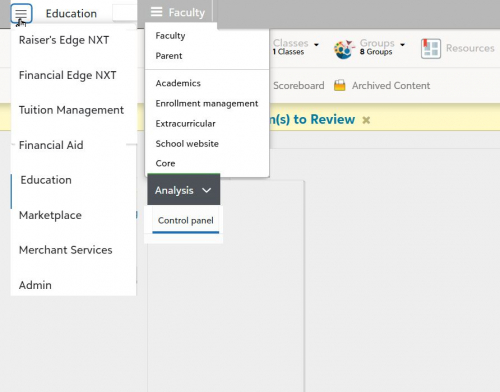
While the Omnibar was a welcome addition, it's annoying.
First, it takes away valuable vertical screen space.
Second, it moves “Faculty/Parent/Academics/etc./Core” selector all the way to the left, while most content is still centered on the page. It's also white on gray, which makes it less legible than the black on white.
Third, it needs to be consistent - either black and white everywhere, or green and black. Better yet, let us decide the color scheme.
Fourth, all pages take longer to load, since it has to figure out what permissions I have.
This is how the Omnibar should have been designed
Comments
-
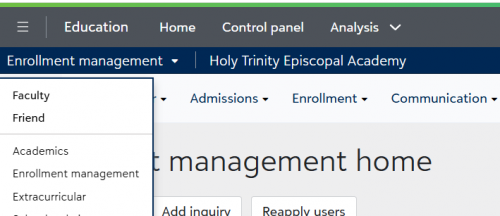
@Art Bryman I like the new Omni bar and my bar reflects the school branding (blue/white education suite) and may browser settings (grey/white text). I like that as an administrator/support of everything Blackbaud, I can get to the other software (FE NXT; RE NXT: Merchant Services; Online Forms; Analysis; Admin; Support) without having to go to blackbaud.com also- it's all within my workspace. My other users are liking the new Omni for the same reasons.
My only issue is that I click on the wrong tabs now - I was so conditioned after working, almost 10 years, in the product, now the tabs have shifted a tab to the left - lol
 3
3 -
@Art Bryman
I agree with all of this. We also lost our custom logo, which is a bummer.I rarely, if ever, use any of those options, so I'd love to be able to turn it off and return to the original view. I do like that it is not visible in Faculty view so it does not reduce the teachers' visible work area.
3 -
@Sarah Koziarski —The majority of our people who received the Omnibar did not need or want it, and did not like how it impacted the screen view to which they had become accustomed. To placate the masses, I turned off the task Omnibar (found under Blackbaud connections) for all of the roles in K12. Much happier people now.
@Art Bryman - I agree it would be very nice if schools could “brand” the Omnibar.
Scott
5 -
@Kathy Hannon
Yes - the tabs shifting is driving us crazy!2 -
@Scott Chrysler I agree - my first task after seeing it (and fielding a few emails) was to disable it for all roles. If Art's concerns were addressed, particularly placing it as a hamburger menu on the left, then I'd be happy to bring it back. That said, I'm immensely grateful that it was indeed implemented as a task in roles, and not just a forced update! I appreciate the consideration from Blackbaud that not everyone might be on board, at least at first.
3 -
@Art Bryman Agreed - I love your suggested redesign! The page now looks crowded and the menus being pushed all the way to the left looks unbalanced/unpolished.
2 -
Thank you all for the feedback! Glad I'm not the only one.
FYI: if you do want to turn it off, here are some helpful tips:
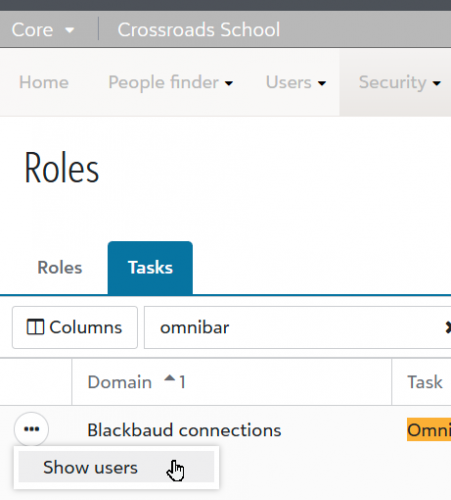
- You can see the users who do have it by going to Core>Security>Roles>Tasks. Then, either search for “omnibar”, or scroll down to Blackbaud Connections. Click on the … and click on “Show users”:
2. You can see all of the Roles that have (and don't have) this task:

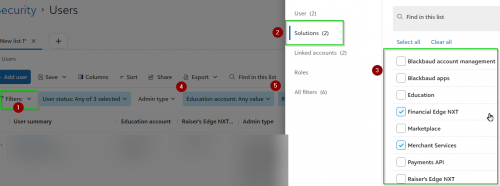
3. You can use the Admin site to figure out who uses BBEM, RE, FE, etc. Go to Security>Users, and add Filters for each solution you use. Then, select “Any Value” for “Education”, and one at a time, set the solution filter to “Any Value”. This will get you a list of users who use both Education and the other solution (RE, FE, etc.):
4. I wanted to keep the Omnibar for anyone who uses multiple solutions. It was hard to find a common role for this group, so I created a new role, and added those users.
3 -
@Art Bryman Agreed. It feels like the Education Mgmt. menu bar was minimized in favor of the Omnibar, even though it's where many of us spend the majority of our day clicking. At just 30px tall, it feels too narrow for such a heavily used area.
6 -
@Art Bryman hi there! I'm Jessi, the Product Manager for Core.
Signing up for Early Adopter Programs is the best way to help shape the path of development, but we're always watching the Community and the Idea bank, too. Phase 1 was released this week with more coming this summer and more again next year. I can share additional context and long-range plans in response to your initial 4 points.
- The claim on extra real estate at the top of the screen is temporary. Next year, menus will move into the Omnibar, returning some of that vertical screen space, but the Omnibar has to exist in BEM before we can move our menus into it.
- All Home pages have moved to full width to reduce wasted space in the left and right margins. We are in the process of updating all pages among all BEM products (in the back-office) to be full width as well, so this is the way of the future in BEM. This will take time, of course.
- You're right - the omnibar should look the same everywhere. The gray w/white Omnibar is V1 of the omnibar and currently appears this way in BEM and FE NXT. Both solutions are working toward the modern Omnibar theme (white w/black), and we will reach that milestone in BEM over the summer. Plus, the Omnibar supports the same branding configured for Blackbaud ID, and that will be enabled when the currently-branded BEM bar is decommissioned.
- I'm curious if others perceive this delay in page loading. You're the first to mention it, but I'll listen for other complaints and explore performance metrics with the team.
As a former customer, I'm forever surprised by the technical complexities that make everything more challenging than it seems.
 Thanks for your candid feedback and for making this SKY transformation journey with us. If you're curious to learn more about our long-range plan, including more Omnibar details, join us at the virtual Product Update Briefings in May and in person at BBCON in October!2
 -
@Art Bryman
Great suggestions! I just went through and removed that task from all but the Platform Manager role. 98% users do not need the Omnibar and it just crowds their screen.Quick question: What base role did you clone as your Omnibar access role for users who could benefit from it?
Thanks.
1 -
In addition to editing Security Roles/Tasks, individuals should have an option to Hide or Show the Omnibar in their settings. Some people in a role may utilize it whereas others will not, and as others have mentioned, the bar takes up valuable screen space.
5 -
@Jessi Walters Thanks for all the info. I wasn't in the early adopters group, but could I bribe you to open another tab when we click on the options (Control Panel, Dashboard, etc)? I can't tell you how many times I open the Dashbar and forget to use the keystroke to open a new window and lose where I am working. Thanks!
2 -
@Annemarie Merow tell me more! What are you doing that makes it helpful to have both pages open at once? (I have an assumption, but you know what they say about those…)
0 -
@Erin Caprielian for the users who want to keep the Omnibar, you could create a System Admin clone with only the Omnibar task enabled. Then you could disable the Omnibar task for all other roles. We don't plan to further customize user settings for the Omnibar since our menus are moving into the Omnibar next year, but this would optimize the system until then.
@Mathieu Farrugia same for your users - System admin was created with this use case in mind.
3 -
@Jessi Walters Two reasons:
Since the bar is now integrated directly above the main tabs - I can't tell you how many times I've accidentally clicked on Academics and lost my work.
Secondly, I've always wished those options would open in a new tab - I just never said it! I might be in Academics/Scheduling and tootling around in all those choices without any problem. If I go to Control Panel, it takes tons of clicks to get back to where I was working. Imagine if you were on one of the Scheduling tasks, say Schedule Outline, and when you choose anther option like Students List, you were taken back to the Academics homepage and had to re-navigate back to Scheduling/Students List. That's what happens when you use any of the new OmniBar menu options unless I am completely missing something!
Hope that helps! Thanks!
3 -
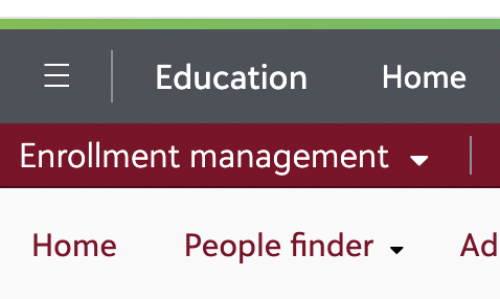
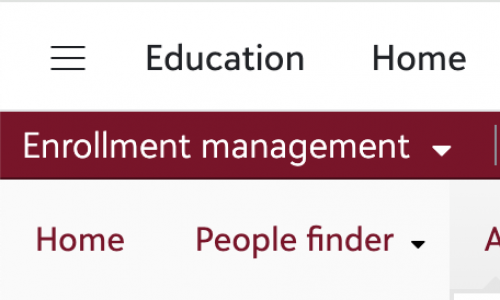
@Jessi Walters - sharing that the Omnibar background color changes frequently. Originally the background color was dark grey. However, sometimes the background color changes to white. Thoughts? I'm using Chrome. Thanks!
 0
0




















Categories
- All Categories
- 6 Blackbaud Community Help
- 213 bbcon®
- 1.4K Blackbaud Altru®
- 402 Blackbaud Award Management™ and Blackbaud Stewardship Management™
- 1.1K Blackbaud CRM™ and Blackbaud Internet Solutions™
- 15 donorCentrics®
- 360 Blackbaud eTapestry®
- 2.6K Blackbaud Financial Edge NXT®
- 656 Blackbaud Grantmaking™
- 576 Blackbaud Education Management Solutions for Higher Education
- 3.2K Blackbaud Education Management Solutions for K-12 Schools
- 939 Blackbaud Luminate Online® and Blackbaud TeamRaiser®
- 84 JustGiving® from Blackbaud®
- 6.6K Blackbaud Raiser's Edge NXT®
- 3.7K SKY Developer
- 248 ResearchPoint™
- 119 Blackbaud Tuition Management™
- 165 Organizational Best Practices
- 241 Member Lounge (Just for Fun)
- 34 Blackbaud Community Challenges
- 34 PowerUp Challenges
- 3 (Open) PowerUp Challenge: Chat for Blackbaud AI
- 3 (Closed) PowerUp Challenge: Data Health
- 3 (Closed) Raiser's Edge NXT PowerUp Challenge: Product Update Briefing
- 3 (Closed) Raiser's Edge NXT PowerUp Challenge: Standard Reports+
- 3 (Closed) Raiser's Edge NXT PowerUp Challenge: Email Marketing
- 3 (Closed) Raiser's Edge NXT PowerUp Challenge: Gift Management
- 4 (Closed) Raiser's Edge NXT PowerUp Challenge: Event Management
- 3 (Closed) Raiser's Edge NXT PowerUp Challenge: Home Page
- 4 (Closed) Raiser's Edge NXT PowerUp Challenge: Standard Reports
- 4 (Closed) Raiser's Edge NXT PowerUp Challenge: Query
- 793 Community News
- 2.9K Jobs Board
- 54 Blackbaud SKY® Reporting Announcements
- 47 Blackbaud CRM Higher Ed Product Advisory Group (HE PAG)
- 19 Blackbaud CRM Product Advisory Group (BBCRM PAG)