Establishing connection between Power BI and RE NXT




I am trying to establish connection between PBI and RE NXT. We recently converted to RE NXT. Blackbaud was not listed in "Other" from “Get Data” in PBI. Am I missing a step? Help is greatly appricated.
*These are the old posts I was following with no luck.-->
https://github.com/GrantQuick/BlackbaudSkyApi-RENXT
https://github.com/blackbaud/powerbi-connector?tab=readme-ov-file
Comments
-
@Rosa Crichton
did you follow the instructions?here's a post where i replied with instructions that has screenshots that helps guide you, but same instruction.
0 -
@Alex Wong
Thank you for your help.Yes. I followed the guide. The mez file was stored in external G drive. Now I re-added the mez file in the computer local c drive with no luck still. Blackbaud did not poplulate in Get file of PBI.
0 -
@Rosa Crichton
not sure where “get file” you are looking.in Power BI, you click on Get data, and then select More…
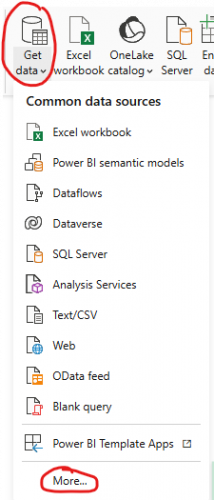
Then you select Other and will see Blackbaud (Beta) (Custom)
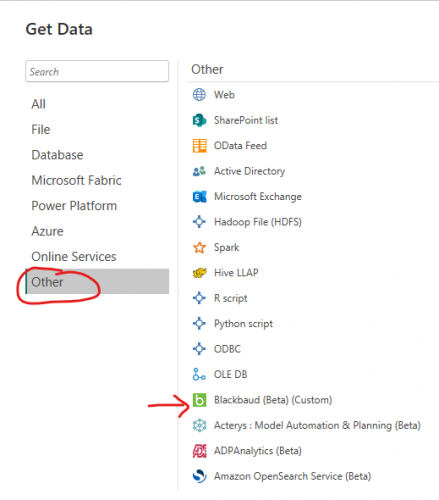
This is assuming you did all the steps correctly. If you do not see Blackbaud (Beta) (Custom), then please send some screenshots of:
- the mez file and its location, to verify that you renamed the zip file correctly as real mez file, not Blackbaud.mez.zip
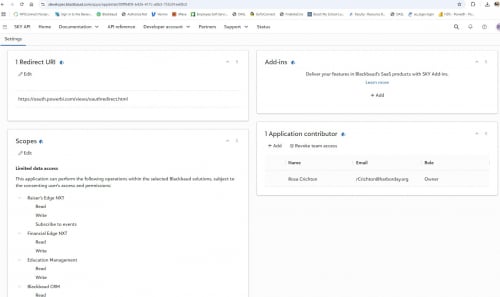
- developer.blackbaud.com's Application scope, environment, and redirect section, the application that you entered the client_id and client_secret into the mez file
0 -
@Alex Wong
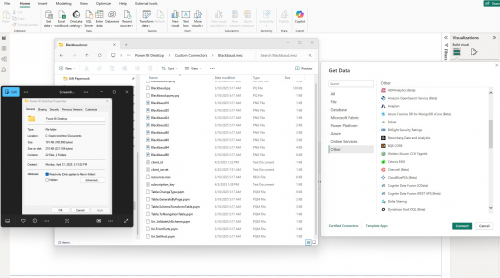
Hi, here are the screenshots.Get data-→Other
URI and Scope
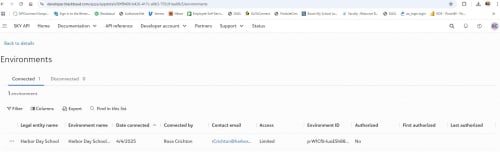
Enviornment
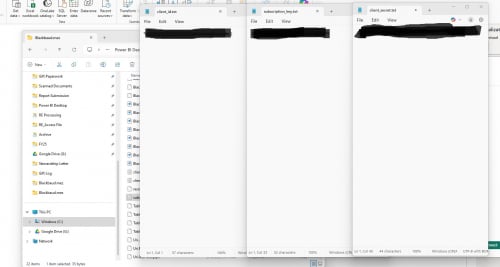
Blackbaud.mez files
 0
0 -
@Alex Wong
Update: I was able to get data to show blackbaud. but now we are coming arcoss this error. please see screenshot.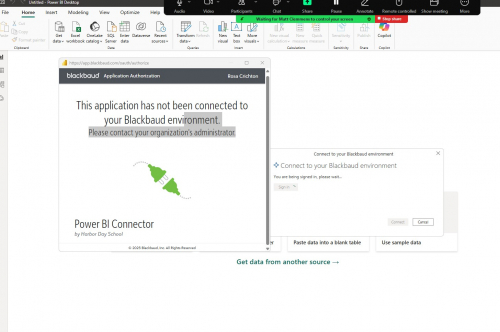 0
0 -
@Rosa Crichton
in your previous screenshot, for Environment, you see that your application is not Authorized.You will need to authorize it for use, I normally would just remove the the app from marketplace and add it again.
0 -
@Alex Wong
Thank you. I removed the app and re-add it. Got the same result. no authorization.I was able to establish connection with my consultant. He cutted and pasted his mez file then changed his app id, client id, and client secret to mine.
We still do not know what the root cause is. Maybe something to the zip file I downloaded from the Github a few weeks ago.
0 -
@Rosa Crichton
I remember there was something specific to deal with the “authorization=false” issue on your application. @Erik Leaver helped someone so maybe he can assist here too1 -
@Rosa Crichton Just so I'm clear, do you have a working connection using the file your consultant provided or is there still an authorization issue?
0 -
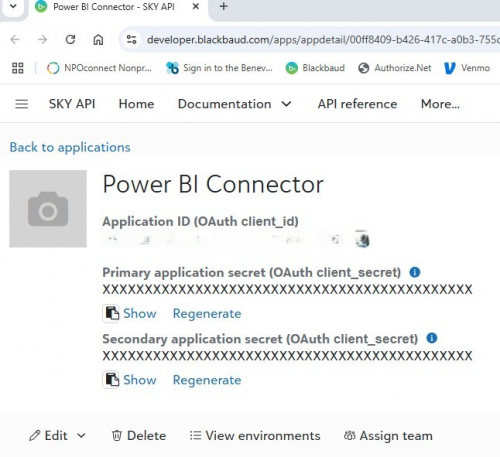
@Rosa Crichton We are having a hard time finding the Client ID and the Client Secret from the application we registered from the getting started section. We are also trying to set up a team so our developers can see the applications and help work on them.
0 -
@Tina Metzger
Assuming you have Sky API account created, the application you created is in the Developer Account tab. Here is a screenshot.Application: Client ID and Client Secret
 0
0 -
@Erik Leaver
Yes, I have connection to Blackbaud tables. I just just checked my enviornment and there is now a yes in my authorized column. Weird.2 -
@Rosa Crichton Alex alluded to some of the odd behavior with the authorizations. Sometimes they require a restart. But awesome you can see this!
1







Categories
- All Categories
- 6 Blackbaud Community Help
- 211 bbcon®
- 1.4K Blackbaud Altru®
- 403 Blackbaud Award Management™ and Blackbaud Stewardship Management™
- 1.2K Blackbaud CRM™ and Blackbaud Internet Solutions™
- 15 donorCentrics®
- 360 Blackbaud eTapestry®
- 2.6K Blackbaud Financial Edge NXT®
- 659 Blackbaud Grantmaking™
- 579 Blackbaud Education Management Solutions for Higher Education
- 3.2K Blackbaud Education Management Solutions for K-12 Schools
- 943 Blackbaud Luminate Online® and Blackbaud TeamRaiser®
- 84 JustGiving® from Blackbaud®
- 6.7K Blackbaud Raiser's Edge NXT®
- 3.8K SKY Developer
- 250 ResearchPoint™
- 120 Blackbaud Tuition Management™
- 165 Organizational Best Practices
- 241 Member Lounge (Just for Fun)
- 36 Blackbaud Community Challenges
- 37 PowerUp Challenges
- 3 (Open) PowerUp Challenge: Grid View Batch
- 3 (Closed) PowerUp Challenge: Chat for Blackbaud AI
- 3 (Closed) PowerUp Challenge: Data Health
- 3 (Closed) Raiser's Edge NXT PowerUp Challenge: Product Update Briefing
- 3 (Closed) Raiser's Edge NXT PowerUp Challenge: Standard Reports+
- 3 (Closed) Raiser's Edge NXT PowerUp Challenge: Email Marketing
- 3 (Closed) Raiser's Edge NXT PowerUp Challenge: Gift Management
- 4 (Closed) Raiser's Edge NXT PowerUp Challenge: Event Management
- 3 (Closed) Raiser's Edge NXT PowerUp Challenge: Home Page
- 4 (Closed) Raiser's Edge NXT PowerUp Challenge: Standard Reports
- 4 (Closed) Raiser's Edge NXT PowerUp Challenge: Query
- 798 Community News
- 3K Jobs Board
- 56 Blackbaud SKY® Reporting Announcements
- 47 Blackbaud CRM Higher Ed Product Advisory Group (HE PAG)
- 19 Blackbaud CRM Product Advisory Group (BBCRM PAG)