Trouble with connecting Power BI to App





Starting to dive in to the power platform. Have been able to create a custom connector for Power BI to RENXT (which was a bit of a chore…) and have created an app through the developer portal and have connected that app to my environment. However, when selecting the custom connector in Power BI and clicking on ‘Connect’, it's telling me that “You aren't signed in” with an error message of “[Expression.Error] We couldn't find the file ‘application_id’.”
In the Developer portal, I can see the applicationid, and in the Power BI custom connector, I have pasted that ID into the application_id of the .mez file. Not sure where to go from here - thoughts??
Comments
-
@Nilsen Septon
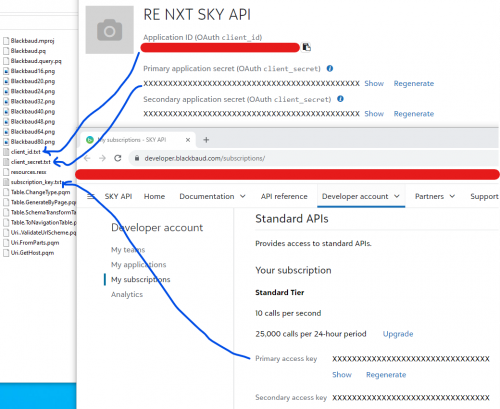
Assuming you are talking about the BLackbaud Power BI connector, not one that you created yourselves, then the instructions are:- Update the client_id.txt and client_secret.txt files with values from the application you registered in the Getting Started section.
- Update the subscription_key.txt file with the value from the SKY Developer Subscriptions page.
these are the 3 files you need to update with your developer account info to it the connector to work.
Info from URL:
0 -
@Alex Wong
Thanks for your response. However, that's part of the issue…the Blackbaud Power BI connector. I did follow the steps as outlined but could never see the custom connector in Power BI - tried both the Manual method as well as using the SDK - no deal either way. BB Support was unfortunately of no help (they just pointed me back to the documentation that I had already followed). We even had a conversation with Microsoft and they said it looks like we've followed all the steps correctly as well (we still have an open case with them on this).One of the things that MS did provide was this link (
) and when I used his file to create the .mez file, I was finally able to see the custom connector when selecting ‘Get Data’ in Power BI.
So basically, the steps provided through Blackbaud were not successful for me (could never see the custom connector) and while the file I used as provided in the link above allowed me to finally see the custom connector, it's still not making the connection needed to our environment. Any help or assistance you (or anyone else) could provide would be greatly appreciated.
0 -
@Nilsen Septon
I followed the same steps in the page and was able to connect and get data, so I don't know where you might have failed.The “GrantQuick” link you sent is outdated and will no longer be supported, I do not suggest you using it as it will not contain the latest API definition.
While the installation page is long, it really boils down to very simple few steps:
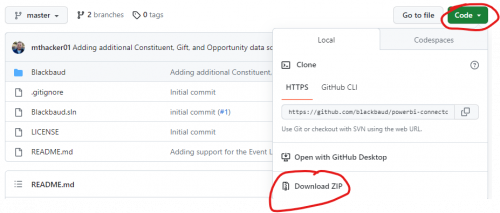
- Extract the zip file, and go into the Blackbaud folder
- Open client_id.txt client_secret.txt and subscription_key.txt and copy and paste into them the needed info
- Select all the files in the Blackbaud folder (DO NOT select the Blackbaud folder itself) and zip (normal zipping, no password, no 7z, no other format).
- Name the file Blackbaud.mez
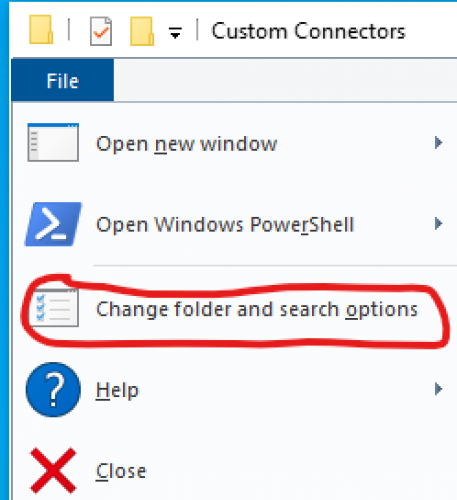
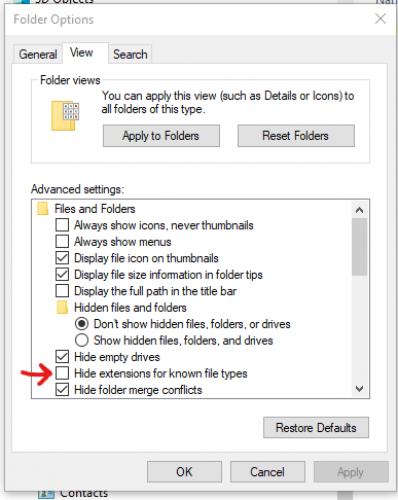
- in normal windows setup, you do not see the file extention of known file type, you need to go into change folder option and uncheck “Hide extensions for known file types”

if you did it correctly, your file should not have a zip file icon, it should just look like a blank paper icon - Then copy/move this file into C:\\Users\\your.login.user.name\\Documents\\Power BI Desktop\\Custom Connectors folder
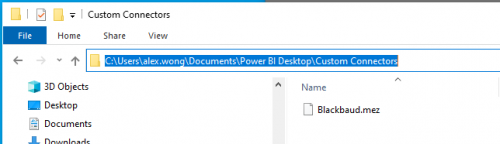
- Start Power BI Desktop and go into option to enable use of custom connector
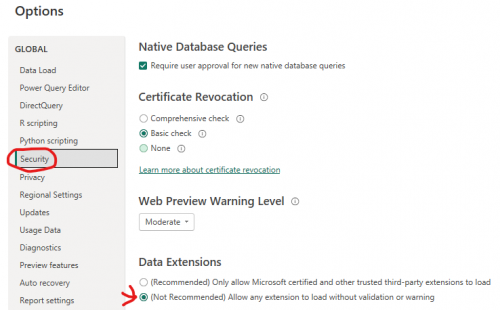
- Restart
You may feel you did everything correctly, but follow through the steps again. it is all in the details of each steps to make it work, the main thing is, it does work.
1 last thing, MAKE SURE you add this URL to the application that you provided the client_id and client_secret into the mez file.
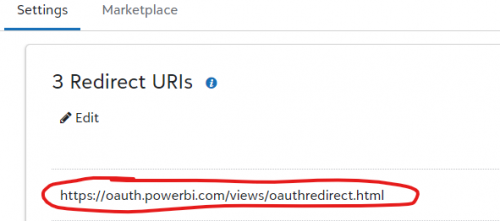
https://oauth.powerbi.com/views/oauthredirect.html 3 -
@Nilsen Septon
Dont' forget this step too: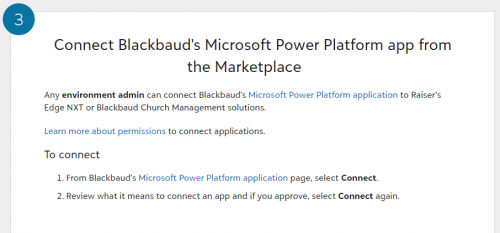 0
0 -
@Alex Wong
Thanks for the link and the steps. I agree, the nuances are making sure you follow the steps in which, I believe when I first created the ‘Blackbaud.zip’ file (after having populated the clientid, clientsecret, and subscriptionkey) I zipped the ‘folder’ rather than just selecting the files and zipping.Custom Connector created, connector visible in Power BI, and am able to connect to RE and pull data.
I appreciate your insight on this allowing us to make the connection. Now on to exploring what we can do which I'm sure will lead to additional questions at some point.
0 -
@Alex Wong
Thanks for these instructions - these are very helpful.In Power BI Desktop, I able to Get Data > More > Other > Blackbaud (Beta) and Connect. I am asked to sign in using my Blackbaud ID. When I log in i get the message:
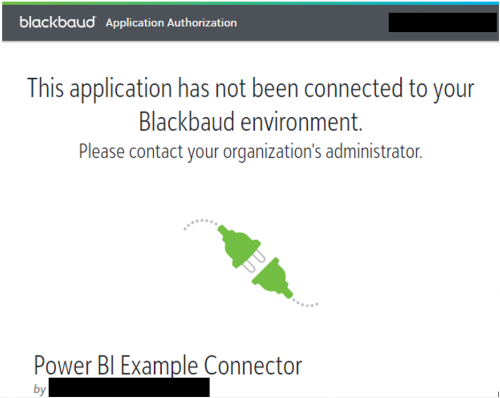
How do I connect to Blackbaud Enrollment Management System?
0 -
@Chetan Sondagar
Did you follow this last steps:0 -
@Alex Wong
I am also trying to connect the PowerBI app. I am in the final step, but my current access does not seem to permit me to enable the application (No application drop-down under Control Panel). The administrators do not know how to give me the access I need. We are new to NXT. Any pointers in the right direction appreciated!0 -
@Kaitlyn Gainer
I don't know what “final step” you are talking about, what instruction are you using?0 -
@Alex Wong
Thank you Alex. Here are the instructions I am following.Instructions: https://github.com/blackbaud/powerbi-connector?tab=readme-ov-file#readme
0 -
@Kaitlyn Gainer
which step are you talking about?Also in this page, there is no mention of Control Panel, will need to know what step you are having trouble.
Also, did you read my reply (long reply with lots of screenshot) and compare what you did? Many people had issue following the steps in the link you provided and find my screenshots to be helpful. Try it out if you haven't already
0 -
@Alex Wong
Thank you Alex, I am referring to the video, starting 7 minutes in. I will take a look at your screenshots, but I think this may have something to do with my needing a higher level of access (environment admin). My administrators are not sure how to grant that to me. I do have an email out to and RE support person to see about access.0 -
@Kaitlyn Gainer
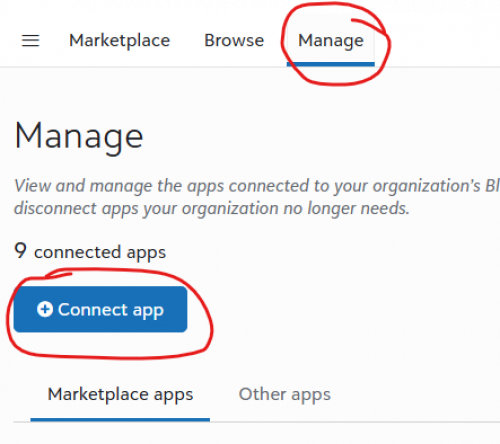
while it may be a permission issue (as connecting app does require certain level of admin right), the issue you have first is Blackbaud has changed its menu. There is no “Control Panel > Application". Instead, click on the “pancake” icon, and go to Marketplace, then click on Manage.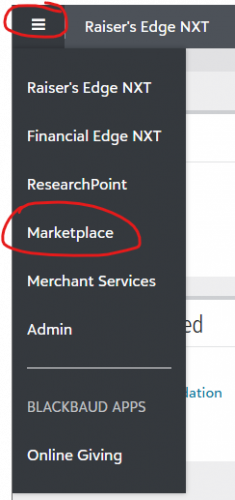
 0
0 -
@Alex Wong
Oh that's helpful! I do need a higher level of access for that “Manage” option to appear though. This got me to the correct spot though, thank you again.0 -
@Alex Wong Thank you for your help Alex. It took me a few tries, but I have now successfully connected Power BI and RE. Now my question is, how does the data refresh? On the GitHub, I see instructions for a gateway and scheduling automatic refresh of data. Is this necessary? What is the benefit? Thanks!
0 -
@Kaitlyn Gainer
since the connector for Power BI is not officially supporoted, you will need a “gateway” (in a nutshell, basically you will need to have a separate computer that's on 24hrs/7days, where the Blackbaud.mez file is installed, and configured it to be used as the “medium” to do the refresh).I never config a gateway as I get my data differently, however, you can look into doing this if you don't want to do gateway.
0 -
@Alex Wong Thanks for the prompt reply Alex. Is there an alternative to this? If I did not install a gateway, what would happen? If I were to hit “Get data” whenever I want to run a report, would that pull in refreshed data? As you can tell, I am brand new at Power BI and connectors….
0 -
@Kaitlyn Gainer
without gateway, you cannot publish the power bi dashboard to the cloud (bi service) and setup auto-refresh. (refresh will fail).You can only manually refresh by clicking on the refresh button in poewr bi desktop.
Alternative is what I sent in my previous reply.
0 -
@Kaitlyn Gainer Welcome to the wonderful world of Power BI!
Using the custom connector and a gateway allows you to automatically refresh your data. The advantage over manually refreshing is it saves you a step (sometimes refreshes can take a bit). It's more helpful when you have multiple people accessing the data in the report.
There are some limitations with the custom connector, mainly that it doesn't have all of the fields that are available in RENXT and it requires a gateway for automatic refreshes. Many practitioners are leveraging Power Automate with the Query API. Power Automate can also be used to refresh the data.0 -
@Erik Leaver Thank you Erik, can you share with me more information about Power Automate and the Query API? How would I access this? What is involved? Is it free?
 Thanks!0
 -
@Kaitlyn Gainer There is no cost to use the APIs (each org is allotted a number of free calls per month. No worries about hitting the limits in most use cases).
I'd recommend starting with this automation which pulls the results of a query into OneDrive or Google Drive:Once you work though that template, you should look at this template which shows how to automate a refresh:
1 -
@Kaitlyn Gainer Hello Kaitlyn, I am also trying to establish the connection between PBI and RE NXT. i am stuck on Step 3 of Enable in Power BI Desktop. Blackbaud did not populate in Other of PBI. Would you help me troubleshoot this issue? thanks.
0 -
@Rosa Crichton, when you do not see Blackbaud (Beta) (Custom) show up in the Get Data list, this is an indication that your .mez file isn't saved in the right location or has another issue.
Your Blackbaud.mez file should be in your user's file path for Documents\\Power BI Desktop\\Custom Connectors. For me, my user's path is under OneDrive, which is common.

If your file path looks right, then it might be a problem with the .mez file. If you manually unzipped and then re-zipped the file, a common mistake is to accidentally zip up the whole folder so that there is an extra folder to drill through before getting into the files within. When manually zipping up the files, be sure to select all of the individual files to zip, rather than zipping up the folder containing the files.
Hopefully you've stumbled through one of these common issues and can get back on track with these tips.
1 -
@Rebecca Sundquist
Thank you Rebecca. I was able to connect to Blackbaud data last week. And you are correct, the problem was the zip file I downloaded.1 -
Hi, I’ve followed the setup steps and included the client ID in both the client_ID.text file, and to connect the app in Blackbaud marketplace, but I receive a pop-up error when trying to sign into my Blackbaud account through Power BI (using the Blackbaud option in “Get Data”).
Could you advise on what additional steps may be required to resolve this issue?
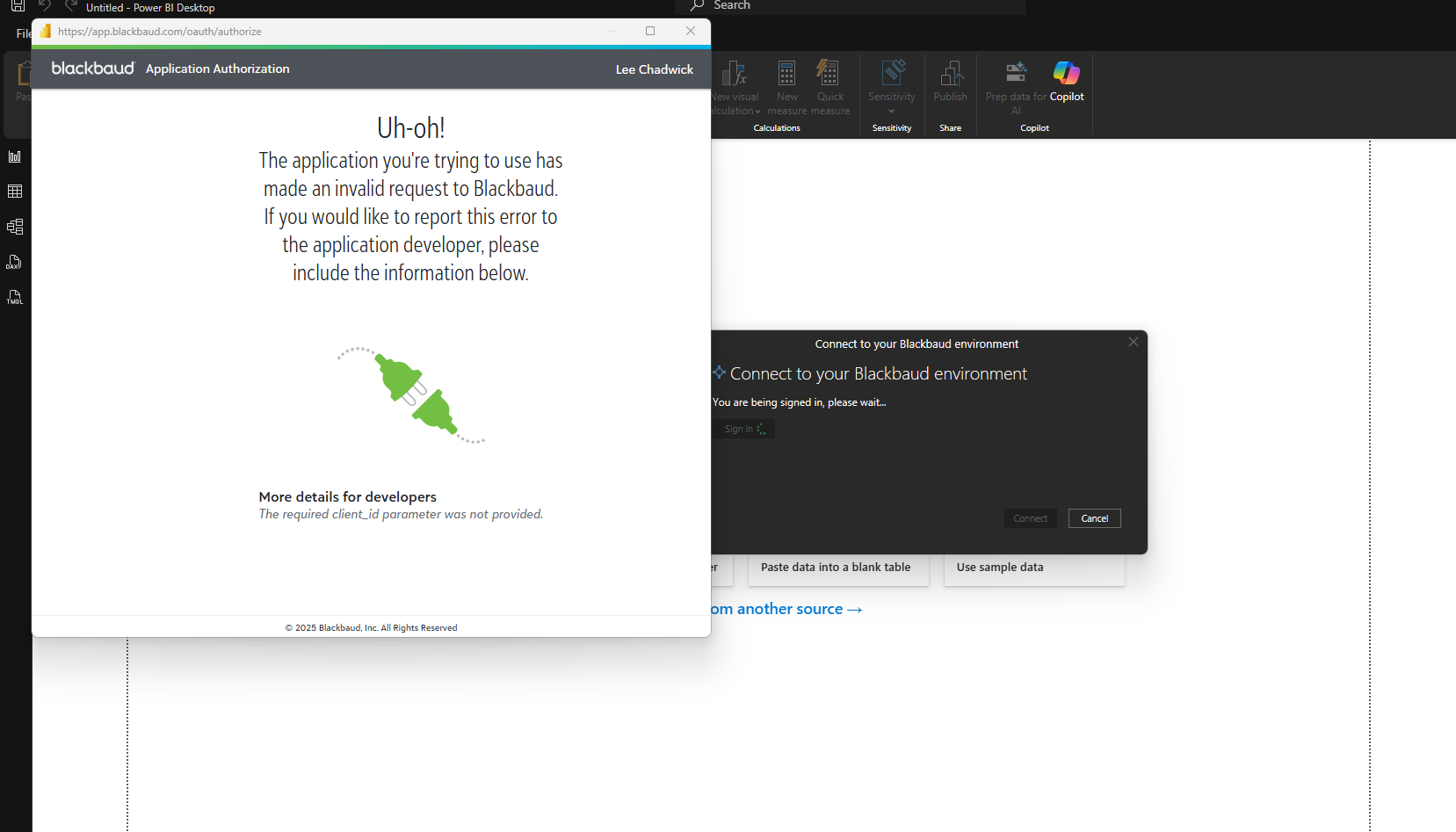
Thank you for your help!
1 -
You can find most the answer you need from this post's that I replied to previously
0 -
Hello! I had the same issue as you did….I followed each step very closely but it STILL wasn't working. Then I realized it may be related to cache because I re-created a NEW app and was trying to connect to it instead of the old one.
To clear the cache in Power BI Desktop, go to File > Options and settings > Options, select Data Load under Global, and click the Clear Cache button for Data Cache, Q&A Cache, and Folded Artifacts, which removes temporary files to ensure fresh data and improve performance.
Hope this helps someone! - Jewel
1














Categories
- All Categories
- New K-12 Community Home (TEST)
- New Higher Education Home Page (Test)
- New Impact Edge Community TEST
- New YourCause Community TEST
- New SKY Community TEST
- New Grantmaking TEST Community
- New Altru Test Community
- New bbcon Community - TEST
- 12 Blackbaud Agents for Good™
- New Raiser's Edge NXT Community
- 8 Blackbaud Community Help
- 222 bbcon®
- 1.4K Blackbaud Altru®
- 410 Blackbaud Award Management™ and Blackbaud Stewardship Management™
- 1.2K Blackbaud CRM™ and Blackbaud Internet Solutions™
- 16 donorCentrics®
- 361 Blackbaud eTapestry®
- 2.7K Blackbaud Financial Edge NXT®
- 687 Blackbaud Grantmaking™
- 604 Blackbaud Education Management Solutions for Higher Education
- 3.3K Blackbaud Education Management Solutions for K-12 Schools
- 954 Blackbaud Luminate Online® and Blackbaud TeamRaiser®
- 85 JustGiving® from Blackbaud®
- 7K Blackbaud Raiser's Edge NXT®
- 4K SKY Developer
- 258 ResearchPoint™
- 123 Blackbaud Tuition Management™
- 165 Organizational Best Practices
- 248 Member Lounge (Just for Fun)
- 40 Blackbaud Community Challenges
- 37 PowerUp Challenges
- 3 (Closed) PowerUp Challenge: Grid View Batch
- 3 (Closed) PowerUp Challenge: Chat for Blackbaud AI
- 3 (Closed) PowerUp Challenge: Data Health
- 3 (Closed) Raiser's Edge NXT PowerUp Challenge: Product Update Briefing
- 3 (Closed) Raiser's Edge NXT PowerUp Challenge: Standard Reports+
- 3 (Closed) Raiser's Edge NXT PowerUp Challenge: Email Marketing
- 3 (Closed) Raiser's Edge NXT PowerUp Challenge: Gift Management
- 4 (Closed) Raiser's Edge NXT PowerUp Challenge: Event Management
- 3 (Closed) Raiser's Edge NXT PowerUp Challenge: Home Page
- 4 (Closed) Raiser's Edge NXT PowerUp Challenge: Standard Reports
- 4 (Closed) Raiser's Edge NXT PowerUp Challenge: Query
- 829 Community News
- 3.1K Jobs Board
- 57 Blackbaud SKY® Reporting Announcements
- 47 Blackbaud CRM Higher Ed Product Advisory Group (HE PAG)
- 19 Blackbaud CRM Product Advisory Group (BBCRM PAG)