Sharing my Power Automate Flow: Automating Standard Report Export to SharePoint





Description: Scheduled export of NXT Standard Report (as PDF) to SharePoint
This flow takes a saved NXT Standard Report & exports the PDF on a schedule. This is set up for PDF exports to SharePoint.
Required Connections: Blackbaud RENXT Reports, Office 365 Outlook, SharePoint
Suggested Skill Level: Basic
Configuration details: You'll want to:
- set the email addresses for failures and for success notifications (initialize variables emailToNotify-report and -error)
- Choose your file name schema
- Choose your report type (mine is Pledge Status Report) and have a saved standard report that has the parameters you want (this is ‘Report Instance’ in the ‘Start a report execution job’ action
- Choose your SharePoint site to save the file to (Create File and Get File Properties actions), and
- Update your reporting email copy.
Category: automation
Instructions: steps in this flow are:
- initial trigger (schedule)
- Start report
- Check status on report until it is complete
- Save PDF to SharePoint
- Send an email to your reporting group
- If report fails, sends email to whoever is identified as needing notice of failure.
Comments
-
@Nicole Holt super handy template thanks for sharing! Just wondered if you might be able to share how you found your job id? We've used this kind of thing for queries before but standard reports look to be different?
0 -
@Kate Clayton,I get the job ID from the 'start a report execution job' step using this expression:
@{first(outputs('Start_a_report_execution_job')?['body']?['job_ids'])}
here's where that is in the workflow: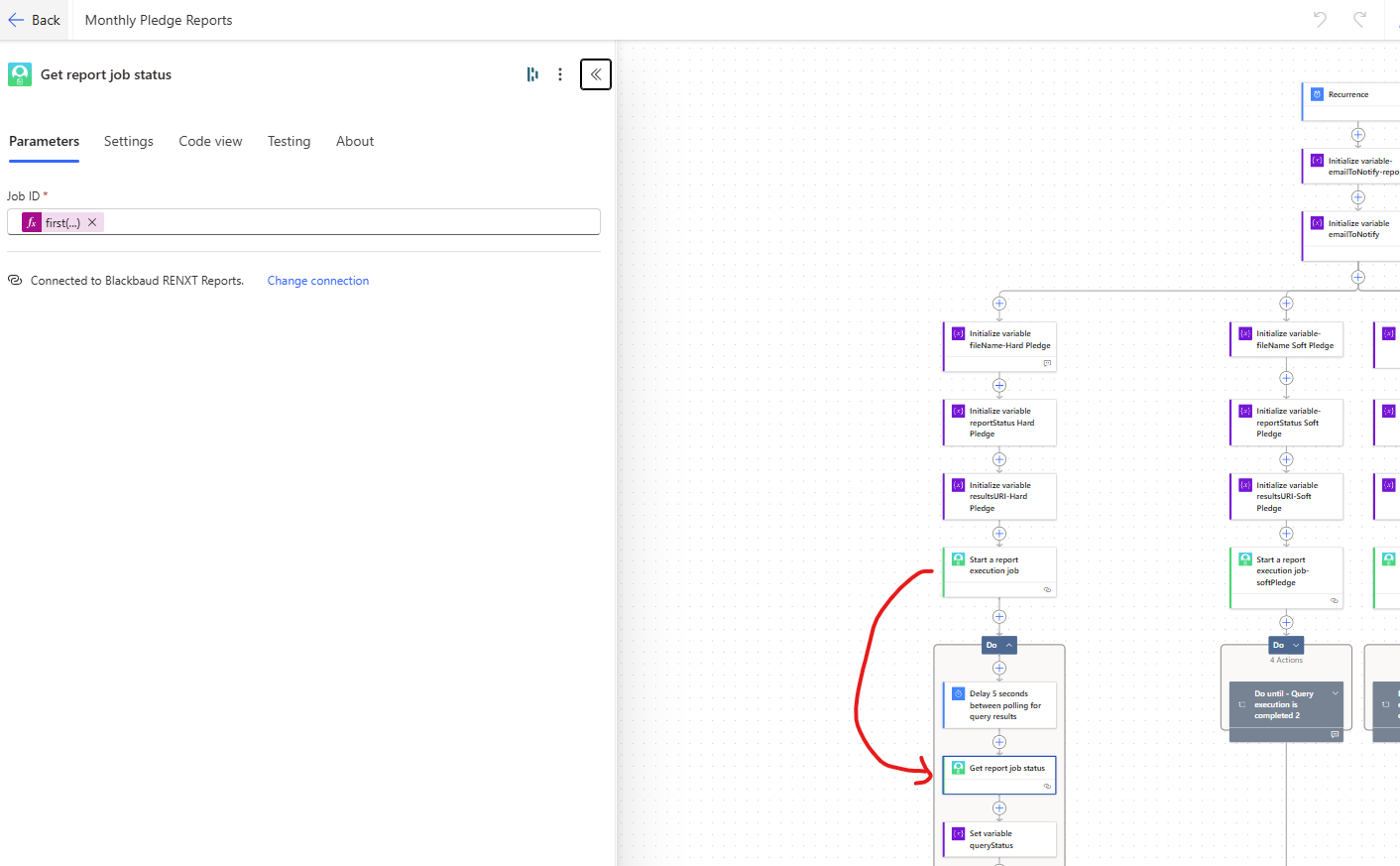 0
0 -
I seem to be having isues when I try to import this flow template. I downloaded the zip file to my computer and double checked all the connections. It is not showing the link to Create a new flow in the error message at the top like it usually does.
Does anyone know what my problem might be?
I have Connected to Blackbaud RENXT Reports Connector
chosen Add New Flow
connected to all three other connectors.
This is the error I receive: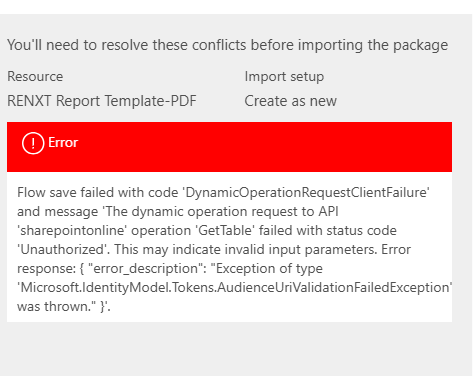 0
0 -
@Nicole Holt Do you know if anyone else is having problems importing this flow?
0 -
I was able to get my answer in the Power Automate user Group meeting today. Thanks!
Problem: the link to Save as a new flow was missing.
Answer: Make sure to do the import when signed into an incognito window.1 -
@Candy Reichert - I'm so glad that worked!
1 -
@Candy Reichert , I'm so sorry I missed this message. This has been a very, very long week…. glad you were able to find help!
1











Categories
- All Categories
- 6 Blackbaud Community Help
- 211 bbcon®
- 1.4K Blackbaud Altru®
- 403 Blackbaud Award Management™ and Blackbaud Stewardship Management™
- 1.2K Blackbaud CRM™ and Blackbaud Internet Solutions™
- 15 donorCentrics®
- 360 Blackbaud eTapestry®
- 2.6K Blackbaud Financial Edge NXT®
- 659 Blackbaud Grantmaking™
- 579 Blackbaud Education Management Solutions for Higher Education
- 3.2K Blackbaud Education Management Solutions for K-12 Schools
- 943 Blackbaud Luminate Online® and Blackbaud TeamRaiser®
- 84 JustGiving® from Blackbaud®
- 6.7K Blackbaud Raiser's Edge NXT®
- 3.8K SKY Developer
- 250 ResearchPoint™
- 120 Blackbaud Tuition Management™
- 165 Organizational Best Practices
- 241 Member Lounge (Just for Fun)
- 36 Blackbaud Community Challenges
- 37 PowerUp Challenges
- 3 (Open) PowerUp Challenge: Grid View Batch
- 3 (Closed) PowerUp Challenge: Chat for Blackbaud AI
- 3 (Closed) PowerUp Challenge: Data Health
- 3 (Closed) Raiser's Edge NXT PowerUp Challenge: Product Update Briefing
- 3 (Closed) Raiser's Edge NXT PowerUp Challenge: Standard Reports+
- 3 (Closed) Raiser's Edge NXT PowerUp Challenge: Email Marketing
- 3 (Closed) Raiser's Edge NXT PowerUp Challenge: Gift Management
- 4 (Closed) Raiser's Edge NXT PowerUp Challenge: Event Management
- 3 (Closed) Raiser's Edge NXT PowerUp Challenge: Home Page
- 4 (Closed) Raiser's Edge NXT PowerUp Challenge: Standard Reports
- 4 (Closed) Raiser's Edge NXT PowerUp Challenge: Query
- 798 Community News
- 3K Jobs Board
- 56 Blackbaud SKY® Reporting Announcements
- 47 Blackbaud CRM Higher Ed Product Advisory Group (HE PAG)
- 19 Blackbaud CRM Product Advisory Group (BBCRM PAG)