DBV Parent Constituent Export - pull in any custom attribute for a Child/Parent relationship





Hi everyone,
In a DBV Constituent Export, need to include a custom attribute that relates to a Child/Parent relationship. I haven’t found clear documentation on the exact steps, and I’d love to learn how others have handled this.
- Has anyone successfully pulled in custom attributes tied to Child/Parent relationships?
2. If so, what steps worked best for you?
3. Any tips or pitfalls I should know before trying this?
4. Can this Only be done manually with merging files and/or using PA/PBI?
5. Is there an idea already posted for this especially for consideration in WBV Query/Export combo tool (link?)
I’d really appreciate your insights. Thanks in advance for sharing your experience. It helps a lot to see how others in the community approach these kinds of setups ☺️
Answers
-
I'm not sure I'm understanding what you're looking for @Darlene LeVielle? It sounds like you have an attribute you need to export. What exactly is the problem? What happened when you tried to run it, or have you not tried the export yet?
0 -
@Dariel Dixon , I am running a constituent export for constituents who are current parents of current students. Along with Parent specific constituent data fields, I also need the export to pull a column for each student the parent has attending our institution based on the relationship code child/parent and then some additional custom attribute columns for each student relationship. I don't see the custom attributes available to output in the export tool.
- Has anyone successfully pulled in custom attributes tied to Child/Parent relationships?
- If so, what steps worked best for you?
- Any tips or pitfalls I should know before trying this?
- Can this Only be done manually with merging files and/or using PA/PBI?
- Is there an idea already posted for this especially for consideration in WBV Query/Export combo tool (link?)
Thanks again for your insights,
-Darlene
0 -
Can you show a screenshot of what you're seeing? When you're in the export module, your attributes should be listed individually under the attribute subheading. Attributes by definition are custom fields so the structure is unique to your organization.
0 -
@Dariel Dixon Sure, thank you!
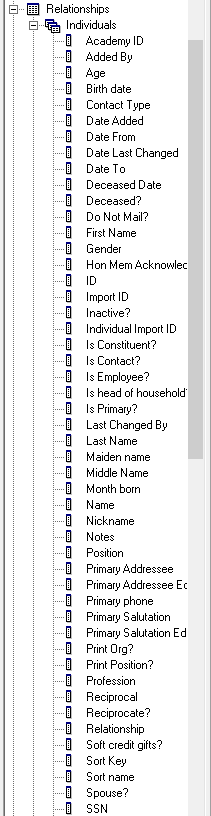
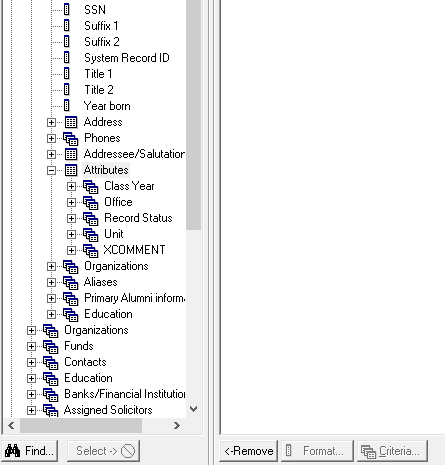
I may be missing it, so I hope this is helpful. There are other custom constituent attributes as you mention that I just may be missing somehow, perhaps.
Thanks for your insight,
-Darlene
0 -
I've pulled in attributes from Relationships. I mostly pull from the Primary Alumni Information attributes. It works great. For parents, I will pull in their child information and whatever attributes we want to see. You want to limit the relationship to your child relationship codes. I pull over up to 4 Child Relationships.
If you aren't seeing a certain attribute it may not be available for you to export. Are you sure it is a constituent attribute that is missing? (not a gift attribute) Did you create it in NXT, it may not appear yet in DB View. The Relationship export fields are very limited. I wish they had Prospect Information like Status or Rating, Assigned Solicitor, etc.
I have had to run another export for the child and then link them together in a Power BI report because the fields aren't available. Like Rating.
-Carol Grant
1 -
if you are trying to do this one time, just do it with query and export.
if you are trying to make a report that refresh automatically and not have to do excel manipulation for hours, then PA and PBI will be your choice.
Others already mention, the data you want to get is most likely available, question is, what are you trying to export, it is important to know where the data you want to pull is located: constituent attribute? gift attribute? individual relationship attribute? etc
1 -
@Carol Grant Thanks for your insights:
Are you sure it is a constituent attribute that is missing? (not a gift attribute) -Yes 2. Did you create it in NXT, it may not appear yet in DB View - They are available in both WBV (for example, they can be pulled into a Constituent Lists, and they are available in DBV constituent exports but not in the Relationship Node. From what you are saying, "The Relationship export fields are very limited", even if I switch it and bring in the students and then pull the parent/child relationship then as you say, Export cannot output as you also wish, the parent Prospect Information like Status or Rating (I need this, especially), Assigned Solicitor, etc. As asked in my initial post:
- Can this Only be done 'Manually' with merging files and/or using PA/PBI?
- Is there an Idea Bank already posted for this especially for consideration when developing the WBV Query/Export combo tool (is there a link to it so that I may vote on it)?
Thanks again for your time,
-Darlene
0 -
- Hi @Darlene LeVielle -
- 1. Correct, this can only be done manually with merging files or if you use VLOOKUP you can put what you need into one spreadsheet manually. Unless someone else knows a trick I don't.
- 2. I'm not sure if it's in the Idea Bank. It should be an Idea, you can't get Spouse Rating easily in export now either.
2 -
I think @Carol Grant is correct here. You can't get to the constituent attributes from the relationship, you would have to export that individually and merge them (because the attributes available there are relationship attributes).
I think it might be worth looking at creating an import file for a individual relationship as there might be some other fields available that may make merging easier.
1 -
Why not just use constituent query/export instead?
0 -
These fields aren't available there either. What she is trying to do from what I can tell is query off one set of constituents, and output data from those constituents and attributes from other constituents based on relationships.
1 -
Thanks @Dariel Dixon , this is correct.
- Can this Only be done 'Manually' with merging files and/or using PA/PBI?
- Is there an Idea Bank already posted for this especially for consideration when developing the WBV Query/Export combo tool (is there a link to it so that I may vote on it)?
0 -
this can be done automated-ly using PA and PBI
0 -
We do this by adding custom fields (attributes) to the Student Education Record. So in a query I can ask for parents that have students who won a particular reward and then output in the query or export the reward they won.
0 -
@Christy Hill , thank you for your insight.
Yes, we run create the same. With our organization’s constituent custom attribute field, you can’t control which records for a given custom attribute get included when there are one-to-many values. Unless you’re using something like Power BI, the native RE DBV Export tool ends up creating multiple columns with no clear order, which makes filtering and reviewing difficult.
I hope the new combined Query/Export tool addresses this and improves the functionality before it’s released. It would be great if enhancements and new tools could take these kinds of use cases into account, especially when they’re tied to ideas that have strong community support.
Thanks,
-Darlene
0
















Categories
- All Categories
- 6 Blackbaud Community Help
- 211 bbcon®
- 1.4K Blackbaud Altru®
- 403 Blackbaud Award Management™ and Blackbaud Stewardship Management™
- 1.2K Blackbaud CRM™ and Blackbaud Internet Solutions™
- 15 donorCentrics®
- 360 Blackbaud eTapestry®
- 2.6K Blackbaud Financial Edge NXT®
- 659 Blackbaud Grantmaking™
- 579 Blackbaud Education Management Solutions for Higher Education
- 3.2K Blackbaud Education Management Solutions for K-12 Schools
- 943 Blackbaud Luminate Online® and Blackbaud TeamRaiser®
- 84 JustGiving® from Blackbaud®
- 6.7K Blackbaud Raiser's Edge NXT®
- 3.8K SKY Developer
- 250 ResearchPoint™
- 120 Blackbaud Tuition Management™
- 165 Organizational Best Practices
- 241 Member Lounge (Just for Fun)
- 36 Blackbaud Community Challenges
- 37 PowerUp Challenges
- 3 (Open) PowerUp Challenge: Grid View Batch
- 3 (Closed) PowerUp Challenge: Chat for Blackbaud AI
- 3 (Closed) PowerUp Challenge: Data Health
- 3 (Closed) Raiser's Edge NXT PowerUp Challenge: Product Update Briefing
- 3 (Closed) Raiser's Edge NXT PowerUp Challenge: Standard Reports+
- 3 (Closed) Raiser's Edge NXT PowerUp Challenge: Email Marketing
- 3 (Closed) Raiser's Edge NXT PowerUp Challenge: Gift Management
- 4 (Closed) Raiser's Edge NXT PowerUp Challenge: Event Management
- 3 (Closed) Raiser's Edge NXT PowerUp Challenge: Home Page
- 4 (Closed) Raiser's Edge NXT PowerUp Challenge: Standard Reports
- 4 (Closed) Raiser's Edge NXT PowerUp Challenge: Query
- 798 Community News
- 3K Jobs Board
- 56 Blackbaud SKY® Reporting Announcements
- 47 Blackbaud CRM Higher Ed Product Advisory Group (HE PAG)
- 19 Blackbaud CRM Product Advisory Group (BBCRM PAG)