Importing Gifts as "Recurring Gift Pay-Cash" type in Database view



We regularly import "Cash" type gifts in Database view via Admin → Import → gifts through a .csv file we routinely upload. We have a few Recurring Gifts that I import using this functionality as we receive notification of payment similarly. This puts them as new gifts of type "Cash" and not the "Recurring Gift Pay-Cash" type that I want for these certain gifts.
In the ideal world here, I'd like to find a process where I can import a .csv of gifts like I do through the Admin → Import → gifts sequence that appear with the "Recurring Gift Pay-Cash" Type if there is a Recurring gift of the same amount on the Constituent ID rather than simply a "Cash" type. Is this possible?
Best Answer
-
I think the responses are getting muddied with the introduction of batches. To reset / clarify: You can only import to batches using a paid third party product such as ImportOmatic or Importacular. You cannot import to batches if you are using the native RE import functionality, which seems to be the case.
You CAN still import recurring gift payments using native import functionality, but will need a different import template. Use Gift —> Recurring Gift Payment:
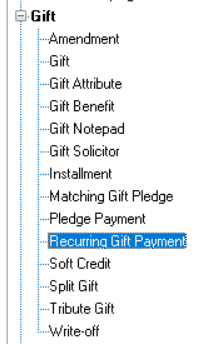
The key is that the data file you are importing will require the import ID of the recurring gift. That is how you are able to connect the payment to it.
I hope that helps!3





Answers
-
It's possible. Yes, the Recurring gift record needs to be created on each record with a payment amount and schedule.
When committing the batch, click to "automatically apply gifts to pledges and recurring gifts." (I check second box as well) That will create the gift type of recurring Gift Pay-cash.
2 -
Hi JoAnn thanks for the helpful response. The Recurring Gifts are already created on each record with the amount and schedule.
I'm not sure this will work as its not a batch I'm committing. Its an import from a .csv file that I generate as a template from other sources and upload to RE. Just looking at what you're saying, when I go to through the Admin → Import → Gifts sequence there is an option to "Automatically add instalments for new pledges", do you think this is it? It sounds similar enough to "automatically apply gifts to pledges and recurring gifts" but there is no option for that directly here on import rather than batch.
I'm not sure what "Automatically add instalments for new pledges" really means.
0 -
I'm not sure. This is what knowledgebase has for that phrase:
When importing pledges with installment schedules, you should mark the "Automatically add installments for new pledges" checkbox on the General tab of the import parameters. This ensures that installments are added automatically for any new pledges being imported.
The imports from outside files I have done, have always come into an RE batch. I have not done a direct import directly to records. Am sure others have and can jump in with an answer.
0 -
Oh thank you for that clarification! The direct import to records from .csv really helps with the volume we process. Hopefully others will jump in 🙏
Another solution would be to use "automatically apply gifts to pledges and recurring gifts" in a batch if there was a way to generate a batch from a .csv file, do you know if that is possible?
0 -
@JoAnn Strommen and @Jordan Frost
In regards to the question: Another solution would be to use "automatically apply gifts to pledges and recurring gifts" in a batch if there was a way to generate a batch from a .csv file, do you know if that is possible?
One way to import gifts directly to batch is using either Importacular or Omatic Cloud. You should know that Importacular (Classic) is used through Database View but Importacular NXT is in beta testing and a basic version will be released in 2026.
This would allow you to easily apply "cash" gifts to recurring gifts or pledge payments via the batch functionality.1 -
If they are existing recurring gifts, and you are updating the most recent scheduled payment - could you capture them in a query, go to batch, use automatically generate transactions for that batch, using the date needed?
0








Categories
- All Categories
- 6 Blackbaud Community Help
- 211 bbcon®
- 1.4K Blackbaud Altru®
- 403 Blackbaud Award Management™ and Blackbaud Stewardship Management™
- 1.2K Blackbaud CRM™ and Blackbaud Internet Solutions™
- 15 donorCentrics®
- 360 Blackbaud eTapestry®
- 2.6K Blackbaud Financial Edge NXT®
- 659 Blackbaud Grantmaking™
- 579 Blackbaud Education Management Solutions for Higher Education
- 3.2K Blackbaud Education Management Solutions for K-12 Schools
- 943 Blackbaud Luminate Online® and Blackbaud TeamRaiser®
- 84 JustGiving® from Blackbaud®
- 6.7K Blackbaud Raiser's Edge NXT®
- 3.8K SKY Developer
- 250 ResearchPoint™
- 120 Blackbaud Tuition Management™
- 165 Organizational Best Practices
- 241 Member Lounge (Just for Fun)
- 36 Blackbaud Community Challenges
- 37 PowerUp Challenges
- 3 (Open) PowerUp Challenge: Grid View Batch
- 3 (Closed) PowerUp Challenge: Chat for Blackbaud AI
- 3 (Closed) PowerUp Challenge: Data Health
- 3 (Closed) Raiser's Edge NXT PowerUp Challenge: Product Update Briefing
- 3 (Closed) Raiser's Edge NXT PowerUp Challenge: Standard Reports+
- 3 (Closed) Raiser's Edge NXT PowerUp Challenge: Email Marketing
- 3 (Closed) Raiser's Edge NXT PowerUp Challenge: Gift Management
- 4 (Closed) Raiser's Edge NXT PowerUp Challenge: Event Management
- 3 (Closed) Raiser's Edge NXT PowerUp Challenge: Home Page
- 4 (Closed) Raiser's Edge NXT PowerUp Challenge: Standard Reports
- 4 (Closed) Raiser's Edge NXT PowerUp Challenge: Query
- 798 Community News
- 3K Jobs Board
- 56 Blackbaud SKY® Reporting Announcements
- 47 Blackbaud CRM Higher Ed Product Advisory Group (HE PAG)
- 19 Blackbaud CRM Product Advisory Group (BBCRM PAG)