Power BI Add-In


Hi all,
I’m working on creating a Power BI add-in that appears on my NXT homepage. I followed the instructions outlined here:
Blackbaud Power BI Add-ins Documentation
and used them to build the URL for my add-in (see attached image). However, after connecting the app, the add-in does not appear on my homepage.
Thank you for any and all assistance!

Answers
-
For a page addin to work, you will need to create 2 separate add-in, one is the page add-in, another is the "trigger" (action/button) add-in that will "open" the page.
0 -
Hi @Nicholas Clements Try using the sky add-in URL builder — it makes creating the URL much easier. We also have a video tutorial from bbdevdays that walks through the steps.
0 -
I followed the video tutorial step by step and my add-in is not showing in the Home Page —>Add-ins. I checked the application id, power bi id, etc. Any suggestion?
0 -
Hi @Jundino Ugo,
If your add-in button doesn't show up on your home page, there's most likely an issue with the page name. it must match the Add in Name. You should also double check the extension point selected.
If you include screenshots of your two add-ins, that would be helpful for troubleshooting.0 -
Thanks @Erik Leaver, here is what I have
 0
0 -
@Jundino Ugo Looks ok to me. You could come to today's Power BI User Group to screenshare & troubleshoot further.
0 -
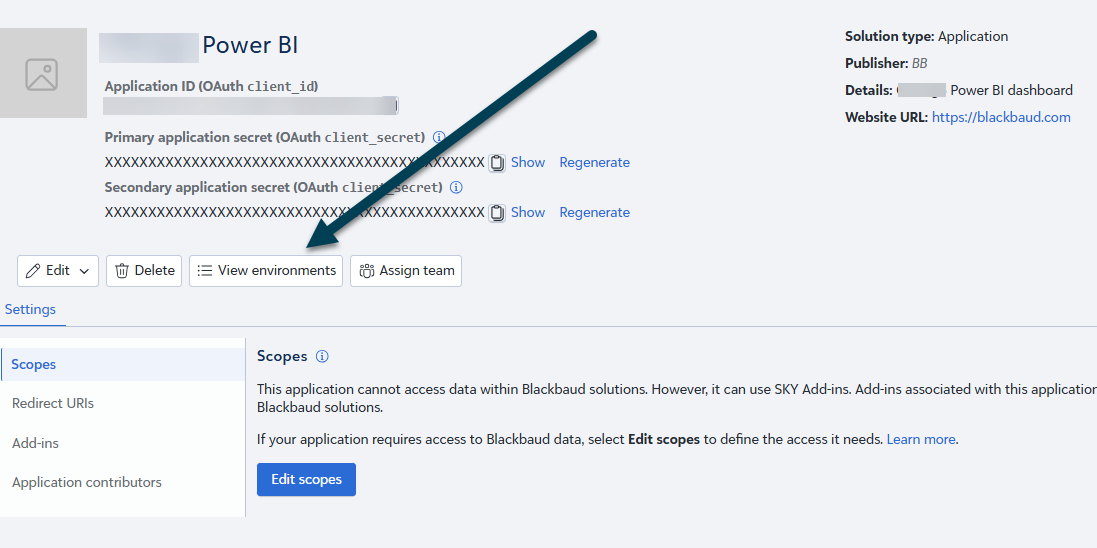
@Jundino Ugo Noting that we discussed confirming the Microsoft Power Platform Marketplace solution was added to your environment and that your App is authorized for your environment:
 0
0 -
Thanks @Erik Leaver for the invite to the Power BI User Group, I learned a lot today from the group.
So I connected my app and even changed the scope to full access just to see if it works. The add in button is still not showing up! Any other ideas?
0 -
@Jundino Ugo - did you confirm you can see the environment? (see my above screenshot where you can review connected environments)
0 -
Hi @Erik Leaver - yes I can see the environment and it's connected. Add-in still not showing up in the Home page.
0 -
@Jundino Ugo Confirmed on the environment (I forgot that I have access to a tool that can check applications). So that brings us back to the URL or potentially your Home Page permissions. Have you asked if any other users can see the add-in?
We might want to test first in the SKY Developer Cohort (our test environment). I'll just sent you an invite to that environment. be sure to check your clutter for the invite.0 -
@Jundino Ugo were you able to get an answer to this?
0













Categories
- All Categories
- 6 Blackbaud Community Help
- 211 bbcon®
- 1.4K Blackbaud Altru®
- 403 Blackbaud Award Management™ and Blackbaud Stewardship Management™
- 1.2K Blackbaud CRM™ and Blackbaud Internet Solutions™
- 15 donorCentrics®
- 360 Blackbaud eTapestry®
- 2.6K Blackbaud Financial Edge NXT®
- 658 Blackbaud Grantmaking™
- 579 Blackbaud Education Management Solutions for Higher Education
- 3.2K Blackbaud Education Management Solutions for K-12 Schools
- 943 Blackbaud Luminate Online® and Blackbaud TeamRaiser®
- 84 JustGiving® from Blackbaud®
- 6.7K Blackbaud Raiser's Edge NXT®
- 3.8K SKY Developer
- 250 ResearchPoint™
- 120 Blackbaud Tuition Management™
- 165 Organizational Best Practices
- 241 Member Lounge (Just for Fun)
- 34 Blackbaud Community Challenges
- 37 PowerUp Challenges
- 3 (Open) PowerUp Challenge: Grid View Batch
- 3 (Closed) PowerUp Challenge: Chat for Blackbaud AI
- 3 (Closed) PowerUp Challenge: Data Health
- 3 (Closed) Raiser's Edge NXT PowerUp Challenge: Product Update Briefing
- 3 (Closed) Raiser's Edge NXT PowerUp Challenge: Standard Reports+
- 3 (Closed) Raiser's Edge NXT PowerUp Challenge: Email Marketing
- 3 (Closed) Raiser's Edge NXT PowerUp Challenge: Gift Management
- 4 (Closed) Raiser's Edge NXT PowerUp Challenge: Event Management
- 3 (Closed) Raiser's Edge NXT PowerUp Challenge: Home Page
- 4 (Closed) Raiser's Edge NXT PowerUp Challenge: Standard Reports
- 4 (Closed) Raiser's Edge NXT PowerUp Challenge: Query
- 798 Community News
- 3K Jobs Board
- 56 Blackbaud SKY® Reporting Announcements
- 47 Blackbaud CRM Higher Ed Product Advisory Group (HE PAG)
- 19 Blackbaud CRM Product Advisory Group (BBCRM PAG)