Add Action to Matched Constituent(s) After Using Search





Hi all,
I'm trying to build out a flow from a Microsoft Form. The idea is that this form can be used by internal staff as well as donors and friends outside of the institution. I've set up the form to allow an option on include a constituent Lookup ID for those internal staff with access to RE NXT. I set the first condition on the flow to check if the Lookup ID field is empty. If it's not empty (first False branch), the flow will use "Get a constituent by lookup ID" and add an action to that constituent. That branch works as expected.
If the lookup ID field is empty (first True branch), I'm using "Search for a constituent (enhanced)" to search on last name and email. Here's where I'm stumbling. I've set up the second condition to check if the last name from the search matches the last name on the form response and the matched email matches the email on the form response. If a match (or matches), I'd like to add an action to the matched constituent(s). If there are no matches, I'd like to use the information from the form response to create a new constiteunt and then add an action to the new constituent. However, the steps after the condition are skipped every time I test a submission without including the Lookup ID.
Any help would be appreciated.

Answers
-
I don't know anything about Microsoft Forms but it might be something to do with how nulls are handled in logical expressions - generally you cannot ask if a null is equal to something because the result is unknown (neither true nor false). What's the expression you're using under the "check for lookup ID" step?
0 -
I'm setting it to check if the lookup ID field in the response is blank. That step is succeeding.
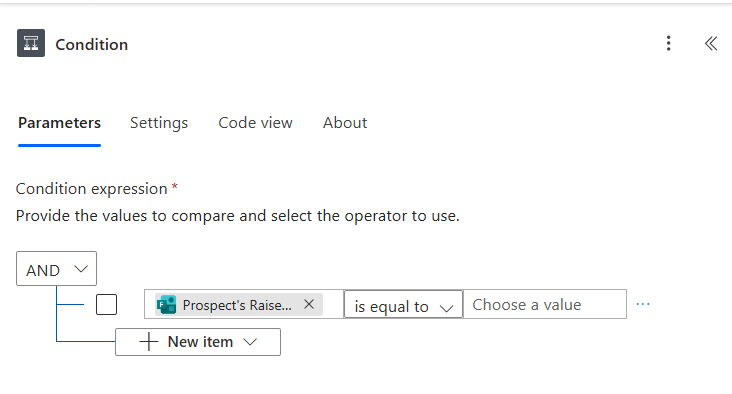 0
0 -
Hmm. The step "succeeding" might not mean it's giving you either a true or false value though, I suppose - it could be returning null. Have you tried comparing the ID to the null expression (see 2nd screenshot in link below) rather than just an empty value?
https://tomriha.com/what-value-to-use-in-condition-if-field-is-empty-in-power-automate/
0 -
Thanks so much for the input, but I was able to solve it! Like I suspected, the issue was with the action after the "Search for a constituent (enhanced)" action. I ended up using the length condition for that. Like the link you attached outlines, you would just leave the field blank for MS Form responses but would use the length for arrays.
1





Categories
- All Categories
- 6 Blackbaud Community Help
- 211 bbcon®
- 1.4K Blackbaud Altru®
- 403 Blackbaud Award Management™ and Blackbaud Stewardship Management™
- 1.2K Blackbaud CRM™ and Blackbaud Internet Solutions™
- 15 donorCentrics®
- 360 Blackbaud eTapestry®
- 2.6K Blackbaud Financial Edge NXT®
- 659 Blackbaud Grantmaking™
- 579 Blackbaud Education Management Solutions for Higher Education
- 3.2K Blackbaud Education Management Solutions for K-12 Schools
- 943 Blackbaud Luminate Online® and Blackbaud TeamRaiser®
- 84 JustGiving® from Blackbaud®
- 6.7K Blackbaud Raiser's Edge NXT®
- 3.8K SKY Developer
- 250 ResearchPoint™
- 120 Blackbaud Tuition Management™
- 165 Organizational Best Practices
- 241 Member Lounge (Just for Fun)
- 36 Blackbaud Community Challenges
- 37 PowerUp Challenges
- 3 (Open) PowerUp Challenge: Grid View Batch
- 3 (Closed) PowerUp Challenge: Chat for Blackbaud AI
- 3 (Closed) PowerUp Challenge: Data Health
- 3 (Closed) Raiser's Edge NXT PowerUp Challenge: Product Update Briefing
- 3 (Closed) Raiser's Edge NXT PowerUp Challenge: Standard Reports+
- 3 (Closed) Raiser's Edge NXT PowerUp Challenge: Email Marketing
- 3 (Closed) Raiser's Edge NXT PowerUp Challenge: Gift Management
- 4 (Closed) Raiser's Edge NXT PowerUp Challenge: Event Management
- 3 (Closed) Raiser's Edge NXT PowerUp Challenge: Home Page
- 4 (Closed) Raiser's Edge NXT PowerUp Challenge: Standard Reports
- 4 (Closed) Raiser's Edge NXT PowerUp Challenge: Query
- 798 Community News
- 3K Jobs Board
- 56 Blackbaud SKY® Reporting Announcements
- 47 Blackbaud CRM Higher Ed Product Advisory Group (HE PAG)
- 19 Blackbaud CRM Product Advisory Group (BBCRM PAG)