Cumulative Giving Queries for 2026





Has anyone had any issues with running a cumulative giving constituent dynamic query for 2026 gift dates? We run these for several calendar year timeframes for an impact report. Prior full calendar years are running fine but anything we try to run for 2026 dates just run and run, regardless whether it's done in database or web view. These are queries we've been running for years with no issues. I tried adding parentheses around the two sets of criteria but that hasn't helped. We have saved as old queries to create this year's criteria, as well as created a new query from scratch. Multiple users have tried running them. No matter what the query just runs.

Best Answers
-
I have had this issue since at least all of 2025 if not 2024 as well. I reported to BB but as they weren't able to duplicate it, they didn't do anything with it. What I have found has helped is to do a query for just the Total Amount criteria and then processes quickly, and then do an OR merge to join them back together. Pain in the !@#$ I admit, but without being able to get BB to address it this has been my go-to work to get the project done. I would report it to Support as well.
BTW, the query as displayed "needs" parenthesis because you're using AND and OR operators. (There is an order of precedence with queries and Boolean logic as with math, but I don't recommend relying on it.) But if you break these into separate queries you might not need parens within the queries.
2 -
two separate issues:
- and/or logic
- your query criteria:
constituent code = Individual AND total_amount_gift_1 between 5 and 999.99 OR constituent code = Individual AND total_amount_gift_2 between 5 and 999.99 - this is same as saying
A and B or A and C - if you translate that to math equation, AND is multiply; OR is addition
A x B + A x C - which from a "logic" operator perspective (assuming I understand your query need here correctly), you do not need any paranthesis as:
A x B + A x C is the same as (A x B) + (A x C)
as multiply/and will be done first, then addition/or - I wrote a long post about AND/OR and paranthesis on this post you can check out if you want to
- from what I am seeing and trying to understand, you want to get any constituents having constituent code of Individual and that has given "revenue/contribution" (meaning include pledge, but not pledge payment) $5-$999.99, inclusively, during 1/1/26-1/13/26 or has given "cash" (meaning include pledge payment, but not pledge) $5-$999.99, inclusively, during the same time period.
- if so, you do not need A and B or A and C, your criteria would be A and (B or C), meaning
constituent code = Individual
and (total_amount_gift_1 between 5 and 999.99
or total_amount_gift_2 between 5 and 999.99)
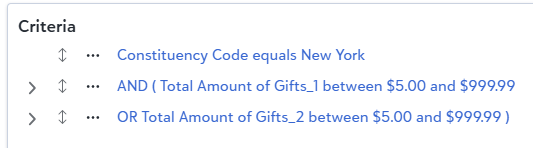
- if so, you do not need A and B or A and C, your criteria would be A and (B or C), meaning
- your query criteria:
- running slow/not finishing
- I tried it and it is able to finish for me using above criteria, maybe need you to provide your output, sort, and option tab to see if anything else you doing that can contribution to the slow/not finsihing.
2 - and/or logic







Answers
-
I don't know if this is the right topic but Bill Connors, I trust you. My dilemma is….It was requested by one of our committees to include in our normal tax mailing letter: not only donations received during the 2025 calendar year but also lifetime giving if it is above $15,000.00 and also if they have a pledge the pledge amount, the amount paid off toward the pledge and the balance of the pledge…. i will welcome any thoughts
0 -
here's what you will need from criteria perspective for a constituent query:
- summary of gift amount > 0
- gift date is last year
- gift type one of (select the gift type that matters for your need)
- OR summary of gift amount >=$15K
- gift type one of (select the gift type that matters for your need)
above criteria will get you any constituent that gave anything last year (2025) based on gift type selection OR any constituent that gave $15K lifetime based on gift type selection.
The "if they have a pledge …" part, i'm not sure if you are seeking to "get" info (as output) about the constituent set above regarding their pledge gift details or is the pledge info is part of the criteria. I'm leaning more toward you are asking for output for pledge info. Please clarify.
0 - summary of gift amount > 0
-
Thank you for your response, Alex. This is one of those inherited queries that a colleague has been running for years now. They have never really utilized the parenthese process when building queries, choosing other options instead.
That said, I did create a new query built with your suggestion, which is how I would have done it if I had been asked to build a new query. I even tried putting the date as this calendar year instead of specific dates and am still getting the same result - it won't complete. I've built it and am running it today in web view so I can do other things in DB view. I'm not sure if it's because our db is so big (we have over 300,000 records) but I don't think so because the full year queries work just fine. It's truly baffling.
Interestingly, if I break the summary criteria into two queries, I get results almost immediately. One gives me 18 constituents and the other 21. So I know it's doable. RENXT seems to just not like having both those gift criteria together in this form, even if past years' data works fine (2025's ran for me in just a few minutes).
0 -
@Bill Connors I just saw your response. I am relieved to know we are not the only ones. I also completely agree on the logic with parentheses but it wasn't mine to build. As I mentioned to Alex before seeing your response, I actually did break out the criteria and was able to get quick results (still waiting on the other query with parentheses to finish). I will certainly forward your comments to my colleague that's in charge of this, though, so she can address with Support. Thank you!
0 -
Alex Wong - thank you. That will help. For the pledge I am inclined to try a separate query or just summarize for the donors that have current pledges something that shows the original pledge amount, the revenue paid toward the pledge and the pledge balance
0 -
Alex has gotten into most/all of the issues with the query, and due to other commitments, I'm not able to comment further on those, sorry. But as the primary point of the original post was about the query not completing, I jumped on to say Yes, that frequently happens to me, to provide confirmation of the "you're not crazy or doing anything wrong" sort, and to recommend breaking the query into multiple queries to resolve that issue. Miki has confirmed that this is an RE issue since the separate queries run fine. I think this is with BOTH views so it would be nice if BB fixed it. Good luck resolving the other issues, but I do agree with Alex (although I don't recommend using order of precedence in RE queries for reasons I won't go into now) that there are other issues with this query that should be looked at. All the best with it!
2 -
I agree with Bill, I've seen this issue for a few years now. I switched to export and use just a basic constit query to isolate donor groups when needed but only trust the Giving Summary from export.
1






Categories
- All Categories
- 6 Blackbaud Community Help
- 211 bbcon®
- 1.4K Blackbaud Altru®
- 403 Blackbaud Award Management™ and Blackbaud Stewardship Management™
- 1.2K Blackbaud CRM™ and Blackbaud Internet Solutions™
- 15 donorCentrics®
- 360 Blackbaud eTapestry®
- 2.6K Blackbaud Financial Edge NXT®
- 659 Blackbaud Grantmaking™
- 579 Blackbaud Education Management Solutions for Higher Education
- 3.2K Blackbaud Education Management Solutions for K-12 Schools
- 943 Blackbaud Luminate Online® and Blackbaud TeamRaiser®
- 84 JustGiving® from Blackbaud®
- 6.7K Blackbaud Raiser's Edge NXT®
- 3.8K SKY Developer
- 250 ResearchPoint™
- 120 Blackbaud Tuition Management™
- 165 Organizational Best Practices
- 241 Member Lounge (Just for Fun)
- 36 Blackbaud Community Challenges
- 37 PowerUp Challenges
- 3 (Open) PowerUp Challenge: Grid View Batch
- 3 (Closed) PowerUp Challenge: Chat for Blackbaud AI
- 3 (Closed) PowerUp Challenge: Data Health
- 3 (Closed) Raiser's Edge NXT PowerUp Challenge: Product Update Briefing
- 3 (Closed) Raiser's Edge NXT PowerUp Challenge: Standard Reports+
- 3 (Closed) Raiser's Edge NXT PowerUp Challenge: Email Marketing
- 3 (Closed) Raiser's Edge NXT PowerUp Challenge: Gift Management
- 4 (Closed) Raiser's Edge NXT PowerUp Challenge: Event Management
- 3 (Closed) Raiser's Edge NXT PowerUp Challenge: Home Page
- 4 (Closed) Raiser's Edge NXT PowerUp Challenge: Standard Reports
- 4 (Closed) Raiser's Edge NXT PowerUp Challenge: Query
- 798 Community News
- 3K Jobs Board
- 56 Blackbaud SKY® Reporting Announcements
- 47 Blackbaud CRM Higher Ed Product Advisory Group (HE PAG)
- 19 Blackbaud CRM Product Advisory Group (BBCRM PAG)