Constant Contact Integration





When setting up/using the integration for the first time, what would be the MOST important things to pay attention to. For instance, what are common barriers that people run into? Or what is a question that you get asked about repeatedly that might not be covered in your knowledgebase?
Answers
-
Hey Katherine, Very proactive question, I like it!
Here are the answers to the FAQs that we get in our conversations:
1) You must be an admin in order to see the "Constant Contact" option under "Communications" in NXT. If you are not an admin, someone on the team who has that access will need to complete the sync.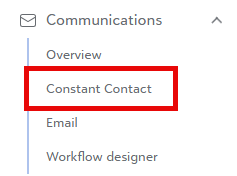
2) You are able to bring NXT Lists into Constant Contact. These will then automatically send to Constant Contact every 24 hours. You can have up to 12 recurring lists synced per account that you have for your different audiences. So you can either create specific lists in NXT and import those into Constant Contact. Or, you can import all relevant constituents to that audience list, and then use the Constant Contact segmenting tool to get a more tailored list (similar to your Queries in NXT).
3) Unsubscribes are handled through Consent Categories that are created in your NXT settings. Solicit codes do not automatically update records in Constant Contact. We can only work with the consent categories.
4) The details we send back to NXT are the unsubscribes/consent updates, and the constituent engagement to the constituent record. This constituent engagement is read only data at this time. We do not send new contact records into NXT, as we understand there are times where you may have non-constituents, or other lists that you may want to send through Constant Contact that aren't relevant to NXT.
Let me know if you have any additional questions and I'd be happy to answer them but those are some good things to know when you get started!2





Categories
- All Categories
- 6 Blackbaud Community Help
- 211 bbcon®
- 1.4K Blackbaud Altru®
- 403 Blackbaud Award Management™ and Blackbaud Stewardship Management™
- 1.2K Blackbaud CRM™ and Blackbaud Internet Solutions™
- 15 donorCentrics®
- 360 Blackbaud eTapestry®
- 2.6K Blackbaud Financial Edge NXT®
- 659 Blackbaud Grantmaking™
- 579 Blackbaud Education Management Solutions for Higher Education
- 3.2K Blackbaud Education Management Solutions for K-12 Schools
- 943 Blackbaud Luminate Online® and Blackbaud TeamRaiser®
- 84 JustGiving® from Blackbaud®
- 6.7K Blackbaud Raiser's Edge NXT®
- 3.8K SKY Developer
- 250 ResearchPoint™
- 120 Blackbaud Tuition Management™
- 165 Organizational Best Practices
- 241 Member Lounge (Just for Fun)
- 36 Blackbaud Community Challenges
- 37 PowerUp Challenges
- 3 (Open) PowerUp Challenge: Grid View Batch
- 3 (Closed) PowerUp Challenge: Chat for Blackbaud AI
- 3 (Closed) PowerUp Challenge: Data Health
- 3 (Closed) Raiser's Edge NXT PowerUp Challenge: Product Update Briefing
- 3 (Closed) Raiser's Edge NXT PowerUp Challenge: Standard Reports+
- 3 (Closed) Raiser's Edge NXT PowerUp Challenge: Email Marketing
- 3 (Closed) Raiser's Edge NXT PowerUp Challenge: Gift Management
- 4 (Closed) Raiser's Edge NXT PowerUp Challenge: Event Management
- 3 (Closed) Raiser's Edge NXT PowerUp Challenge: Home Page
- 4 (Closed) Raiser's Edge NXT PowerUp Challenge: Standard Reports
- 4 (Closed) Raiser's Edge NXT PowerUp Challenge: Query
- 798 Community News
- 3K Jobs Board
- 56 Blackbaud SKY® Reporting Announcements
- 47 Blackbaud CRM Higher Ed Product Advisory Group (HE PAG)
- 19 Blackbaud CRM Product Advisory Group (BBCRM PAG)