Space in addresses




Anyone have a solution for random spaces in line 2 of the addresses? For some reason some of the addresses in our database have random spaces below the address and I am not sure how to run a query to find all of them and fix them. Has this happened to anyone?
Answers
-
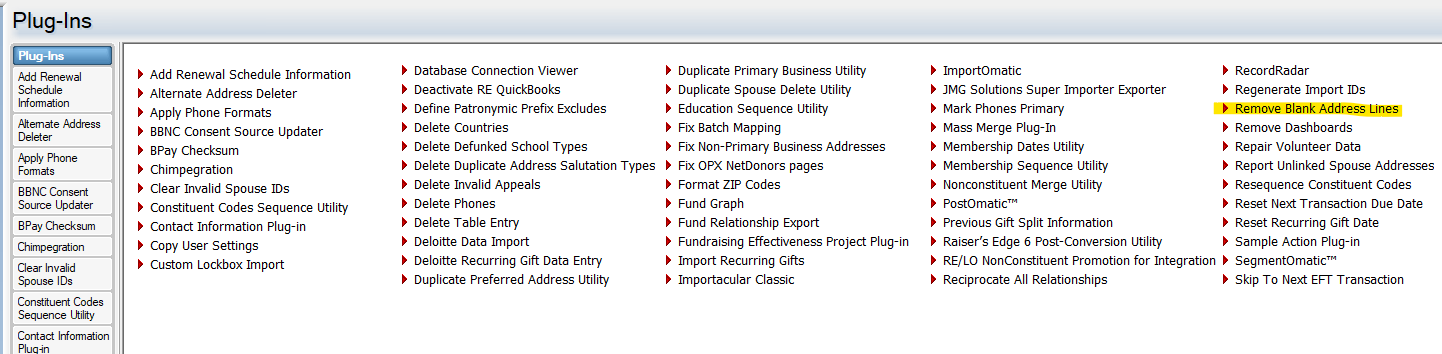
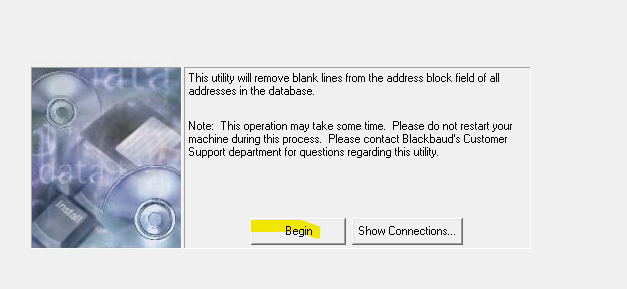
In Database View, go to Plug-Ins and chose "Remove Blank Address Lines" and click begin. It may take a little time, but not that much, just depends.
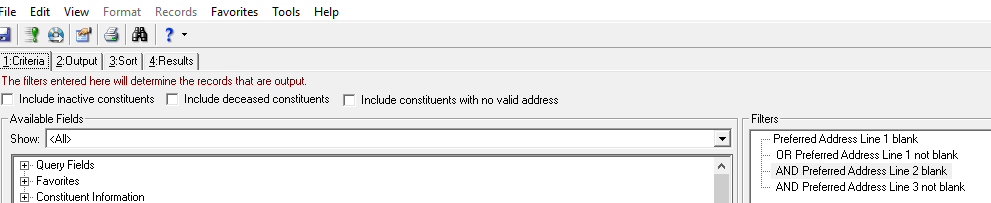
You also have another choice with a query set up like below. Do check the boxes of inactive, deceased or no valid address. Sometimes depending on how the record was put into the system you will have the first line blank and the 2nd line will have the address( Preferred address line 1 is blank). In your case where there are two lines, but the middle line has the blank, you have the criteria of Address line not Blank, address line 2 is blank, address line 3 not blank. But then when you get the results you need to fix them, where the Plug-In does all the work for you.
 4
4 -
Thanks Joe, this was very helpful and insightful! Do you know if this is a common bug where addresses will magically gain that space or is this usually a result of some issue during data entry?
0 -
Some of it is from data entry, but I think a good bit is from an excel sheet that gets imported and there are spaces in the excel sheet. I run this as my regular database clean-up.
2 -
Thanks Joe! The plugin worked but trying your query I don't think it fully isolates and captures the issue. For example the issue I am having is that addresses are showing up like this, with a space between the address and city:
Address Line 1
City
Province Postal CodeYour query would show me both entries that look like that and regular entries that don't have line 2. Most of the time we don't use line 2 or 3. Would you be able to help me with figuring out a query that only shows me the addresses with issues?
0 -
I think with the example you are showing, will not work, since the line that has a space is Address line 2. You are better off using the plugin, since it will deal with all various kind of issues, where there is a blank line.
1 -
Alright that's fine, for the most part it seems like the plugin does the job, just wanted to see if there is a way to regularly check for these errors. Thank you so much for your help Joe!
0







Categories
- All Categories
- 6 Blackbaud Community Help
- 211 bbcon®
- 1.4K Blackbaud Altru®
- 403 Blackbaud Award Management™ and Blackbaud Stewardship Management™
- 1.2K Blackbaud CRM™ and Blackbaud Internet Solutions™
- 15 donorCentrics®
- 360 Blackbaud eTapestry®
- 2.6K Blackbaud Financial Edge NXT®
- 659 Blackbaud Grantmaking™
- 579 Blackbaud Education Management Solutions for Higher Education
- 3.2K Blackbaud Education Management Solutions for K-12 Schools
- 943 Blackbaud Luminate Online® and Blackbaud TeamRaiser®
- 84 JustGiving® from Blackbaud®
- 6.7K Blackbaud Raiser's Edge NXT®
- 3.8K SKY Developer
- 250 ResearchPoint™
- 120 Blackbaud Tuition Management™
- 165 Organizational Best Practices
- 241 Member Lounge (Just for Fun)
- 36 Blackbaud Community Challenges
- 37 PowerUp Challenges
- 3 (Open) PowerUp Challenge: Grid View Batch
- 3 (Closed) PowerUp Challenge: Chat for Blackbaud AI
- 3 (Closed) PowerUp Challenge: Data Health
- 3 (Closed) Raiser's Edge NXT PowerUp Challenge: Product Update Briefing
- 3 (Closed) Raiser's Edge NXT PowerUp Challenge: Standard Reports+
- 3 (Closed) Raiser's Edge NXT PowerUp Challenge: Email Marketing
- 3 (Closed) Raiser's Edge NXT PowerUp Challenge: Gift Management
- 4 (Closed) Raiser's Edge NXT PowerUp Challenge: Event Management
- 3 (Closed) Raiser's Edge NXT PowerUp Challenge: Home Page
- 4 (Closed) Raiser's Edge NXT PowerUp Challenge: Standard Reports
- 4 (Closed) Raiser's Edge NXT PowerUp Challenge: Query
- 798 Community News
- 3K Jobs Board
- 56 Blackbaud SKY® Reporting Announcements
- 47 Blackbaud CRM Higher Ed Product Advisory Group (HE PAG)
- 19 Blackbaud CRM Product Advisory Group (BBCRM PAG)