Azure Data Factory Connectors for BB





Hi everyone,
I have read a few articles that BB does not provide much flexibility for ADF, since we are using Bearer tokens and requires user manual intervention to get response back the token. Having said that, what other options do I have to pull Education Management Data? in form of json or csv files as recurrent schedules? Thank you so much.
I am really appreciate any input on this topic.
Answers
-
Hi @Giovanni Franco. I've leveraged the Google ecosystem to create a Google Sheets extension that automatically pulls Advanced Lists directly into Google Sheets, which can then be saved/sent as json or csv files. It all runs directly within Google Sheets with no coding at all. These are set on a schedule to automatically update at a desired frequency, usually every hour. The solution details are listed here. If you are interested, I'd love to share more details and demo it for you. Free to get started!
nick@collarcityconsulting.com
0 -
Manual intervention is only required for your very first token. After that, you can get new tokens fully automatically.
Steps:
- Go to https://oauth2.sky.blackbaud.com/authorization?client_id=your_client_id&response_type=code&redirect_uri=your_redirect_uri
- Click "Approve"
- Blackbaud redirects you to your_redirect_uri with a code
- Make a POST request to https://oauth2.sky.blackbaud.com/token with the body "grant_type=authorization_code&code=the_code_from_blackbaud&redirect_uri=your_redirect_uri"
The refresh token lasts 1 year, but you can refresh it fully programmatically, no human intervention needed.
To do that, have your process make a new POST request to https://oauth2.sky.blackbaud.com/token. My processes do it every day. That way, we never get close to the 1 year expiration. (If a process doesn't run for a month or two, we don't have to worry.)
The body should be "grant_type=refresh_token&refresh_token=your_refresh_token&preserve_refresh_token=true" (or false).
Hope this helps!
0 -
One thing I should add to this….
The redirect URI be fake. You don't need a real web app for it. All you need is to get the code that Blackbaud appends to it from your browser's address bar.
Here's what I mean. One of my old scripts uses this redirect URI:
https://localhost:7178
"Localhost" means "whatever computer this browser is running on." So, here's how this works with the process in my last post….
You click "Approve" in Blackbaud. Blackbaud redirects your browser to your redirect URI (localhost, in this case). Blackbaud adds a code at the end of the URI:
https://localhost:7178/?code=60f3db7a8a7d4792aa201c5585204629
If, like me, you don't have anything running on port 7178 of your computer, then your browser will say, "This site can't be reached." That's fine! You just need the code that Blackbaud added to the URI. Copy that and use it in your first POST request to Blackbaud for a refresh token.
0 -
I see, I will take a look. Thx.
1 -
Awesome, let me know if any questions come up and I'll try to help.
0 -
I will, thx.
Eric, by any chance do you have an adv list that capture final GPA grades for each student by calendar year in the school by subject and number of credits.
Example - Final Grade First SemesterStudentid, name, grade, calendar year, course id, course desc, credits, Semester, GPA Final weighted, GPA final unweighted.
Same thing for Second Semester and Final Grades.
I want to track the final GPAs by semester and final grade at the end of a calendar year.
Thank you.0 -
Unfortunately, GPA can't be added to advanced lists, only SKY lists. But the API can only export advanced lists, not SKY lists. So there's no way to export GPAs automatically/on a schedule yet that I know of. I'm hoping this changes.
In the meantime, you can manually export them from a SKY list. You have to have the system calculate them first.
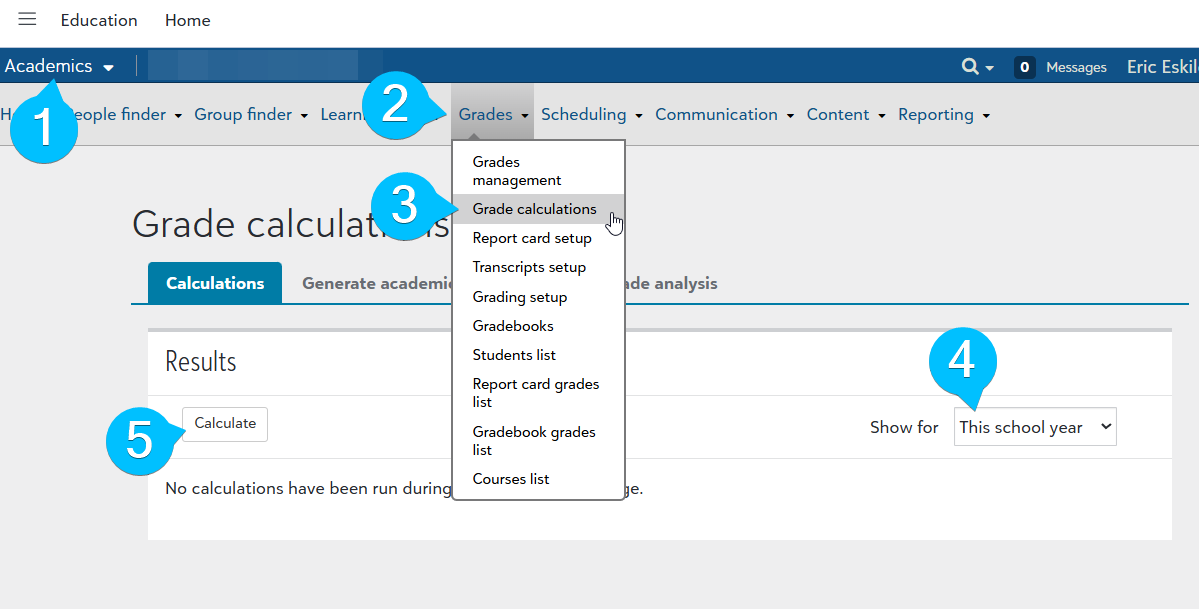
To calculate them, go to Academics (1), Grades (2), Grade calculations (3), choose a time period (4), and click Calculate (5). That computes and stores them.
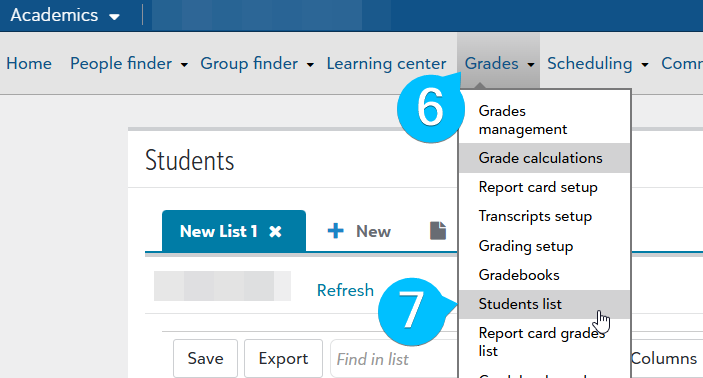
Then go to Grades (6), Students list (7).
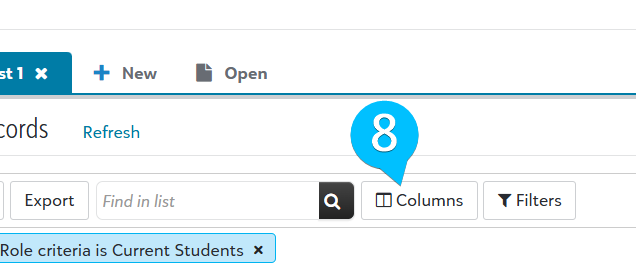
Click Columns (8).
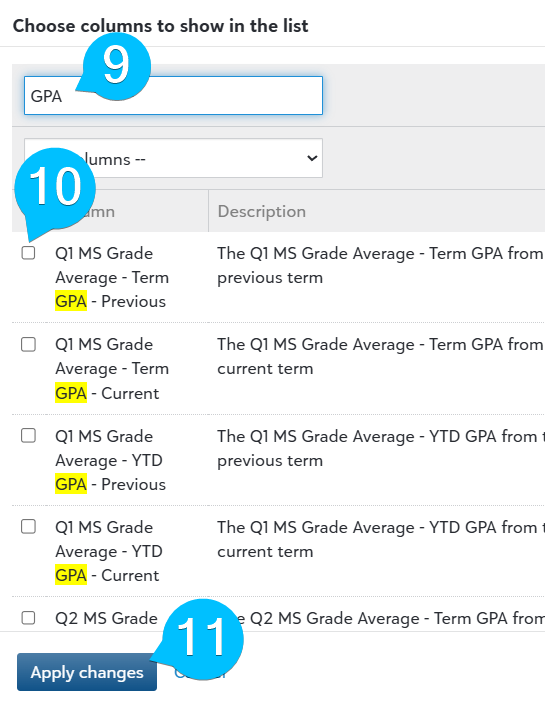
Search for GPA (9). Tick any GPA columns you'd like to add to the list (10). Then click Apply changes (11).
The Export button at the top of the list will download a CSV file (12).
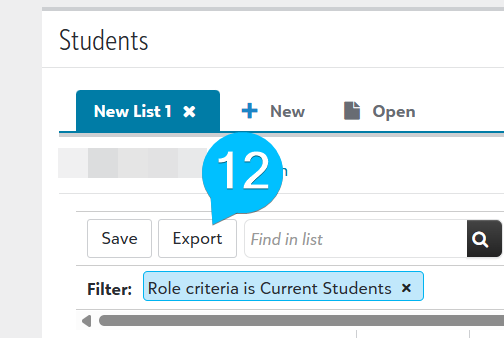
Not ideal for a data pipeline….I'm hoping this is added to the API!
0 -
I got this one but I need to include courses with ids, teachers, etc, this is only GPAs
Have you created one of them already? I want to track by semester, by finals, cum. etc. I am new on Ed. field as weill as new to this position, but trying to understand how this works. :) Thx again for your valuable help and time.0 -
Ah! I see what you mean.
I don't know of a way to break it down by course….Tagging Stephen in case he has anything to add here.
0





Categories
- All Categories
- 6 Blackbaud Community Help
- 211 bbcon®
- 1.4K Blackbaud Altru®
- 403 Blackbaud Award Management™ and Blackbaud Stewardship Management™
- 1.2K Blackbaud CRM™ and Blackbaud Internet Solutions™
- 15 donorCentrics®
- 360 Blackbaud eTapestry®
- 2.6K Blackbaud Financial Edge NXT®
- 659 Blackbaud Grantmaking™
- 579 Blackbaud Education Management Solutions for Higher Education
- 3.2K Blackbaud Education Management Solutions for K-12 Schools
- 943 Blackbaud Luminate Online® and Blackbaud TeamRaiser®
- 84 JustGiving® from Blackbaud®
- 6.7K Blackbaud Raiser's Edge NXT®
- 3.8K SKY Developer
- 250 ResearchPoint™
- 120 Blackbaud Tuition Management™
- 165 Organizational Best Practices
- 241 Member Lounge (Just for Fun)
- 36 Blackbaud Community Challenges
- 37 PowerUp Challenges
- 3 (Open) PowerUp Challenge: Grid View Batch
- 3 (Closed) PowerUp Challenge: Chat for Blackbaud AI
- 3 (Closed) PowerUp Challenge: Data Health
- 3 (Closed) Raiser's Edge NXT PowerUp Challenge: Product Update Briefing
- 3 (Closed) Raiser's Edge NXT PowerUp Challenge: Standard Reports+
- 3 (Closed) Raiser's Edge NXT PowerUp Challenge: Email Marketing
- 3 (Closed) Raiser's Edge NXT PowerUp Challenge: Gift Management
- 4 (Closed) Raiser's Edge NXT PowerUp Challenge: Event Management
- 3 (Closed) Raiser's Edge NXT PowerUp Challenge: Home Page
- 4 (Closed) Raiser's Edge NXT PowerUp Challenge: Standard Reports
- 4 (Closed) Raiser's Edge NXT PowerUp Challenge: Query
- 798 Community News
- 3K Jobs Board
- 56 Blackbaud SKY® Reporting Announcements
- 47 Blackbaud CRM Higher Ed Product Advisory Group (HE PAG)
- 19 Blackbaud CRM Product Advisory Group (BBCRM PAG)