Adaptive Card Not Working





I had designed an adaptive card that brought back the local weather for a donor based on their zip code. Everything worked fine….then it stopped working. Here is the flow….

What is happening from what I see… is that the Http Request is not returning the SystemRecordId, so the Get a Constituent is failing. Because it fails, my adaptive card does not show up on any record. Here is what my Http Request looks like:

Not much else to it. Befor eyou say my Method is blank…I had it set to GET. And that did not work. Here is what it is returning:

Any suggestions….I have tried everything and am now at my wits end. Any help would be appreciated.
Thanks,
Bob
Answers
-
@Bob Rickards The Method actually should be blank. When you test it with the Method field left empty, are you still not seeing the record ID come into the Flow?
0 -
Nope…still comes through blank.
0 -
Request Body JSON Schema is missing.
{

    "type": "object",

    "properties": {

        "uit": {

            "type": "string"

        },

        "context": {

            "type": "object",

            "properties": {

                "recordId": {

                    "type": "string"

                }

            }

        }

    }

}
1 -
Changed the JSON like Alex suggested…with no Method and now it does not run.
0 -
can you confirm the application add-in URL
It should look like this
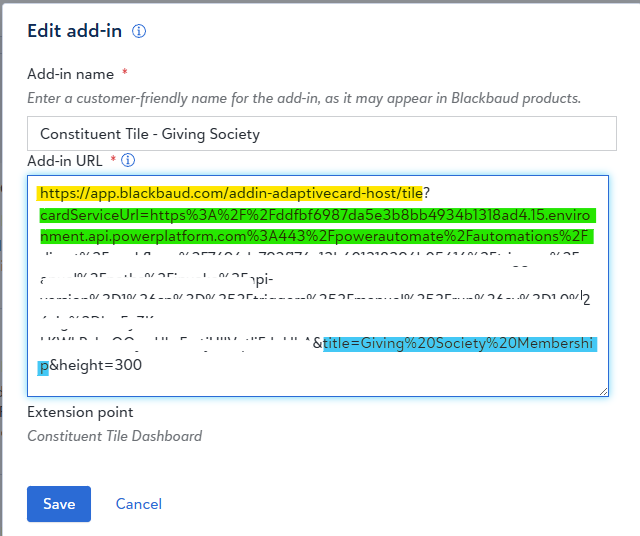
yellow highlight = base URL SPA that indicate adaptive card
green highlight following the cardServiceUrl query parameter = the Encoded URL of the trigger url in your flow
blue highlight following the title query parameter = the Encoded title of the tile
0 -
I suspect your tile is not adaptive card, but AIO that Glen created before adaptive card became available.
If it is AIO, the Application Add-in would look like this:
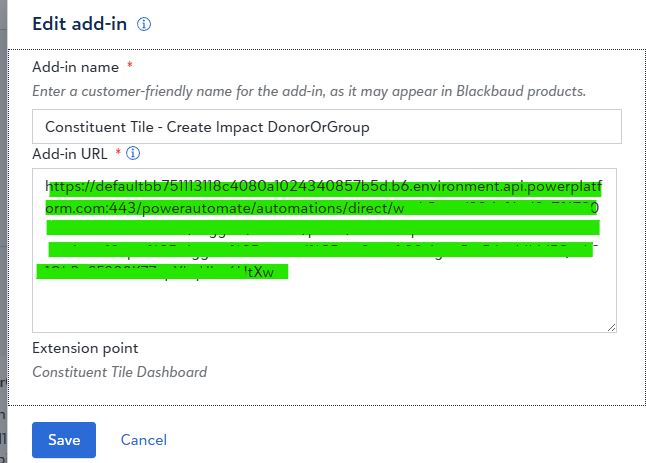
where green highlight (the FULL Add-in URL) is the trigger url in your flow
IF that is the case, you will want to remove the Request Body JSON Schema and change Method to Get
0 -
0
-
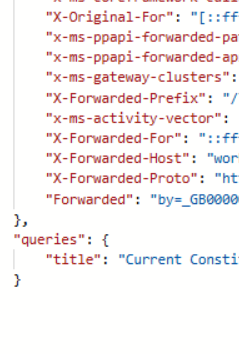
Seems its the application add in….removed the json and added the method of GET and ran the process. Still get a failure. Here is the return.
 0
0 -
Unlike Adaptive Card where system record id is provided "automatically", Glen's AIO replies on custom JavaScript code that "insert" the system record id into the request to your flow trigger, it appears you may have broke something in the javascript code. or the logic behind the code.
Also to note, when a constituent page is loaded with AIO, it actually makes multiple calls to the flow, first call is going to go down the "default" path of the switch. 2nd flow call will trigger the "validate" path, then a 3rd call that finally display the content of the flow. So depending on when your constituen page is loading and if there is 1 run history, 2, or 3 run history, your flow is failing in different area. You will need to provide a lot more info for investigation.
The specific code is in the MainScript variable:
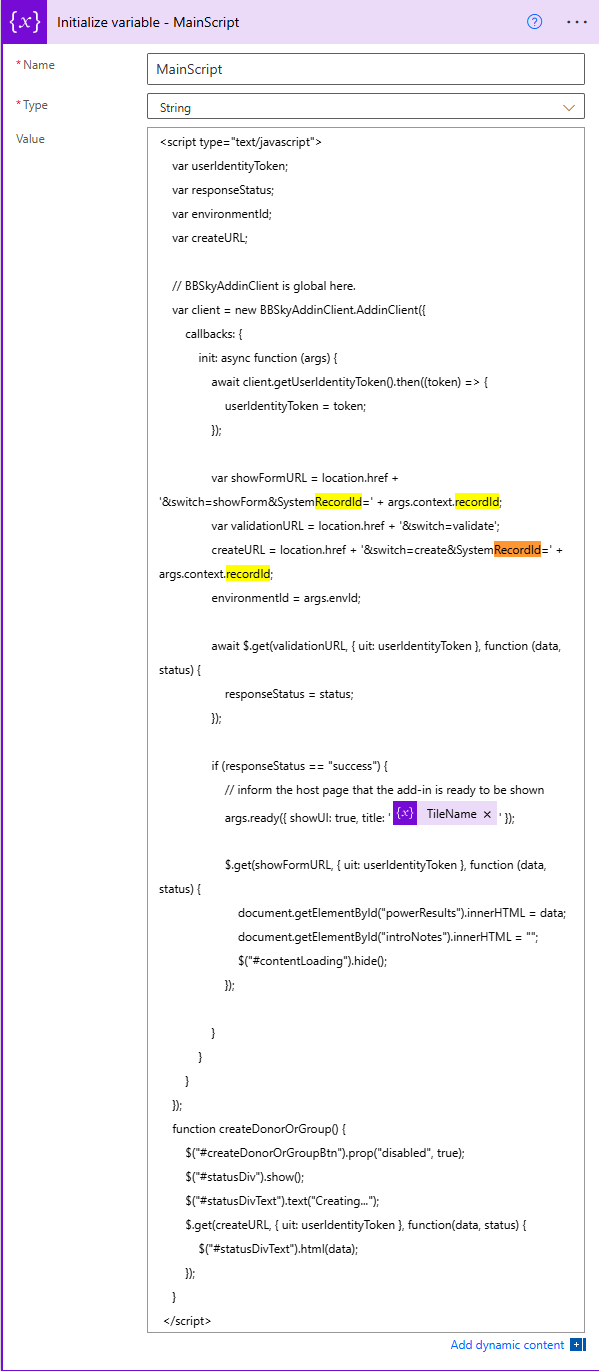
so first is to confirm your MainScript is still correct. (see where pieces important here in highlight)
BEFORE i type up an even longer troubleshooting steps, maybe what you need to verify is if anyone or yourselves have made changes to the flow as you said it was previously working.
0 -
I am the only one who touches the flow. Here is what I am running. I am not using a Main Script.
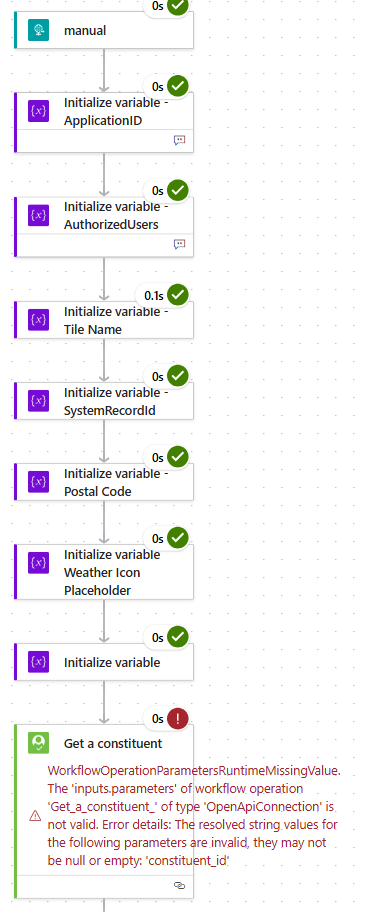
I can remove AuthorizedUsers, and TileName bc those come from code. Where does main script go?
0 -
I don't know if there is different version of AIO that Glen published. I also made updates to his AIO to make it more efficient for me. So this "MainScript" variable might have been me separating out the code pieces.
Your screenshot also does not look correct to me from Glen's AIO perspective. You have "Get a constituent" running every time the flow run, that would always error out. So I don't know how your tile had worked previously.
Glen's AIO logic is:
- RE NXT calls the flow first time, which does down the "default" path of the "switch" action that loads the full HTML page to display on the tile, which at this point is "nothing" yet. This HTML contains client side (on your browser) javascript that uses SKY UX Blackbaud javascript object to obtain s UIT (User Identify Token) and the context (constituent) system record id. Then it hit the flow again providing it the UIT to validate as well as the system record id.
- THERE IS NO system record id of the constituent in this flow run. Your Get a constituent will fail, and therefore #2 below will never happen.
- Run #2 in the flow, you should see the trigger request have a query property for uit and system record id. This goes down the "validate" path of the "switch" action, which uses the "Validate User identify token" action to validate the UIT. Once validated successfully, the "script" will know to load the "Loading…" content onto the tile to let user know it is now loading. the "script" then runs the flow a 3rd time to get the content to display
- At this 2nd flow run, you will have constituent system record id in the query. The Get a constituent would not fail (but you won't get here b/c first flow above failed already), but would also be useless to call that action
- Run #3 in the flow is where the "real" work is done to display what you want to display. This goes down another "path" in the "switch", which I have it very different than Glen's as I have different logic that have interaction with user. You will have to look at your "switch" action looking for another path that it went down.
- THIS is the path that the Get a constituent action should be in.
So all that said, which gives you more context about the flow's logic. The fix "likely" just means you somehow moved the Get a constituent action incorrectly to where it is now. It needs to be moved in the the "switch" path that does the real work. If you can't figure out where that is, take a screenshot of your "switch" expanded.
0 - RE NXT calls the flow first time, which does down the "default" path of the "switch" action that loads the full HTML page to display on the tile, which at this point is "nothing" yet. This HTML contains client side (on your browser) javascript that uses SKY UX Blackbaud javascript object to obtain s UIT (User Identify Token) and the context (constituent) system record id. Then it hit the flow again providing it the UIT to validate as well as the system record id.
-
sorta understand. Is there a copy of one that you have that I can mimic. Don't need the details behind the flow…just flow steps. Really appreciate the help.
0 -
A few quick thoughts
If your flow is saved in a Solution, you could use Version History to try reverting back to a version before your flows stopped failing.
Have you switched this flow over to the new trigger URL, or are you still calling it using the old one? (Does the URL in the "Add-in URL" field in your Add-in settings match the URL on your trigger in your flow?)
0 -
This doesn't look like the AIO flow to me, either. I'm curious what's in the Constituent ID field in your Get a Constituent action?
0 -
Ben….It is saved in a soultion….but it stopped working many months ago and PA only goes back 28 days. With the Get a Constituent Action I was using the recordId from the Http request. Guess I will go back to the drawing board and start a new adaptive card….especially since Blackbaud has updated the Http call and adaptive card now has a new version.
0 -
My AIO is configured to do more than just display info with more switch paths, so won't be a good starting point.
Here's Glen's original template
Here's where you can download the original "Weather" AIO template0 -
It is the AIO from Glen b/c I still have one that I didn't update to use Adaptive Card yet.
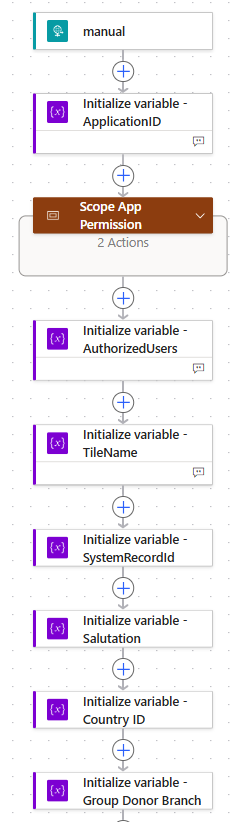
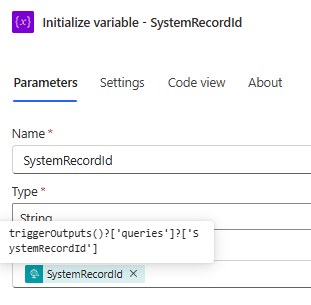
The ID used in the Get a Constituent is using the SystemRecordId variable, which is initialized with query parameter from trigger output
@Bob Rickards if you are going to re-do anyway, might as well change the tile to use Adaptive Card instead.
1 -
Well, I chnaged the tile to an adaptive card and it worked. Not sure how to customize the card, but that is another issue…atleast I have the tile back. Thanks for all the help! Really appreciate this community!
0














Categories
- All Categories
- 6 Blackbaud Community Help
- 211 bbcon®
- 1.4K Blackbaud Altru®
- 403 Blackbaud Award Management™ and Blackbaud Stewardship Management™
- 1.2K Blackbaud CRM™ and Blackbaud Internet Solutions™
- 15 donorCentrics®
- 360 Blackbaud eTapestry®
- 2.6K Blackbaud Financial Edge NXT®
- 658 Blackbaud Grantmaking™
- 579 Blackbaud Education Management Solutions for Higher Education
- 3.2K Blackbaud Education Management Solutions for K-12 Schools
- 943 Blackbaud Luminate Online® and Blackbaud TeamRaiser®
- 84 JustGiving® from Blackbaud®
- 6.7K Blackbaud Raiser's Edge NXT®
- 3.8K SKY Developer
- 250 ResearchPoint™
- 120 Blackbaud Tuition Management™
- 165 Organizational Best Practices
- 241 Member Lounge (Just for Fun)
- 36 Blackbaud Community Challenges
- 37 PowerUp Challenges
- 3 (Open) PowerUp Challenge: Grid View Batch
- 3 (Closed) PowerUp Challenge: Chat for Blackbaud AI
- 3 (Closed) PowerUp Challenge: Data Health
- 3 (Closed) Raiser's Edge NXT PowerUp Challenge: Product Update Briefing
- 3 (Closed) Raiser's Edge NXT PowerUp Challenge: Standard Reports+
- 3 (Closed) Raiser's Edge NXT PowerUp Challenge: Email Marketing
- 3 (Closed) Raiser's Edge NXT PowerUp Challenge: Gift Management
- 4 (Closed) Raiser's Edge NXT PowerUp Challenge: Event Management
- 3 (Closed) Raiser's Edge NXT PowerUp Challenge: Home Page
- 4 (Closed) Raiser's Edge NXT PowerUp Challenge: Standard Reports
- 4 (Closed) Raiser's Edge NXT PowerUp Challenge: Query
- 798 Community News
- 3K Jobs Board
- 56 Blackbaud SKY® Reporting Announcements
- 47 Blackbaud CRM Higher Ed Product Advisory Group (HE PAG)
- 19 Blackbaud CRM Product Advisory Group (BBCRM PAG)