Help! Import wealth ratings

UPDATE: Thanks for all the help I've officially figured it out! I was a little confused with the import functions on database view but it has been sorted!!
Hi! My organization just conducted a wealth screening of all of our constituents using iWave/Kindsight. We now have the estimated capacity range and likelihood ratings for each constituent.
I figured that this information is best stored in the 'Ratings' section of each constituent's profile record as a new custom rating. However, I don't want to manually add thousands of ratings to records. Is it possible to import/globally add these ratings as an import file?
If not, what are some other options we can use to record the results of our wealth screening? Thank you for any help or advice!
Answers
-
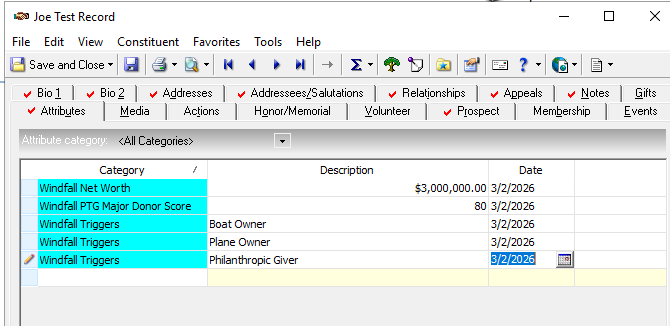
We use Windfall and we found the best place for it was in Attributes. We have a Windfall Networth and then have a Windfall Triggers, that have various info in the drop down such as Boat Owner, Plane Owner, Trust Association, etc. We import this information on a bi-monthly basis when the information we send to Windfall comes back. I found the Ratings section to be a little too problematic when it came to exporting the info.
0 -
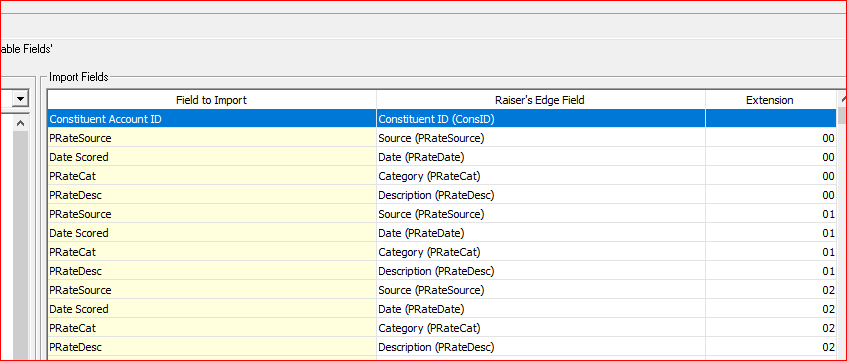
You definitely can import the ratings using native import. You'll need to first create a Source in the Prospect—>Source table called iWave. Then you'll need to create entries for each rating you want to import in the Prospect—>Ratings table and specify whether they are text, number, etc. Once you've got these created, you can set up an import file using the constituent RE IDs or Constituent Import Ids and for each rating that you'll import you'll have a Column called Source, a column called Category, a column called Date, and a Column called Description. The Source will be the same in all columns (iWave), the Category will be the entries added to the Ratings table (for ex. Estimated Capacity Range), the date will be the date you ran the screening, and the description will be the results iWave returned. When setting up the import, pay attention to the Extension—it should match for each group of ratings you are importing. Here's example of my import. I
 2
2 -
I do want to say, that in its current state in Database view, exporting ratings tended to be very problematic and I could not really get what I wanted, hence the reason I used attributes. It tends to come out messy as opposed to simple attributes.
1 -
No argument about that. We've had to do some convoluted workarounds to export info out. Our Attribute tab is already so full of things (depending on the donor) that adding several dozen ratings to it would have been crazy.
0 -
For our Windfall ratings, we just made it text as opposed to adding so many different ratings. And we have it set for just one rating per record, the same with the Donor Score. The Triggers are a drop-down box of about 8 different items. Works well when it comes to exporting.
 0
0 -
Yes, pulling rating data can be confusing. It seems like db and wv pull it in opposite ways.
What we found was we had to do was import the same data two ways so it could be pulled using either view.
In db 'source' of iWave did not pull correctly when exporting so one had to pull every rating field. It's like source and category are flipped around. So we import a second time with each rating listed as the source and category 'iWave.'Best wishes on the project.
0













Categories
- All Categories
- 6 Blackbaud Community Help
- 211 bbcon®
- 1.4K Blackbaud Altru®
- 403 Blackbaud Award Management™ and Blackbaud Stewardship Management™
- 1.2K Blackbaud CRM™ and Blackbaud Internet Solutions™
- 15 donorCentrics®
- 360 Blackbaud eTapestry®
- 2.6K Blackbaud Financial Edge NXT®
- 658 Blackbaud Grantmaking™
- 579 Blackbaud Education Management Solutions for Higher Education
- 3.2K Blackbaud Education Management Solutions for K-12 Schools
- 943 Blackbaud Luminate Online® and Blackbaud TeamRaiser®
- 84 JustGiving® from Blackbaud®
- 6.7K Blackbaud Raiser's Edge NXT®
- 3.8K SKY Developer
- 250 ResearchPoint™
- 120 Blackbaud Tuition Management™
- 165 Organizational Best Practices
- 241 Member Lounge (Just for Fun)
- 34 Blackbaud Community Challenges
- 37 PowerUp Challenges
- 3 (Open) PowerUp Challenge: Grid View Batch
- 3 (Closed) PowerUp Challenge: Chat for Blackbaud AI
- 3 (Closed) PowerUp Challenge: Data Health
- 3 (Closed) Raiser's Edge NXT PowerUp Challenge: Product Update Briefing
- 3 (Closed) Raiser's Edge NXT PowerUp Challenge: Standard Reports+
- 3 (Closed) Raiser's Edge NXT PowerUp Challenge: Email Marketing
- 3 (Closed) Raiser's Edge NXT PowerUp Challenge: Gift Management
- 4 (Closed) Raiser's Edge NXT PowerUp Challenge: Event Management
- 3 (Closed) Raiser's Edge NXT PowerUp Challenge: Home Page
- 4 (Closed) Raiser's Edge NXT PowerUp Challenge: Standard Reports
- 4 (Closed) Raiser's Edge NXT PowerUp Challenge: Query
- 798 Community News
- 3K Jobs Board
- 56 Blackbaud SKY® Reporting Announcements
- 47 Blackbaud CRM Higher Ed Product Advisory Group (HE PAG)
- 19 Blackbaud CRM Product Advisory Group (BBCRM PAG)