Constituent Map: Plotting Your Interactions





As previously announced, Raiser's Edge NXT recently released an exciting new feature — a constituent map! With this map, you can locate nearby constituents and plan interactions as you prepare for a trip; an ideal feature for the active fundraiser on-the-go!
Powered by Microsoft Bing, the map displays the locations of constituents — as pins — based on their primary addresses. (When you update a constituent's primary address, it may take up to 24 hours for the new pin to appear on the map.) To adjust the area included in the map, select Zoom in or Zoom out (the plus and minus signs) as necessary.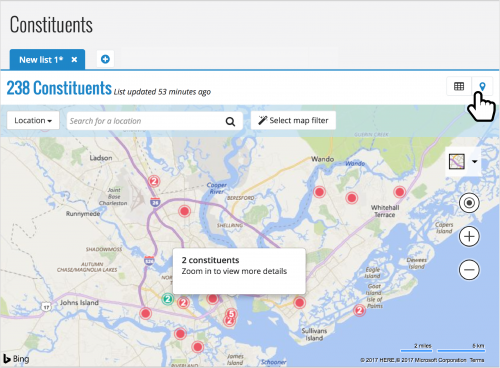 Locate nearby constituents. To view the map, select Map (the pin) on a new constituent list. When you first open the map, it automatically displays constituents near you, based on the wifi or location settings of your device. You can also select Locate me (the bullseye) to return the map's focus to your personal location at any time.
Search for other constituents. To locate constituents not in your general vicinity, search the map by constituent or location.
For more information about this feaure, check out the Constituent Map Help. And don't hesitate to chime in with your thoughts and ideas about this feature in the Discussions thread or the comments below!
Powered by Microsoft Bing, the map displays the locations of constituents — as pins — based on their primary addresses. (When you update a constituent's primary address, it may take up to 24 hours for the new pin to appear on the map.) To adjust the area included in the map, select Zoom in or Zoom out (the plus and minus signs) as necessary.
- To identify the constituent at a location, select their pin to view their name and address. For more details, select the constituent's name to vew their record.
- When multiple constituents are in close proximity, the pin displays how many are near the location. To zoom in on the location and its constituents, select the pin.
 Locate nearby constituents. To view the map, select Map (the pin) on a new constituent list. When you first open the map, it automatically displays constituents near you, based on the wifi or location settings of your device. You can also select Locate me (the bullseye) to return the map's focus to your personal location at any time.
Search for other constituents. To locate constituents not in your general vicinity, search the map by constituent or location.
- To pinpoint a constituent, select Constituent next to the search box, enter their name, and select Search.
- To pinpoint a location like a specific city or part of town, select Location next to the search box, enter the address or general location, and select Search.
For more information about this feaure, check out the Constituent Map Help. And don't hesitate to chime in with your thoughts and ideas about this feature in the Discussions thread or the comments below!
1
Comments
-
This will eventually be a very useful feature to my team. I created a couple of ideas that we think would improve it. Please upvote the links below!
https://renxt.ideas.aha.io/ideas/RENXT-I-638
https://renxt.ideas.aha.io/ideas/RENXT-I-6350 -
Thanks for sharing your ideas, Eric! Good stuff.0
-
Best new tool since comments for phone numbers!0
-
Hey Eric! If you check the map today, you'll find we just implemented the ability to get directions to a pin. Thanks again for the great idea!0
-
Is is possible to do a radius on a map? We would like to see how many donors and alumni we have within a certain radius to determine which cities we should target for events. The only way I can find to do that is to continue going back and forth to google maps to determine how far a surrounding city is to a major city. Thanks!
Mandy Pottorf, MUSC, Charleston0 -
Hey Amanda! You can't currently do a radius filter on the map, but we're actively working on that as I speak (er, type). With this filter, you'll be able to view constituents within a specific number of miles (or kilometers, for those outside the US) of an address or location. Stay tuned!0
-
Any new developments regarding the radius map capabilities? Thanks!
Is is possible to do a radius on a map? We would like to see how many donors and alumni we have within a certain radius to determine which cities we should target for events. The only way I can find to do that is to continue going back and forth to google maps to determine how far a surrounding city is to a major city. Thanks!
Mandy Pottorf, MUSC, Charleston0 -
Hey Zaheva! 2018 actually kicked off with new location filters on constituent lists, including by radius. On constituent list, just select 'Filters', 'Location', 'Filter by radius', and then search for the center point — i.e., a specific city — and distance around that point — in miles or kilometers — for your radius. When you apply that filter, you'll get a list of all constituents in that area. You can also apply additional filters — like those with a constituent code of Alumni — to fine-tune that list further. For more details about these location filters, check out the blog post from a few months back (https://community.blackbaud.com/blogs/13/3246) or the Constituent Location Filters Help (https://www.blackbaud.com/files/support/helpfiles/rex/content/bb-constituent-location-filters.html). I hope that's easier than the Google Fu you've been doing! Thanks!0
-
Is there a way to distinguish between different constituency codes, perhaps by different color dots?0
-
Hey Elliott! That's an interesting idea. If you haven't already, I'd suggest adding it to the Idea Bank. Thanks!0






Categories
- All Categories
- New YourCause Community TEST
- New SKY Community TEST
- New Grantmaking TEST Community
- New Altru Test Community
- New bbcon Community - TEST
- 12 Blackbaud Agents for Good™
- New Raiser's Edge NXT Community
- 7 Blackbaud Community Help
- 218 bbcon®
- 1.4K Blackbaud Altru®
- 409 Blackbaud Award Management™ and Blackbaud Stewardship Management™
- 1.2K Blackbaud CRM™ and Blackbaud Internet Solutions™
- 16 donorCentrics®
- 361 Blackbaud eTapestry®
- 2.7K Blackbaud Financial Edge NXT®
- 680 Blackbaud Grantmaking™
- 598 Blackbaud Education Management Solutions for Higher Education
- 3.3K Blackbaud Education Management Solutions for K-12 Schools
- 952 Blackbaud Luminate Online® and Blackbaud TeamRaiser®
- 85 JustGiving® from Blackbaud®
- 7K Blackbaud Raiser's Edge NXT®
- 3.9K SKY Developer
- 257 ResearchPoint™
- 123 Blackbaud Tuition Management™
- 165 Organizational Best Practices
- 247 Member Lounge (Just for Fun)
- 40 Blackbaud Community Challenges
- 37 PowerUp Challenges
- 3 (Closed) PowerUp Challenge: Grid View Batch
- 3 (Closed) PowerUp Challenge: Chat for Blackbaud AI
- 3 (Closed) PowerUp Challenge: Data Health
- 3 (Closed) Raiser's Edge NXT PowerUp Challenge: Product Update Briefing
- 3 (Closed) Raiser's Edge NXT PowerUp Challenge: Standard Reports+
- 3 (Closed) Raiser's Edge NXT PowerUp Challenge: Email Marketing
- 3 (Closed) Raiser's Edge NXT PowerUp Challenge: Gift Management
- 4 (Closed) Raiser's Edge NXT PowerUp Challenge: Event Management
- 3 (Closed) Raiser's Edge NXT PowerUp Challenge: Home Page
- 4 (Closed) Raiser's Edge NXT PowerUp Challenge: Standard Reports
- 4 (Closed) Raiser's Edge NXT PowerUp Challenge: Query
- 822 Community News
- 3.1K Jobs Board
- 57 Blackbaud SKY® Reporting Announcements
- 47 Blackbaud CRM Higher Ed Product Advisory Group (HE PAG)
- 19 Blackbaud CRM Product Advisory Group (BBCRM PAG)