Marking up an attachment to a journal entry



Hello,
We are beginning the process of attaching our supporting documentation to our journal entries. My Controller was wondering if there is a way she can mark it up with notes of her own after I upload the document into the batch? She likes to write notes about the batch ie her reasoning for a certain account, referencing another batch, etc. Is this possible?
Thanks!
We are beginning the process of attaching our supporting documentation to our journal entries. My Controller was wondering if there is a way she can mark it up with notes of her own after I upload the document into the batch? She likes to write notes about the batch ie her reasoning for a certain account, referencing another batch, etc. Is this possible?
Thanks!
0
Comments
-
Hi Katie,
There's not a "workflow" type edit in attachments, but there are a couple things you can do:
1. Attach the notes as a separate attachment on the journal entry, that way you have the original untouched documentation and supplemental material as two separate attachments. In my experience talking to customers, this is fairly popular.
2. Download the initial attachment, add notes/pages to it (separate sheets/pages, etc.), and edit the attachment to replace it with the new file. If you click on edit attachment one of the options is to replace the document (now, obviously make sure it's the right documents, etc. to attach).This is in the edit attachment dialog: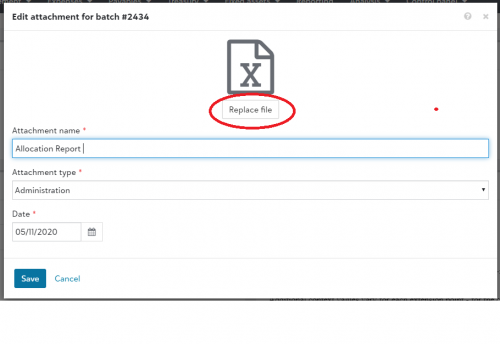
Hope this helps!
Eddie Barker
Financial Edge NXT Product Management1 -
This is directed to Eddie Barker. We want to move to a "paperless" system. For journal entries, I upload backup and then let my reviewer know to look at the journal entries with attachments. She approves the JE, then I post it. I then save a copy of the posted JE to the JE batch as additional backup.
What I want to avoid is having to also print a copy of the JE and backup and file them. As an alternative, I can download the JE and backup to our local server, which is backed up every night.
A Blackbaud rep seemed to indicate that storage is limited so I can't rely on our hosted system to be my reliable backup. That means that I'm have to save the information in two different places - uploaded to FE and saved to our server. While I'm getting away from managing the paper, but it seems like double work. We're just at the beginning of implementing a paperless process, so I want to get this right.0 -
Hi Monica, hope all is well!
The limit on attachments is a 25mb per attachment limitation. So if you have a very complex contract or document that is by itself over 25 mb, you can't directly attach it. You can split it between two documents, each under 25 mb, and attach them separately (calling them "Vendor contract page 1" and "Vendor contract page 2" for example). You can also store the entire over-25-mb-file in other internal storage that you have and save a link in attachments.
There isn't another size limitation in document attachments. If you want to read the help on it, inside Financial Edge NXT at the home page, under General Features, you can read about attachments.
Now, having said that, there is a limit in your hosted files directory, which is a completely different thing than attachments inside the product. That is meant for temporary storage and moving files (for example. Excel spreadsheets that are a work in progress between several people) and you can read https://kb.blackbaud.com/articles/Knowledge/51734 that will cover some more information.
It's not uncommon to see clients who have a basic storage need for paperless documents, but not a complex workflow/approval system, to use the attachments functionality in exactly the way you are proposing.
Hope this helps. Have a great day!1








Categories
- All Categories
- New K-12 Community Home (TEST)
- New Higher Education Home Page (Test)
- New Impact Edge Community TEST
- New YourCause Community TEST
- New SKY Community TEST
- New Grantmaking TEST Community
- New Altru Test Community
- New bbcon Community - TEST
- 12 Blackbaud Agents for Good™
- New Raiser's Edge NXT Community
- 8 Blackbaud Community Help
- 222 bbcon®
- 1.4K Blackbaud Altru®
- 411 Blackbaud Award Management™ and Blackbaud Stewardship Management™
- 1.2K Blackbaud CRM™ and Blackbaud Internet Solutions™
- 16 donorCentrics®
- 361 Blackbaud eTapestry®
- 2.7K Blackbaud Financial Edge NXT®
- 688 Blackbaud Grantmaking™
- 604 Blackbaud Education Management Solutions for Higher Education
- 3.3K Blackbaud Education Management Solutions for K-12 Schools
- 954 Blackbaud Luminate Online® and Blackbaud TeamRaiser®
- 85 JustGiving® from Blackbaud®
- 7.1K Blackbaud Raiser's Edge NXT®
- 4K SKY Developer
- 258 ResearchPoint™
- 123 Blackbaud Tuition Management™
- 165 Organizational Best Practices
- 249 Member Lounge (Just for Fun)
- 40 Blackbaud Community Challenges
- 37 PowerUp Challenges
- 3 (Closed) PowerUp Challenge: Grid View Batch
- 3 (Closed) PowerUp Challenge: Chat for Blackbaud AI
- 3 (Closed) PowerUp Challenge: Data Health
- 3 (Closed) Raiser's Edge NXT PowerUp Challenge: Product Update Briefing
- 3 (Closed) Raiser's Edge NXT PowerUp Challenge: Standard Reports+
- 3 (Closed) Raiser's Edge NXT PowerUp Challenge: Email Marketing
- 3 (Closed) Raiser's Edge NXT PowerUp Challenge: Gift Management
- 4 (Closed) Raiser's Edge NXT PowerUp Challenge: Event Management
- 3 (Closed) Raiser's Edge NXT PowerUp Challenge: Home Page
- 4 (Closed) Raiser's Edge NXT PowerUp Challenge: Standard Reports
- 4 (Closed) Raiser's Edge NXT PowerUp Challenge: Query
- 829 Community News
- 3.1K Jobs Board
- 57 Blackbaud SKY® Reporting Announcements
- 47 Blackbaud CRM Higher Ed Product Advisory Group (HE PAG)
- 19 Blackbaud CRM Product Advisory Group (BBCRM PAG)