This has helped me.

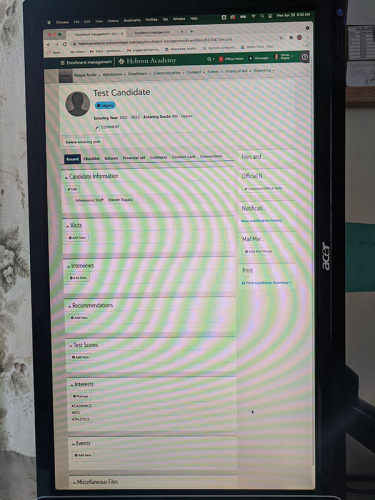
After being frustrated with the vertical layout of the BB interface, and wasting too much time with the mouse, I finally resorted to a hardware solution. Setting up an external display in portrait orientation is a simple way that has greatly improved visibility and access to the information. (There's still waaay too much wasted space IMO, burning prime screen real estate, but at least now there are no hidden controls, and all of those vertical lists can be viewed with less scrolling.)

Comments

  • Faith Murray
    Faith Murray Community All-Star
    Tenth Anniversary Kudos 5 First Reply Name Dropper
    Steven Ragatz‍, LOL! Talk about inventive. I don't think our IT dept would let me sideways my screen like that, but we all feel your pain on the scrolling and inefficient space usage of NXT.


    Like they say, it takes different types of minds for fundraisers and DBMs, which is why fundraisers love webview and DBMs still like database view better!
  • If you have a Dell monitor made in the last 15 years it should be able to rotate no problem. Then just tell computer to rotate the screen 90. I use this solution for many things. Unfortunately the modern responsive design of the Blackbaud education portal limits width to about 1024 pixels to allow for flowing onto mobile display. There are a few of the newest redesigned pages that fully use width but since some are still in the podium format I am not holding out hope for updates.
  • Yep! For some views it helps to drop the browser zoom to 90% because the interface does not scale properly. I installed a swing arm for the display, and it rotates easily if I want it back in landscape, but I set up this option specifically for the Blackbaud EM orientation.
  • Thanks for offering up this idea! It's refreshing to see a post that is purely altruistic (in contrast to my frequent requests for assistance lol).

Categories

