API Qs: myschoolapp vs sky, lists, auth…

Hi all

Newbie here. I'm trying to wrap my head around the API(s) for K-12…

FWIW: Our objective for using the API is to pull live student/faculty/enrollment/etc. data out of Blackbaud for use in another database application, so ideally we'd be able to pull, e.g., a list of all current class enrollments, including studentID, facultyID, classID, sectionID, etc.

1. It looks like there's an API at {school}.myschoolapp.com and another one at api.sky.blackbaud.com. What's the difference? Is myschoolapp the "legacy" API (is it from whipplehill?) and Sky is the new one? Is the Sky API the one we “should” be using? Or do we use both?

2. It looks like "lists" are the way to compile data on the Blackbaud end, before pulling it through the API. Is that correct? If so, I've only seen how to create lists through the myschoolapp website, but the Help on those pages "encourage you to use "Sky" lists, when possible." How/where do we create a Sky list? — And then what about “Legacy list” vs “List Single (BETA)”, both of which seem like they might get deprecated?

3. Authenticating: Looking at documentation for the Sky API, it seems to focus on creating an "app" for users, but all we want is to use the API to pull data into our other database system. Where can I find instructions for how to receive a token using the API? (I'm able to use the one generated via the Sky console successfully, but how can I create a token just by hitting the API itself?)

TIA,

-Joel

Comments

  • Brian Gray
    Brian Gray Community All-Star
    Eighth Anniversary Kudos 5 First Reply bbcon 2025 Attendee Badge

    The API at {school}.myschoolapp.com is the older “ON” API. The API at api.sky.blackbaud.com is the newer SKY API. My understanding (as a programmer/user for a K-12 school) is that ON API is not getting any new work. All of Blackbaud's efforts are on the SKY API.

    ON has a few features that have not been built into SKY yet. I do all of my development in SKY. Depending on your projects, you may decide to use some ON calls until the equivalent function is available in SKY.

    Using Advanced Lists is a good tool. It can simplify some programming task. I also use the other SKY API calls to access data directly. (For example, I choose to always get user data from User List and User List Extended instead of through an Advanced List. I use Advanced Lists to get data that I can't get from the SKY API calls directly. The Legacy List call is older, and all of my current code uses it. The List Single is very new - just a few weeks old. I'll start experimenting with it on my current project.

    The Authentication can be tricky. Don't let the terminology get in the way. The type of project you describe is common, and is often referred to as a “headless” app. It runs as a scheduled task with no direct user interaction. I have several programs that work this way.

    I use SKYLib Net from Protege Solutions. They have a nice library for developing in the Visual Studio environment. The example program that comes in the library download is a very good example of how the authentication works generally. If you have access to Visual Studio, get the library and spend some quality time with it. The download is free. If you decide to use it in production, the license is worth every penny. (I'm just a happy customer - not their sales rep…)

  • Bryna Gleich
    Bryna Gleich Blackbaud Employee
    Tenth Anniversary Kudos 3 Name Dropper Participant

    A “SKY” list is any list that uses SKY UX/UI. If it's not a “Basic” list or an “Advanced” list, then it's probably a “SKY” list.

    Some people just call them “Lists”, especially in other products like Raiser's Edge NXT. However, since Education Management still has older “legacy” lists (Basic and Advanced lists), some people call them “SKY” to as a way to quickly differentiate between them.

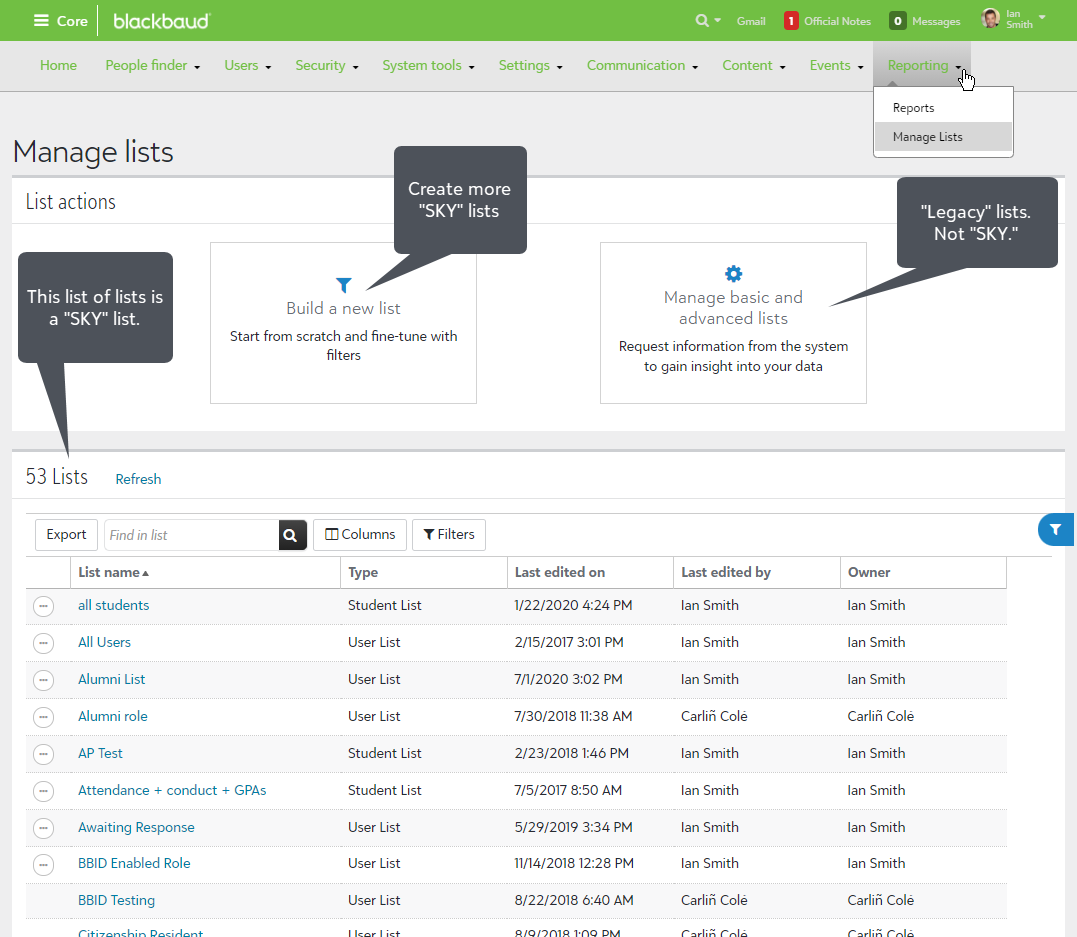
    Sky lists appear in many places throughout the product. One of the many ways you might encounter one as a List Manager is from Core > Reporting > Manage Lists.

    cc55acd2f3931fdc44b58d851baedb08-origina

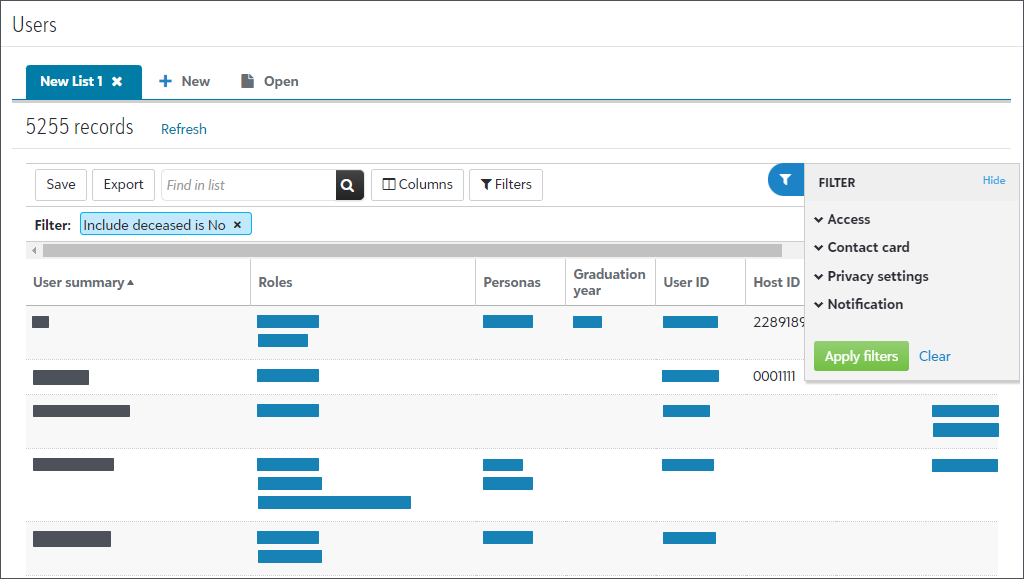
    The Users List in Core > Users > Users list is an example of a “SKY” list.

    9c9b5c92b34f1fdc4b1444469d0a5cff-origina

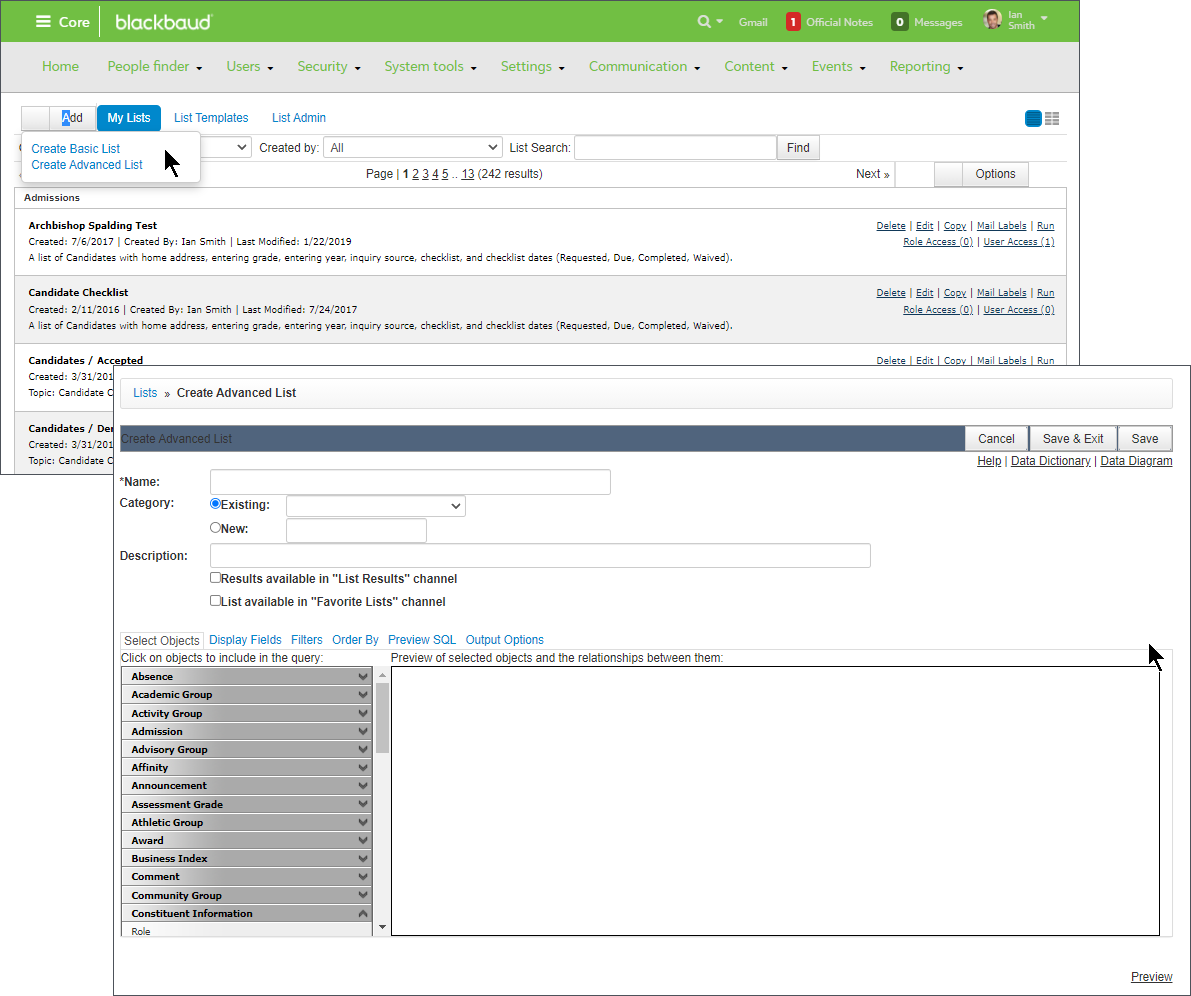
    You'll notice that “SKY” lists are more modern looking and easier to use than “legacy” lists (basic and advanced). “Legacy” lists have been around a lot longer. They're from before Blackbaud acquired Whipple Hill. For “advanced” lists, it helps to know a bit about SQL or databases. Advanced lists are very powerful, but harder to use. See how the “Legacy” stuff below looks older than the “SKY” stuff above?

    ef31fc90e3dd64c0883181ca5d6db8ad-origina

    Likewise the “ON” or “Legacy” API is from WhippleHill before Blackbaud. The newer “SKY” API is being actively expanded with new endpoints. The older ON/Legacy API is not recommended and is not being expanded with new endpoints. SKY API has parity with the “Legacy” ON API.

  • Hi Bryna

    Thanks so much for your reply and explanations.

    Do you know of a base URL where I can see that Blackbaud Core page in your first screenshot? I've only seen that interface at {school}.myschoolapp.com. (And when I go to host.nxt.blackbaud.com/education/?envid=xxx, the "Go to Education Management" link goes back to myschoolapp.com)

    Also, at least on this myschoolapp page, the "Build a new list" link gives me only the option of "Report Card Grade List" while my colleague gets options for "Student List" & 1 other (I don't remember now). The school admin says we both have the same privileges. Do you know how I can get more options for new SKY lists, beyond just Report Card Grade List?

    Thanks, -Joel

  • Hi Brian

    Thanks very much for your clarifications. They're really helpful!

    And yes, a "headless app" like you describe is exactly what we're looking to create :-)

    We don't have any .NET setup, so I don't think the SKYLib Net would help us. Have you been able to authenticate without using SKYLib? (Any hints? ?)

    Thanks, -Joel

  • Bryna Gleich
    Bryna Gleich Blackbaud Employee
    Tenth Anniversary Kudos 3 Name Dropper Participant

    Joel Shapiro:
    Do you know of a base URL where I can see that Blackbaud Core page in your first screenshot? I've only seen that interface at {school}.myschoolapp.com. (And when I go to host.nxt.blackbaud.com/education/?envid=xxx, the "Go to Education Management" link goes back to myschoolapp.com)

    I don't have a URL for you, because my base would be different from yours. But the navigation is shown in the screenshot (Core > Reports > Lists).

    Your “myschoolapp” url is probably where you'll see Core, Academics, Faculty/My Day, etc. The top navigation will probably be in your school colors (mine shows green).

    Your “host.nxt” url is probably where you'll do Sky Reporting and other things. The top navigation will probably be grey, instead of your school colors.

    When you're in “host.nxt” and you select “Go to Education management” it'll take you back to Core (your school colors in top nav).

    Conversely, when you're in “myschoolapp” and you select “Go to the Education area" it'll take you to the things like Sky Reporting (grey top nav).

    Also, at least on this myschoolapp page, the "Build a new list" link gives me only the option of "Report Card Grade List" while my colleague gets options for "Student List" & 1 other (I don't remember now). The school admin says we both have the same privileges. Do you know how I can get more options for new SKY lists, beyond just Report Card Grade List?

    Thanks, -Joel

    If you have the same security roles and tasks enabled, then you should have access to see the same things. I'd recommend checking with customer support to compare with roles are actually enabled. You probably don't have the same roles enabled if you're not seeing the same things.

  • Bryna Gleich
    Bryna Gleich Blackbaud Employee
    Tenth Anniversary Kudos 3 Name Dropper Participant

    Joel Shapiro:
    And then what about “Legacy list” vs “List Single (BETA)”, both of which seem like they might get deprecated?

    I doubt that both would be deprecated.

    Legacy List is the old one. This one will be eventually deprecated. There isn't a date for when yet.

    List Single (BETA) is the new endpoint for “Advanced lists” that Evan describes in

    BETA means it's in an early testing phase. Not exactly the same thing as an early adapter program, but kind of related to that. This would replace the Legacy List endpoint that will be deprecated.

    Advanced lists themselves may be old/legacy compared to Sky Lists, but the API endpoint to reach them that Evan was talking about isn't old at all. It's new.

  • Bryna Gleich:
    I don't have a URL for you, because my base would be different from yours. But the navigation is shown in the screenshot (Core > Reports > Lists).

    Your “myschoolapp” url is probably where you'll see Core, Academics, Faculty/My Day, etc. The top navigation will probably be in your school colors (mine shows green).

    Thanks, this was helpful. The bouncing back and forth between myschoolapp and blackbaud was confusing me. I hadn't seen the Core interface before (all links had taken me to the Academics page) but now I've got it — and now from there I too have options for Student List and User List ?

  • Bryna Gleich:

    Legacy List is the old one. This one will be eventually deprecated. There isn't a date for when yet.

    List Single (BETA) is the new endpoint for “Advanced lists” that Evan describes in

    Advanced lists themselves may be old/legacy compared to Sky Lists, but the API endpoint to reach them that Evan was talking about isn't old at all. It's new.

    And to confirm, Advanced Lists are currently only createable/editable through the ON/myschoolapp interface. Correct?

  • Joel Shapiro:

    3. Authenticating: Looking at documentation for the Sky API, it seems to focus on creating an "app" for users, but all we want is to use the API to pull data into our other database system. Where can I find instructions for how to receive a token using the API? (I'm able to use the one generated via the Sky console successfully, but how can I create a token just by hitting the API itself?)

    Hi again

    Does anybody have any tips for me on how to get tokens through the SKY API (other than through SKYLib)?

    If it's a “headless app” that I'll be creating (as described by Brian), do I still have to go through the “build a SKY app” procedure — as per the Getting Started page?

    TIA, -Joel

  • Brian Gray
    Brian Gray Community All-Star
    Eighth Anniversary Kudos 5 First Reply bbcon 2025 Attendee Badge

    Joel -

    I don't have an example of my own for SKY API authentication without using the SKYLib Net library. It can be done, of course, but I haven't done it. You may find something on the App showcase page helpful. One of the examples is a Headless data sync.

  • Brian Gray:

    Joel -

    I don't have an example of my own for SKY API authentication without using the SKYLib Net library. It can be done, of course, but I haven't done it. You may find something on the App showcase page helpful. One of the examples is a Headless data sync.

    Thanks Brian! That one's also .NET, but I'm looking through that and other links to try to get some clues.

    Looks like if I can create a JSON Web Token (JWT) I might be able to do this, but still looking for more documentation on that.

  • Ben Lambert:

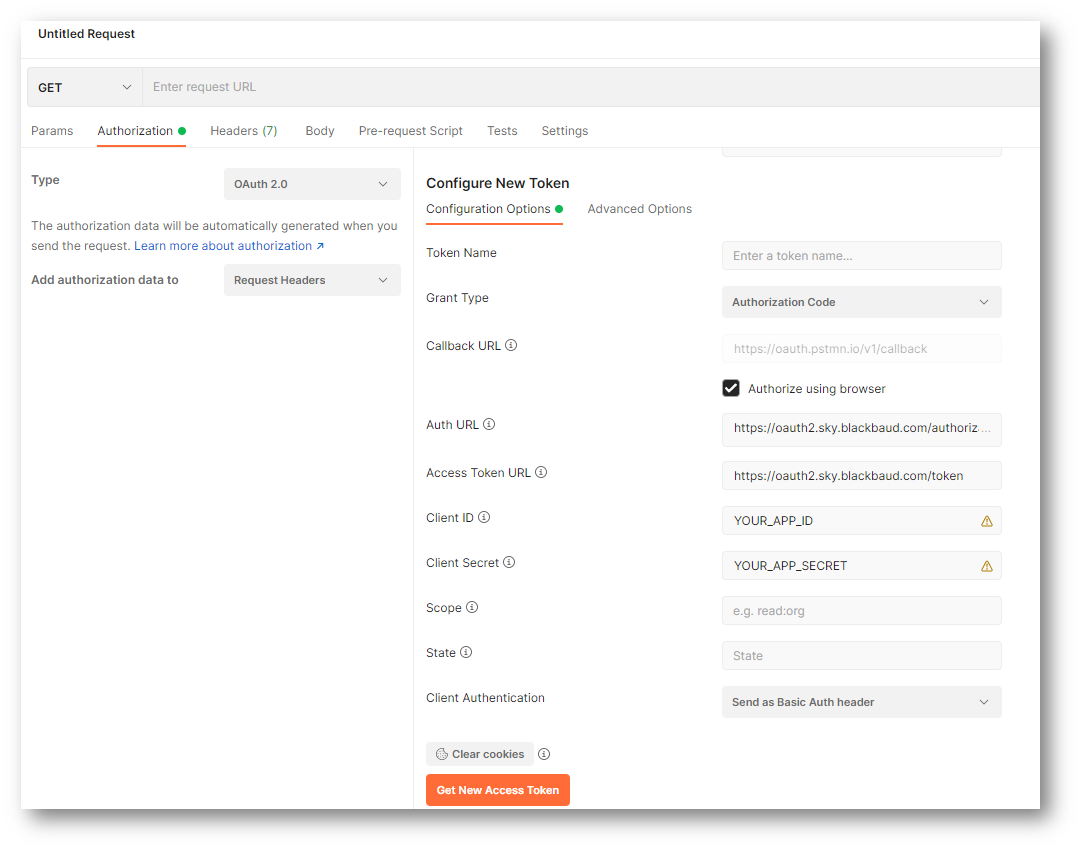
    Headless apps call the same APIs as interactive apps, so the same requirement exists - at some point, a user has to go through the OAuth process. That user can certainly be “you” (as a developer) if you have access to the environment, and you needn't do this from the headless machine where your app is running, you can do it locally. You can use a tool like Postman to make this a fairly painless chore. We've covered this technique in some webinars in the past (and we're working on getting those webinars posted and linked from the developer portal - stay tuned for that).

    I hope that helps - please let us know if you have any questions!

    Hi Ben

    Thanks very much for this. I can get a token through Postman… but it requires me to click an "Authorize" button in my browser. How will I set up the "headless" part so that no human will need to be involved each time we want to get a new token and access the API?

  • Hey Joel,

    I'd suggest searching the Community for “headless”, “unattended”, etc. There're quite a few posts on this subject many with explanations and samples.

    Cheers, Steve

  • Using the technique I described, you'll get an initial access token (which you can ignore) AND a refresh token. The refresh token is the value you can code into your headless app, and each time your app runs it can call the Token endpoint to refresh the access token non-interactively. By default, refreshing an access token will also produce a new refresh token - you can either persist this value somewhere (for the next run of your app), or use the preserve_refresh_token feature (described here) to keep the same refresh token value for 365 days.

  • Ben Lambert:

    Using the technique I described, you'll get an initial access token (which you can ignore) AND a refresh token. The refresh token is the value you can code into your headless app, and each time your app runs it can call the Token endpoint to refresh the access token non-interactively. By default, refreshing an access token will also produce a new refresh token - you can either persist this value somewhere (for the next run of your app), or use the preserve_refresh_token feature (described here) to keep the same refresh token value for 365 days.

    Hi Ben

    Thanks so much! I've got it working now ?

    In case anyone else comes to this thread looking for how to use the Refresh Token, this is what worked for me:

    -X POST
    -H "Authorization: Basic {authorization}"
    -H "Content-Type: application/x-www-form-urlencoded"
    -d "{body}"


    Where:
    {authorization} =
    <base64 encoded: Application_ID:Application_secret > (note the colon between the two)
    (If you can't base64-encode in your app, you can use https://www.base64encode.org/ )

    {body} =
    grant_type=refresh_token&refresh_token={refreshToken}[&preserve_refresh_token=true]

    {refreshToken} =
    the refresh_token value that was returned in your previous authorization call, whether via Postman or your app

    [&preserve_refresh_token=true] is optional

    So it ends up looking something like:

    -X POST
    -H "Authorization: Basic RG8geW91IGhhdmUgdG8gZGVhbCB3aXRoIEJhc2U2NCBmb3JtYXQ/IFRoZW4gdGhpcyBzaXRlIGlzIHBlcmZlY3QgZm9yIHlvdSE="
    -H "Content-Type: application/x-www-form-urlencoded"
    -d "grant_type=refresh_token&refresh_token=VXNlIG91ciBzdXBlciBoYW5keSBvbmxpb"

    Best, -Joel

Categories