Authorization Failures

Today we've had reports of authorization failure and authorization form blocks for users of SKYLib.NET.

Previously running apps using the library and being prompted to reauthorize out of the blue and the pop up authorization form is being blocked:

14964b80976bc74bb101bdcb19fa4924-huge-im

(We use the embedded .NET WebBrowser control to request authorization from within the SKYLib library.)

At first we thought it might have been the cyber suite or oAuth2 redirect changes that are due to come into effect today, but we tested all of that beforehand and it was fine. This appears to be something new.

Would someone please respond as an urgency as I expect that all of our customers are unable to use their apps.

Thank you.

Steve Cinquegrana | CEO and Principal Developer | Protégé Solutions

Comments

  • Brian Gray
    Brian Gray Community All-Star
    Eighth Anniversary Kudos 5 bbcon 2025 Attendee Badge K-12 Fall 2025 Product Update Briefing Badge

    I am using SKYLib, and I'm seeing the problems that Steve described. All of my programs are behaving the same way - including those that run as headless console apps and those that are interactive. This happens on servers and desktop.

  • Hi Steven,

    We are investigating the issue with the highest priority and will respond as soon as possible

  • We at action for children have been experiencing what we think is the same issue. We logged a call with the Blackbaud helpdesk but were told - If you have already worked through the documentation for common authorization issues as per https://developer.blackbaud.com/skyapi/docs/authorization/common-auth-issues then the next step would be to go to the developer site and ask in there. I'm afraid we can only run through what is in the documentation and are unable and untrained to do any testing for login issues.

  • Chris Rodgers
    Chris Rodgers Blackbaud Employee
    Ninth Anniversary Kudos 2 Name Dropper Participant

    Hey Steve,

    Thank you for reporting the issue. Apologies that you ran into this. We discovered an issue in Internet Explorer preventing the Authorization page from loading. We have pushed a change to fix this. Can you test this change to see if it resolves your issue?

  • Hi Chris,

    I saw that there was some kind of change made but

    1. We still see the “Not supported” banner
    2. We get through to selecting enviro now and get an auth code
    3. But then it fails on token retrieval with “Unsupported Media Type”.

    This is from stepping through the (our) code.

    Steve

    UPDATE

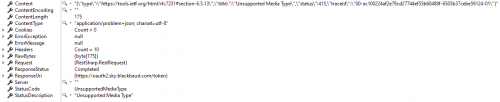
    Here's the RestSharp object response after requesting a new token set with the authcode:

    db429370cc58a9f8553c444cce57c514-huge-im

    Not sure why that image is so small and not opening. Oh well.

    {"type":"https://tools.ietf.org/html/rfc7231#section-6.5.13","title":"Unsupported Media Type","status":415,"traceId":"00-ac100224af2e79cd27744ef55b60488f-6505b37cebe59124-01"}

    We haven't changed our token endpoint, as recommended:

    https://oauth2.sky.blackbaud.com/token

    The request content looks like:

    grant_type=authorization_code&code=0c36a6d6f52141d5ac44d02b39aa4a5d&redirect_uri=https://protege.com.au/oauth2/callback

  • Hi Steve,

    We released a change that should help with the Unsupported Media Type issue you are seeing. Are your request using`application/x-www-form-urlencoded` media/content type?

  • Brian Gray
    Brian Gray Community All-Star
    Eighth Anniversary Kudos 5 bbcon 2025 Attendee Badge K-12 Fall 2025 Product Update Briefing Badge

    As of now (1:15pm Central) I am able to run programs that authenticate with SKYLib again - using the stored credentials (i.e., without getting prompted for new authentication).

    In a program that I forced to require authentication, I still see the message that Internet Explorer is not supported, but I am able to continue with the authentication process and access the API.

  • Seems to be working now, apart from the No longer supported banner.

    We're using application/json. Why?

    Can you fill us in on what happened please?

  • Hi Steve,

    Our documentation states that refresh token requests MUST use `application/x-www-form-urlencoded` for the Content-Type header value. Due to recenty security enhancements, we started enforcing that token requests have the proper content type. We have relaxed the content type restriction due to the problems you were experiencing. If you could please update your SDK to use `application/x-www-form-urlencoded` content type to avoid this in the future, we would appreciate it.

  • @Daniel Leonard things seem to be working now, apart from the No longer supported banner. Can this be removed please? And please give us some notice and time to look for a code alternative.

    We're using application/json. Why?

    Can you fill us in on what happened please?

  • I can update it, have in fact, but please bear in mind that there are applications out there - especially headless ones, services, etc - that will be using previous SKYLib versions and might never be updated.

  • Hi Steve,

    Support for Internet Explorer ended for most of our products the end of last year. There will be an update to the banner message soon with a more specific date on when it will no longer be supported for authorization.

  • @Daniel Leonard can you please provide a little more background on the Accept/Content-Type MIME type? Auth responses are JSON, so why wouldn't the request specify an Accept/Content-Type header of application/json?

  • Hi Steve,

    Thank you for your question. This is something that probably confuses a lot of people.

    The Accept header of a request would inform the server which content types the client can understand in a response. In this case, we will always return a content type encoding of `application/json` in the response body regardless of the Accept header of the request.

    The Content-Type header of a request would be for the server to know the encoding of the request body. The Content-Type header of the response would be the encoding of the response body. In this case, we are expecting `application/x-www-form-urlencoded` to be the content type of the request body and we would then reply with a content type of `application/json`, as per the OAuth2 spec and our documentation.

    4.1.3. Access Token Request

    The client makes a request to the token endpoint by sending the
    following parameters using the "application/x-www-form-urlencoded"
    format per Appendix B with a character encoding of UTF-8 in the HTTP
    request entity-body:

    grant_type
    REQUIRED. Value MUST be set to "authorization_code".

    code
    REQUIRED. The authorization code received from the
    authorization server.

    redirect_uri
    REQUIRED, if the "redirect_uri" parameter was included in the
    authorization request as described in Section 4.1.1, and their
    values MUST be identical.

    client_id
    REQUIRED, if the client is not authenticating with the
    authorization server as described in Section 3.2.1.

    If the client type is confidential or the client was issued client
    credentials (or assigned other authentication requirements), the
    client MUST authenticate with the authorization server as described
    in Section 3.2.1.

    For example, the client makes the following HTTP request using TLS
    (with extra line breaks for display purposes only):

    POST /token HTTP/1.1
    Host: server.example.com
    Authorization: Basic czZCaGRSa3F0MzpnWDFmQmF0M2JW
    Content-Type: application/x-www-form-urlencoded

    grant_type=authorization_code&code=SplxlOBeZQQYbYS6WxSbIA
    &redirect_uri=https%3A%2F%2Fclient%2Eexample%2Ecom%2Fcb

    The authorization server MUST:

    o require client authentication for confidential clients or for any
    client that was issued client credentials (or with other
    authentication requirements),

    o authenticate the client if client authentication is included,

    o ensure that the authorization code was issued to the authenticated
    confidential client, or if the client is public, ensure that the
    code was issued to "client_id" in the request,

    o verify that the authorization code is valid, and

    o ensure that the "redirect_uri" parameter is present if the
    "redirect_uri" parameter was included in the initial authorization
    request as described in Section 4.1.1, and if included ensure that
    their values are identical.

    4.1.4. Access Token Response

    If the access token request is valid and authorized, the
    authorization server issues an access token and optional refresh
    token as described in Section 5.1. If the request client
    authentication failed or is invalid, the authorization server returns
    an error response as described in Section 5.2.

    An example successful response:

    HTTP/1.1 200 OK
    Content-Type: application/json;charset=UTF-8
    Cache-Control: no-store
    Pragma: no-cache

    {
    "access_token":"2YotnFZFEjr1zCsicMWpAA",
    "token_type":"example",
    "expires_in":3600,
    "refresh_token":"tGzv3JOkF0XG5Qx2TlKWIA",
    "example_parameter":"example_value"
    }