1099 ACTIVITY NOT SHOWING CORRECTLY ON VENDOR RECORD





Hello. Is anyone having trouble with the 1099 activity tile on their vendor records not being accurate? I am working on 1099's and my 1099 activity report pulls a correct total, but my vendor record has invoices dated last year, but paid this year. That total is not showing up on the current year 1099 activity. I have them marked as 1099 invoices on the actual invoice, so not sure why the total is incorrect.
Comments
-
Hello @Julie Jorgensen, in some of my testing I've seen the same when looking at 1099 activity, on the vendor record, in FE NXT. For now the best way to confirm the vendor activity (aside from the reporting) is on the vendor record in database view. I'll make sure to share this with the Product Management team as well.
Below is the workflow for viewing 1099 activity on the vendor record in database view:
FE 7 (database view) Vendor Record – Activity Tab – Summary
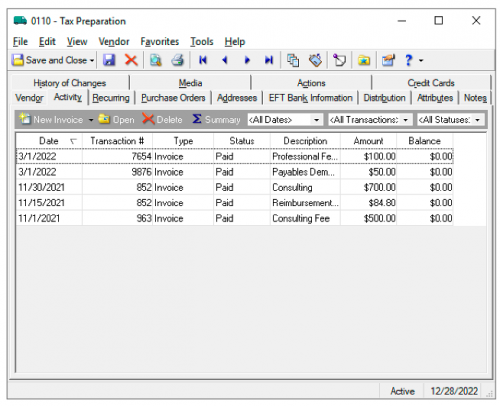
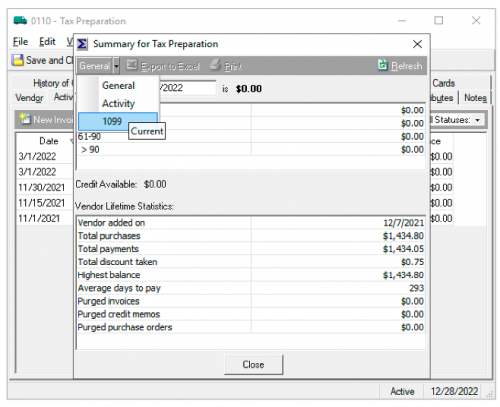
Select from the Summary drop down – 1099 Activity
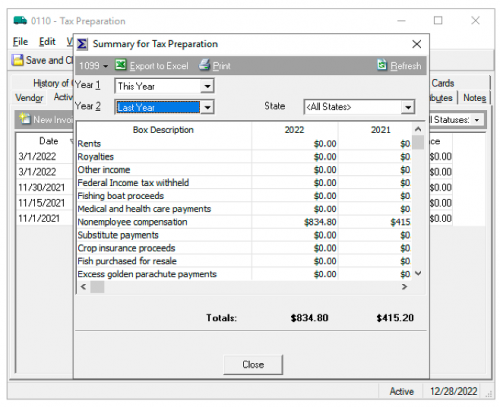
From this window you can select what year you want to look at and/or compare activity.
We also covered this in our Customer Success Session that aired in early December, Financial Edge NXT: Tax Season – Part 1: 1099 Preparations. Click on the session title to catch it on-demand.We will also host additional 1099 sessions again in January, see below for dates and links to register.
- January 5, 2 pm ET: Tax Season – Part 1: 1099 Preparations
- January 12, 2 pm ET: Tax Season – Part 2: 1099 Processing
- January 19, 2 pm ET: Chat with the Experts Live Q&A
Happy to help! Let me know if you have any additional questions.
1 -
@Christina Imbriani
Thanks Christina. So it appears that I would not need to do an adjustment in WebView if my database vendor records are correct. Is this correct?My other question is that on some vendors, I missed marking a 2022 invoice as 1099 eligible [or part of it such as when I am paying a security deposit and rent on the same invoice] but when I run the 1099 activity report, it is pulling the correct total for that vendor. I am not sure how that is possible because in FE and database view it shows the amount of that invoice as excluded from 1099 activity.
I do not know in this case if I should make an adjustment in FE or not?? I tested it and if I make an adjustment, the1099 activity total is too high. So it makes it very difficult to know when to make the adjustment in web view…It must only be if your data base vendor activity is not correct…but I do no know how it can be pulling the correct total when an invoice is incorrect. Thanks for any insight you can provide
0 -
@Julie Jorgensen, happy to help!
You can make the adjustment in either webview or database view. If its a positive adjustment (you need to add to the total amount of 1099 activity) then just add as a whole number ($100). If you need to decrease the amount of 1099 activity, then enter the adjustment as a negative number (-$100).
For the second part of your question, without being able to see the activity myself, it seems there may be another invoice for that vendor that also has 1099 activity that’s impacting the total. There are a couple different ways you can work through the activity to see what other invoices may have 1099 activity. One way is to cull through the invoices, this is can be done quickly through the invoice list view in webview. You could also run a Vendor activity report, filter by vendor that has activity discrepancy. You can also attach a query to it make it specific for 1099 activity only. Here is a KB that will help you with a query:
Also remember that 1099 activity is for anything paid to a vendor in a calendar year, so sometimes invoices dated in the prior calendar year, are paid in the next calendar year.
If you're still having issues, always best to reach out to Support and they can help work through the issue.
0 -
@Julie Jorgensen Mine is not accurate at all. I have vendors that are checked as 1099 vendors, but the system is not capturing any of the invoices paid to them as 1099 payments.
0 -
@Dawn Asbury sorry this is giving you trouble! It sounds like they were marked as 1099 but the invoices were not and did not have the correct distribution. Just check out the adjustment steps given on this same thread and you can knock that out – just one adjustment is needed on the vendor record for the total paid amount, so you're not entering an adjustment for each invoice amount.
0 -
@Nikki Baldwin I should not need to adjust the same vendor every single year with a manual adjustment. I should not need to review every single invoice every single time if the system was working properly. The 1099 program is just broken and awful.
1 -
@Dawn Asbury, I agree you should not have to do that every year and this does sound like an initial set up issue, as most others are able to set them up and not have to make adjustments except in some exception cases. Are you saying that if you set up a required 1099 distribution on the vendor, marking them not only as 1099 but also including required distribution, that new invoices are not including the 1099 distribution? If that's the case, and you can show that to support, then that's a defect that we need to file to resolve for your database. Overall, in sample data, I can't duplicate that issue as once it's set up correctly, the new invoices take that distribution but it's never been intended to work retroactively. So if you set up the 1099 distribution after invoices have been entered, they won't retroactively add the distribution, and hence the need for the adjustment.
0 -
@Nikki Baldwin yes, that is what I am saying. This not a retroactive issue. At least two years in a row a few select vendors had activity AFTER the 1099 vendor was selected and the system is not capturing their 1099 activity.
0 -
@Dawn Asbury, thank you for confirming. While the immediate issue/need is resolved via creating adjustments, once you get those taken care of, I'd again recommend you filing a case with support. As long as you can show them that a Vendor you have (or multiple) have all the appropriate 1099 distributions set up and required and yet when you create a new invoice for them, the 1099 distribution is missing, we should be able to file a defect on your database to get the issue resolved. It's not typical that this would happen and is not a reflection of how the 1099 distribution works by default, so we definitely want to get that resolved for you!
0










Categories
- All Categories
- New K-12 Community Home (TEST)
- New Higher Education Home Page (Test)
- New Impact Edge Community TEST
- New YourCause Community TEST
- New SKY Community TEST
- New Grantmaking TEST Community
- New Altru Test Community
- New bbcon Community - TEST
- 12 Blackbaud Agents for Good™
- New Raiser's Edge NXT Community
- 8 Blackbaud Community Help
- 222 bbcon®
- 1.4K Blackbaud Altru®
- 411 Blackbaud Award Management™ and Blackbaud Stewardship Management™
- 1.2K Blackbaud CRM™ and Blackbaud Internet Solutions™
- 16 donorCentrics®
- 361 Blackbaud eTapestry®
- 2.7K Blackbaud Financial Edge NXT®
- 688 Blackbaud Grantmaking™
- 604 Blackbaud Education Management Solutions for Higher Education
- 3.3K Blackbaud Education Management Solutions for K-12 Schools
- 954 Blackbaud Luminate Online® and Blackbaud TeamRaiser®
- 85 JustGiving® from Blackbaud®
- 7.1K Blackbaud Raiser's Edge NXT®
- 4K SKY Developer
- 258 ResearchPoint™
- 123 Blackbaud Tuition Management™
- 165 Organizational Best Practices
- 249 Member Lounge (Just for Fun)
- 40 Blackbaud Community Challenges
- 37 PowerUp Challenges
- 3 (Closed) PowerUp Challenge: Grid View Batch
- 3 (Closed) PowerUp Challenge: Chat for Blackbaud AI
- 3 (Closed) PowerUp Challenge: Data Health
- 3 (Closed) Raiser's Edge NXT PowerUp Challenge: Product Update Briefing
- 3 (Closed) Raiser's Edge NXT PowerUp Challenge: Standard Reports+
- 3 (Closed) Raiser's Edge NXT PowerUp Challenge: Email Marketing
- 3 (Closed) Raiser's Edge NXT PowerUp Challenge: Gift Management
- 4 (Closed) Raiser's Edge NXT PowerUp Challenge: Event Management
- 3 (Closed) Raiser's Edge NXT PowerUp Challenge: Home Page
- 4 (Closed) Raiser's Edge NXT PowerUp Challenge: Standard Reports
- 4 (Closed) Raiser's Edge NXT PowerUp Challenge: Query
- 829 Community News
- 3.1K Jobs Board
- 57 Blackbaud SKY® Reporting Announcements
- 47 Blackbaud CRM Higher Ed Product Advisory Group (HE PAG)
- 19 Blackbaud CRM Product Advisory Group (BBCRM PAG)