AP Error

Good morning,

I entered an Invoice in Blackbaud Invoice. The expense account was entered, FE NXT added the AP account by default then I entered the Project code, saved and closed.

At some point FE NXT changed the Project code on the AP portion of the invoice.

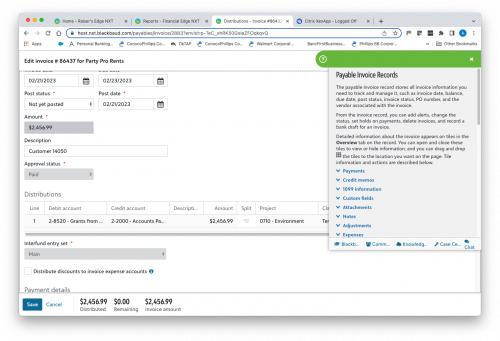
Top shot is the FE NXT Invoice Entry

Second shot is the edit view after the check has been cut.

Any Ideas on what is going on? Anyone else had this happen?
937e5cf6ebbceaf25e7ee31c13989fc2-huge-sc
b455a2890f20f479e2350271bfbd618f-huge-sc

Comments

  • @Anne Swearingin
    I encourage you to contact support due to the product error message. To reach them click on Help > Customer Support.

    In harmony,

    Elizabeth

  • @Elizabeth Perron
    Thank you. I reached on when this happened on another invoice on 2/2/23 and again today. I was just wondering if anyone else has had a similar issue.

  • Hallie Hurwitz
    Hallie Hurwitz Blackbaud Employee
    Sixth Anniversary Kudos 2 Name Dropper Participant

    Hi @Anne Swearingin - The top screenshot is only showing the Project code for the Debit side of your distribution. If you select the Split icon and then choose ‘Split credit’, you’ll see the Project for the Credit side. Based on your second screenshot, it must be defaulting to 9999 - Default.

    af90cd23e07d16b76d8711319ea5adf0-huge-im
  • @Hallie Hurwitz

    After several years of entering AP invoices, this is only the second time this has happened. The first time was on February 2nd of this year.

    I do not understand that if this is supposed to be DEFAULTING to the 9999, why have all the others been posting to the project entered with the expense item?

Categories