Tuition Refund Insurance





For the first time we are requiring tuition refund insurance for new students while keeping it optional for returning. We have received three different answers from customer support on how to accomplish this and now our contracts for 2023-24 are locked leaving us completely stuck. Wondering if any other school utilizes this model and how they do it…separate contracts for new vs. returning? Where in Manage Contract Forms is the setting that you use? Thanks in advance.
Comments
-
@Eileen Grabowski I will be interested to see input on this. for 23-24 we are requiring Tuition refund insurance for our 10-month payment plan and it is optional for the 1 payment plan.
1 -
@Coco ParhamHi Coco. I believe you would go to Manage Contract Forms, select the contract you wish to edit, go the the Payment Plans and Tuition Refund Plan section, scroll down to Payment Plans, Select, then hover over the Tuition Insurance field to make your selection.
0 -
@Eileen Grabowski We did that, thanks!
0 -
@Eileen Grabowski We have two different contract types for each set (new vs. returning) though we do it because we need different start dates (re-enrollment is a month earlier than new student enrollment).
I would attack it as having a contract type of “Incoming Students” and then for contracts of that type, you would require tuition refund insurance for every payment type option.
0 -
@Jamie Cross Hi Jamie, Thanks for your response. We did try to create an additional contract to accomplish this approach, but we were unable to save it (brand new contract not attached to any student) because for some reason 2023-24 is now locked. Unfortunately, support has not been helpful or responsive in helping us overcome this obstacle.
0 -
@Eileen Grabowski Hi Eileen! By “locked” do you mean 2023-24 is grayed out when selecting the academic year for the template under the “Contract Type”? If so, create a new contract type and this should allow you to select 2023-24. You can not have more than 1 of the same academic year under each contract type.
0 -

@Karen Oravainen Hi Karen, That is correct. We created a new contract to fix the errors made previously due to direction provided by customer support and this banner appeared on the new contract. For the new student contract we add the premium for Tuition Refund Insurance as a Fee, but on the returning student contract, where it is optional, we cannot see the selection when the contract is completed and returned to us. So we tried to create a third contract and are unable to.
0 -
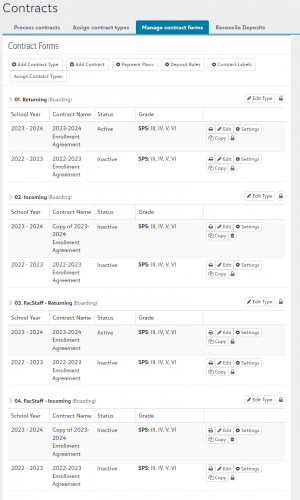
@Eileen Grabowski You have to create another contract type and create a new contract for 2023-2024 there. You can only have one contract per year within a specific contract type.
Here's a screenshot for our setup:
 3
3 -
Sorry if this has been addressed, but the emphasis here is that you must create a new Contract Type as well as a new Contract of that new type in order to have access to that academic year.
3 -
@Coco Parham Hi Coco, how did you set this up based on payment plan in your system? Are you integrated with Tuition Management? Does the fee show on your contracts? Did you enter it as an optional fee and had to rely on people doing the 10 month plan selectin the fee?
0 -
@Ashley Foltiny Hi Ashley, first we added a paragraph in the contract explaining the Tuition Refund Program right above the payment plans. If a parent chooses the monthly plan, they are required to use Tuition Refund Insurance (TRP). Once the Business Office gets the contract, they flag the family and add the charge to the family's Tuition Management account on the back end when the new year roles over to the new year, July 1st (payments are due July 31st).
0 -
@Coco Parham
Hi Coco, Thanks so much for the reply! That makes sense! We will probably have to do the same.1











Categories
- All Categories
- New eTapestry Home Community
- New K-12 Community Home (TEST)
- New Higher Education Home Page (Test)
- New Impact Edge Community TEST
- New YourCause Community TEST
- New SKY Community TEST
- New Grantmaking TEST Community
- New Altru Test Community
- New bbcon Community - TEST
- 12 Blackbaud Agents for Good™
- New Raiser's Edge NXT Community
- 8 Blackbaud Community Help
- 223 bbcon®
- 1.4K Blackbaud Altru®
- 411 Blackbaud Award Management™ and Blackbaud Stewardship Management™
- 1.2K Blackbaud CRM™ and Blackbaud Internet Solutions™
- 16 donorCentrics®
- 361 Blackbaud eTapestry®
- 2.7K Blackbaud Financial Edge NXT®
- 688 Blackbaud Grantmaking™
- 604 Blackbaud Education Management Solutions for Higher Education
- 3.3K Blackbaud Education Management Solutions for K-12 Schools
- 954 Blackbaud Luminate Online® and Blackbaud TeamRaiser®
- 85 JustGiving® from Blackbaud®
- 7.1K Blackbaud Raiser's Edge NXT®
- 4K SKY Developer
- 258 ResearchPoint™
- 124 Blackbaud Tuition Management™
- 165 Organizational Best Practices
- 249 Member Lounge (Just for Fun)
- 40 Blackbaud Community Challenges
- 37 PowerUp Challenges
- 3 (Closed) PowerUp Challenge: Grid View Batch
- 3 (Closed) PowerUp Challenge: Chat for Blackbaud AI
- 3 (Closed) PowerUp Challenge: Data Health
- 3 (Closed) Raiser's Edge NXT PowerUp Challenge: Product Update Briefing
- 3 (Closed) Raiser's Edge NXT PowerUp Challenge: Standard Reports+
- 3 (Closed) Raiser's Edge NXT PowerUp Challenge: Email Marketing
- 3 (Closed) Raiser's Edge NXT PowerUp Challenge: Gift Management
- 4 (Closed) Raiser's Edge NXT PowerUp Challenge: Event Management
- 3 (Closed) Raiser's Edge NXT PowerUp Challenge: Home Page
- 4 (Closed) Raiser's Edge NXT PowerUp Challenge: Standard Reports
- 4 (Closed) Raiser's Edge NXT PowerUp Challenge: Query
- 829 Community News
- 3.1K Jobs Board
- 57 Blackbaud SKY® Reporting Announcements
- 47 Blackbaud CRM Higher Ed Product Advisory Group (HE PAG)
- 19 Blackbaud CRM Product Advisory Group (BBCRM PAG)