Grading on a Curve?

One of our teachers grades on a curve. How do you do this at your school? BB Support reports that the system doesn't support this system. Hive mind: any clever workarounds?

To flush this out further: this teacher gives periodic assessments, all of which are 5 multiple choice questions. The curve is 5 correct = 100%, 4 = 92%, 3 = 85%, 2 = 77%, etc. All his assessments have equal weight over the course of the term.


Comments

  • Brian Gray
    Brian Gray Community All-Star
    Eighth Anniversary Kudos 5 bbcon 2025 Attendee Badge K-12 Fall 2025 Product Update Briefing Badge

    @Lauren Marcus Eisenberg:
    The curve is 5 correct = 100%, 4 = 92%, 3 = 85%, 2 = 77%, etc.

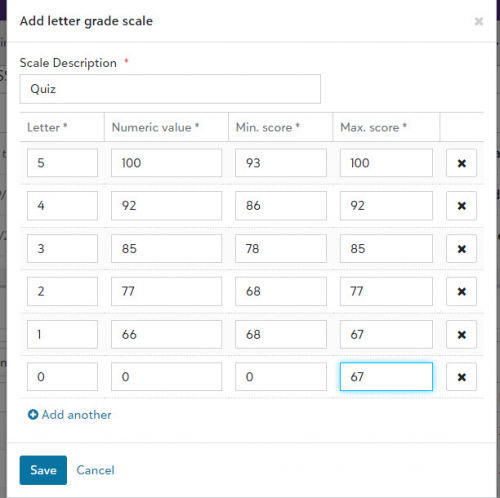
    I think that you can do this with a Letter Grade Scale.

    Academics > Grades > Grading setup > Gradebook settings. Scroll to the bottom of the page and add a new Letter Grade Scale. The Numeric Value column has your numbers. The min & max values have to be there, and should be consistent with the numeric value.

    da6ef4571ca5cd8592fe8ba80afeb949-huge-sc

    The teacher adds an assignment type for the quizzes, and assigns the letter grade to it in Gradebook settings.

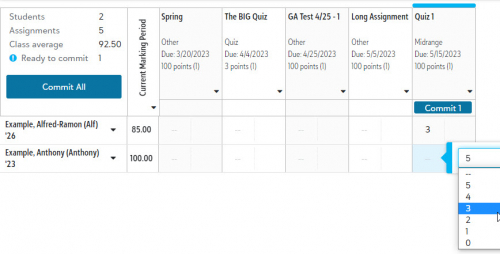
    The big downside is that the quiz grades will have to be entered by clicking in the grade menu for each student as shown below. I haven't figured out a way to allow entry from the keyboard.

    519e91cf2485759623e6327bba173874-huge-sc

    Your mileage may vary.

  • @Brian Gray Thanks for this - will definitely try and see if it meets our need.

  • Bryna Gleich
    Bryna Gleich Blackbaud Employee
    Tenth Anniversary Kudos 3 Name Dropper Participant

    @Lauren Marcus Eisenberg Does the curve shift for each assignment? That's what I think of when I hear “grading on a curve.”

    For example, if a specific quiz has 5 questions and no one gets all 5 correct, does 4 correct become the new 100% for that specific quiz?

  • @Bryna Gleich Perhaps it's not technically a “curve” but technically grade translations.