Using Resource Boards




hi! I am working on revamping our resource boards and I'd love some input from other schools on how you use these! I found some great examples looking through the community here, but I do have some more specific questions.
- How can I create tiles for our Directories?
- I saw someone had a tile that linked to the Nurses Office - does anyone do this using the blackbaud nurse' office and how would that work?
- I would like to create a tile that links to our Community Organization group, is there a way to link directly?
- I would also like to link a tile to the Athletics information, does anyone else have a way they do that?
- Any other great ways you use Resource boards that parents and teachers find helpful?
Thank you!!
Comments
-
Hi @Amanda Polson!
1) You can create posts to directories. There are a few things you'll have to be cautious of.
If you're adding a link to the faculty resource board, you will need to make sure that you have copied the FACULTY persona URL.
For example: https://cwaldorf.myschoolapp.com/app/FACULTY#directory/1012If you're adding a link to the student resource board, you will need to make sure that you have copied the STUDENT persona URL.
For example: https://cwaldorf.myschoolapp.com/app/STUDENT#directory/1012Each directory has a unique URL. The last digits in the URL are what identify the directory. You'll want to make sure that you're copying the appropriate Directory URL and also make sure that the roles that fall into a specific persona have been granted Directory Access, or the "All School" role has access if the directory can be viewed by anyone logging in.
2) I could be wrong, but I am thinking that the Nurse's Office post you saw might have been a detail page. Maybe with forms, downloads or general information about the Nurse's office. Or it could have been an external link. I believe that the "Nurse's Office" is only a link that would be accessible by those with the Nurse role.
3) You can link to a community group. This also requires that the URLs are unique to each board/persona that you're adding them to and that the community group Membership is set accordingly. You might want to also double check the group page access to be sure it's set up for the appropriate roles.
4) There are multiple ways you can create an athletics tile. You can either add a direct link to an existing athletics page you have setup on your front end site. This requires you to add that link to a links category first. You would then select "Direct Link". You're then prompted to select the category and link you added when setting up the board. Or you can create a detail page if you have numerous forms, downloads and content that you're looking to display to users.
5) The Embed feature you can add to a detail page is great. I have seen schools embed document onto detail pages for things like library catalogs, course catalogs or summer programs. There are multiple sites that allow you to create an online flipbook that you can then embed so users can flip through multiple pages right from the detail page.
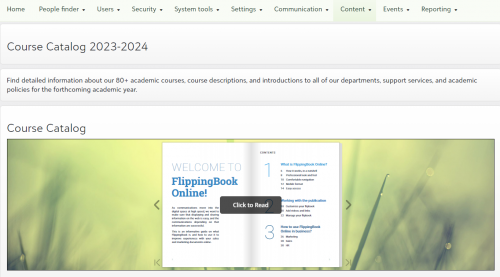
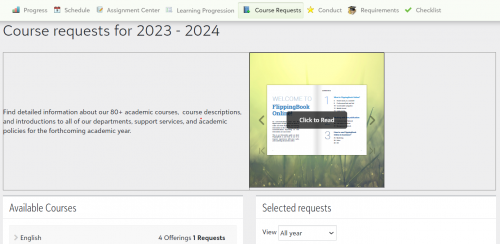
Fun fact, the Policy text box on the Course Request Setup screen also supports embed codes and can be very useful during course request season for schools that want to post a course catalog that can be browsed through right on screen. I hope that helps!
 3
3 -
@Kristen Duval thank you so much! This is so helpful!
1



Categories
- All Categories
- New YourCause Community TEST
- New SKY Community TEST
- New Grantmaking TEST Community
- New Altru Test Community
- New bbcon Community - TEST
- 12 Blackbaud Agents for Good™
- New Raiser's Edge NXT Community
- 7 Blackbaud Community Help
- 218 bbcon®
- 1.4K Blackbaud Altru®
- 409 Blackbaud Award Management™ and Blackbaud Stewardship Management™
- 1.2K Blackbaud CRM™ and Blackbaud Internet Solutions™
- 16 donorCentrics®
- 361 Blackbaud eTapestry®
- 2.7K Blackbaud Financial Edge NXT®
- 681 Blackbaud Grantmaking™
- 598 Blackbaud Education Management Solutions for Higher Education
- 3.3K Blackbaud Education Management Solutions for K-12 Schools
- 952 Blackbaud Luminate Online® and Blackbaud TeamRaiser®
- 85 JustGiving® from Blackbaud®
- 7K Blackbaud Raiser's Edge NXT®
- 3.9K SKY Developer
- 257 ResearchPoint™
- 123 Blackbaud Tuition Management™
- 165 Organizational Best Practices
- 247 Member Lounge (Just for Fun)
- 40 Blackbaud Community Challenges
- 37 PowerUp Challenges
- 3 (Closed) PowerUp Challenge: Grid View Batch
- 3 (Closed) PowerUp Challenge: Chat for Blackbaud AI
- 3 (Closed) PowerUp Challenge: Data Health
- 3 (Closed) Raiser's Edge NXT PowerUp Challenge: Product Update Briefing
- 3 (Closed) Raiser's Edge NXT PowerUp Challenge: Standard Reports+
- 3 (Closed) Raiser's Edge NXT PowerUp Challenge: Email Marketing
- 3 (Closed) Raiser's Edge NXT PowerUp Challenge: Gift Management
- 4 (Closed) Raiser's Edge NXT PowerUp Challenge: Event Management
- 3 (Closed) Raiser's Edge NXT PowerUp Challenge: Home Page
- 4 (Closed) Raiser's Edge NXT PowerUp Challenge: Standard Reports
- 4 (Closed) Raiser's Edge NXT PowerUp Challenge: Query
- 822 Community News
- 3.1K Jobs Board
- 57 Blackbaud SKY® Reporting Announcements
- 47 Blackbaud CRM Higher Ed Product Advisory Group (HE PAG)
- 19 Blackbaud CRM Product Advisory Group (BBCRM PAG)