Connecting to Raiser's Edge API with Axios




Hi, I am looking to connect to RE NXT's API using Axios and I am curious about setting up a request to do this. I have the “Bb-Api-Subscription-Key" and I am wondering if anyone else has experience with this for data integration and can help me structure the Axios request.
Our organization is trying to make a REST call to make what we call a shadow copy of constituents, notes and gifts.
Comments
-
Hey Jennifer, you also need an Authorization Token and pass that along in the header of the request that will at least allow you to hit the API endpoints.
This is explained on the following page:
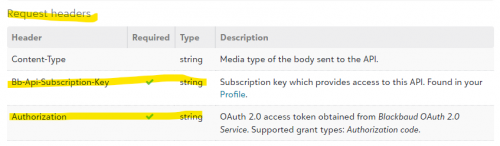
The authorization token is timestamped and only last for 1 hour (without refreshing) so some logic needs to be added for that.
I have built a similar application to offload/backup the different entities from Blackbaud to a separate data store if you wish to discuss in more detail.
I hope this helps and let me know if you have any questions.
0 -
Hey Bob, thank you for your response. I do understand that I need an auth token, I am just unsure how to get it in an automated(?) way using my job integration that I am creating. I do understand the oAuth process but every example I have seen seems to be a front end user talking to a backend and approving the connection manually to get the token.
I need a way to do this in a job run hourly with no human intervention. I am just new to RE.
Thanks!
0 -
@Jennifer McGarry:
…every example I have seen seems to be a front end user talking to a backend and approving the connection manually to get the token.I need a way to do this in a job run hourly with no human intervention
You are correct for the original token. But, you need to store that token (i.e. in a database). Blackbaud provides you with a “Refresh Token” as well. With the “Refresh Token”, you programmatically (i.e. C#, Javascript) need to request a new Auth Token after one hour of inactivity. Essentially, the auth token will continually change (for security).
Automating this process needs to be done in code with a place to persist the Token/Refresh Token. I use tools and code (c#) in Azure to do this. Send me a private message (click on my name) and I can provide some additional info.
0 -
@Jennifer McGarry
As @Bob Rowe mentioned, have somewhere that store the API token and refresh token, but I would go 1 step further and store the API token and refresh's token's “time” info. Either you store the time you refresh, and then “add” # of seconds when the token expire (60 minutes) or refresh token expires (365 days) at your “routine” (mention below), or store the “date/time token/refresh token" expires directly.You will want to create a subroutine that:
- checks if the token has expired, if not, return the token for use
- if token expired, use the refresh token API endpoint to refresh the token (and make sure to NOT specify preserve_refresh_token, so you always get new refresh token with a new 365 days expiration), store the new token, refresh token and update the expiration
Doubt this would be the case, but you MAY want to have a “scheduler” that calls this subroutine “potentially” monthly and if the refresh token will expire within the month, refresh it.
Then in your application, all you need to do is call this subroutine to get a token for calling API. (Keep in mind that if your application runs “long” and may call API multiple times, that you “potentially” call the subroutine each time to get a token. Only you can determine how long your application/function will run for and determine if there's a possibility that the token expires in midst of operations. (there are other “condition” and logic you can applies to make the subroutine more efficient, but you can play around with that.
0 -
@Jennifer McGarry, I'll add a few comments in addition to what others have said on this thread…
The SKY API operates in the context of an end-user (i.e., someone with access to log into Raiser's Edge). This is so that the system can enforce that user's security permissions (as defined by your organization's administrator). So if a user can't do <x> in the product, they won't be able to do <x> via the API. That's why the authorization protocol involves a human interaction - it needs a user to authenticate (via Blackbaud ID) and provide consent (aka authorization).
The good news is it's a one-time chore and from there no further user interaction is required (since you can always use your refresh token to obtain a new access token, non-interactively). The access token is attached to the consenting user (and the SKY application in context) and thus can only do at most that which the user can do in the product. It's also subject to the "scope" defined for the application by the developer (meaning, the actual level of access for a token can be further scoped-down to less than the user's actual set of security permissions).
So both access token (a 60-minute token) and refresh token (365 days, on a sliding window) are associated with an end-user. If you're building a headless application (like a job or a script or some other non-interactive system), you still need an end-user to provide that initial one-time consent. That could of course be *you* (i.e., you're acting as the developer AND an application user) if you yourself have permission to log into Raiser's Edge.
If you haven't seen it, you might consider checking out the headless data sync article in the Showcase area of the developer portal. Another (easy) option you can explore is, use the technique I demonstrate in this video to obtain the initial access token and refresh token:
https://www.youtube.com/watch?v=Dw3vrbSPAZU(skip to the 25:10 mark)
This approach uses Postman for the initial one-time consent chore. Postman acts as your OAuth client (you plug in your SKY application's ID and secret), and it handles launching the browser, obtaining consent, etc. The end result is that you get access and refresh tokens associated with *your* end-user (Blackbaud ID) account. You can then store those values and use them going forward (for example, you could make APIs calls with the access token, or discard it altogether and just paste in the refresh token into your script so it refreshes the access token before making API calls). Keep in mind that the token will be operating in the context of *you* and thus subject to your permissions as granted by your organization's administrator.
Hope this helps!
1 -
Thanks so much. This really made it clearer. However, now that I have the tokens needed I keep getting a 400 error and I am unsure which part of my request is wrong. Any idea?
axios.request(
{
method: 'post',
url: `${apiURL}`,
// data: `grant_type=refresh_token&refresh_token=${apiRefreshToken}&preserve_refresh_token=true&client_id=${apiAcct}&client_secret=${apiPWSecret}`,
headers: { 'Content-Type': 'application/x-www-form-urlencoded' },
data: {
grant_type: 'refresh_token',
refresh_token: `${apiRefreshToken}`,
preserve_refresh_token: true,
client_id: `${apiAcct}`,
client_secret: `${apiPWSecret}`,
},
})I tried sending the data in both formats and neither are working.
0 -
@Jennifer McGarry
this is what mine looks like and works every 58 minutes: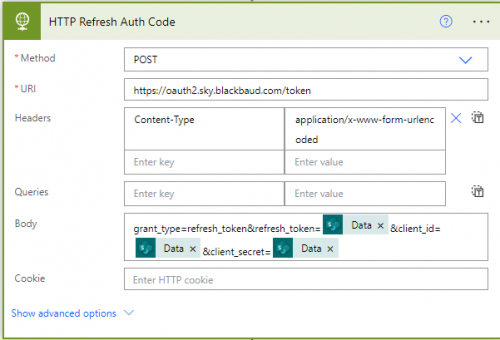 0
0 -
@Alex Wong @Ben Lambert @Bob Rowe
Thank you all so much for your assistance with my issue. I am now successfully making the API call to refresh the token in an “automated” way in order to run my data sync.
God Bless!
1









Categories
- All Categories
- New YourCause Community TEST
- New SKY Community TEST
- New Grantmaking TEST Community
- New Altru Test Community
- New bbcon Community - TEST
- 12 Blackbaud Agents for Good™
- New Raiser's Edge NXT Community
- 7 Blackbaud Community Help
- 218 bbcon®
- 1.4K Blackbaud Altru®
- 409 Blackbaud Award Management™ and Blackbaud Stewardship Management™
- 1.2K Blackbaud CRM™ and Blackbaud Internet Solutions™
- 16 donorCentrics®
- 361 Blackbaud eTapestry®
- 2.7K Blackbaud Financial Edge NXT®
- 681 Blackbaud Grantmaking™
- 599 Blackbaud Education Management Solutions for Higher Education
- 3.3K Blackbaud Education Management Solutions for K-12 Schools
- 952 Blackbaud Luminate Online® and Blackbaud TeamRaiser®
- 85 JustGiving® from Blackbaud®
- 7K Blackbaud Raiser's Edge NXT®
- 3.9K SKY Developer
- 257 ResearchPoint™
- 123 Blackbaud Tuition Management™
- 165 Organizational Best Practices
- 247 Member Lounge (Just for Fun)
- 40 Blackbaud Community Challenges
- 37 PowerUp Challenges
- 3 (Closed) PowerUp Challenge: Grid View Batch
- 3 (Closed) PowerUp Challenge: Chat for Blackbaud AI
- 3 (Closed) PowerUp Challenge: Data Health
- 3 (Closed) Raiser's Edge NXT PowerUp Challenge: Product Update Briefing
- 3 (Closed) Raiser's Edge NXT PowerUp Challenge: Standard Reports+
- 3 (Closed) Raiser's Edge NXT PowerUp Challenge: Email Marketing
- 3 (Closed) Raiser's Edge NXT PowerUp Challenge: Gift Management
- 4 (Closed) Raiser's Edge NXT PowerUp Challenge: Event Management
- 3 (Closed) Raiser's Edge NXT PowerUp Challenge: Home Page
- 4 (Closed) Raiser's Edge NXT PowerUp Challenge: Standard Reports
- 4 (Closed) Raiser's Edge NXT PowerUp Challenge: Query
- 822 Community News
- 3.1K Jobs Board
- 57 Blackbaud SKY® Reporting Announcements
- 47 Blackbaud CRM Higher Ed Product Advisory Group (HE PAG)
- 19 Blackbaud CRM Product Advisory Group (BBCRM PAG)