Connecting Raisers Edge API to Alteryx




How does RE connect to an application if that application is not available in the known apps… having trouble connecting and really unsure of the token situation and how often that has to be refreshed if connected directly
Comments
-
@Taylor Thornhill If the application is not available in the known apps, you would usually need to connect Raiser's Edge and Alteryx using a third application like Postman or Microsoft Power Automate where that third application has the ability to talk to both systems.
Quickly looking over the Alteryx documentation, it looks like they provide a way to create a custom connector. You could use this to create your own custom application on the Alteryx side that would connect to RENXT.
The token expires after 60 minutes but the use of the refresh token allows that token to be updated without having to prompt a user to sign back in after that 60 minutes. The refresh token expires every 365 days. The authorization code flow tutorial here includes steps on using the refresh token. Referencing this documentation, along with the Alteryx documentation, should allow you to create a connection between the two systems.
0 -
@Ashley Moose
I just cannot get the Token? Any ideas? I have tried to use the Client ID and Client Secret but can never get the Token0 -
@Taylor Thornhill When you say you cannot get the token, are you receiving an error or is something else occurring? Try taking a look at the documentation around common authorization issues - https://developer.blackbaud.com/skyapi/docs/authorization/common-auth-issues .
Does that help?
0 -
@Ashley Moose
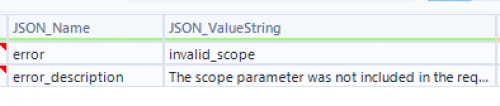
I think I am almost there but I am getting the following error…{"error":"invalid_scope","error_description":"The scope parameter was not included in the request"}
any idea how to set this?
in Blackbaud, I have the scope set to “Full data access”
0 -
0
-
@Ashley Moose
ok stupid question… did you run this in Alteryx? Obviously, you have your json code.. but0 -
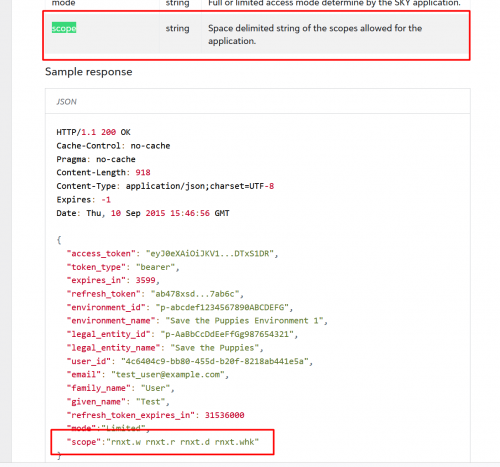
@Taylor Thornhill No I was just sharing the relevant section from the SKY API documentation. Is it not accepting the scope options?
0 -
@Ashley Moose
I have the scope options on the SKY API Page set to “Full Data Access” under the created application0 -
@Taylor Thornhill Are you including the environment ID as a parameter in the initial authorization request?
0 -
@Ashley Moose
I am not. not sure what that is. or where to find it0 -
@Taylor Thornhill The environment ID can be found by opening RENXT and checking the URL. The value after envid= and before &svcid is the environment id.
 0
0 -
@Ashley Moose
I havent been, this is the first I have heard of it..0 -
@Ashley Moose
where does this go? the setup i have been working on didnt include this Id0 -
@Taylor Thornhill
It would be included as an additional parameter in the query string when making the authorization request.Take a look at https://developer.blackbaud.com/skyapi/docs/authorization/auth-code-flow/confidential-application/tutorial#request-authorization and https://developer.blackbaud.com/skyapi/docs/addins/concepts/connect-to-skyapi#limit-the-scope-of-consent-to-the-current-environment for examples.
0 -
@Ashley Moose
any chance you have a workflow that would show all of this?0 -
@Taylor Thornhill There are two tutorials/workflows available from the Developer Portal documentation (one under confidential application and one under public application) - https://developer.blackbaud.com/skyapi/docs/authorization/auth-code-flow
0 -
@Ashley Moose
I am starting to think NO ONE has ever set up an alteryx workflow… lol.. this is crazy.. definitely having trouble following this0 -
@Taylor Thornhill
While you are likely correct that no one have setup automation through Alteryx, the basic idea is the same.Blackbaud API authentication is through OAUTH which requires the “user” to login to get access token for running API calls. However, with a background running (cloud running) automation, the “workflow” is not going to be able to “get the user to login" for the token. Meaning your workflow needs to obtain the authentication token via an “existing token” situation. A token that has been obtained via a user (likely you, as admin of the workflow and system, OR if you are not part of the company/org and is developing something for another org, you will need someone that is admin to “login" and get the “initial token”).
The initial token can be (and I would say more easily) obtained using POSTMAN. Are you familiar with POSTMAN and OAUTH? If so I'm not going to expand more on how to do this.
Once you have the token, it is ONLY GOOD for 60 minutes. However, with the token you also obtain a refresh token, that is good for 365 days. The ONLY way you can work this is to store the token and refresh token in a “safe” location that can be retrieved and saved to from the Alteryx workflow. Once you got this setup done, then the rest is easy.
Either 1: you create a 2nd workflow that call the refresh token API endpoint every 55min (just any interval of time before 60 minutes is up to ensure the TOKEN is always valid).
OR
2: you create a 2nd workflow that does the refresh “on demand”. Meaning, whenever you need to make SKY API call, you will call this 2nd workflow first (assuming Alteryx allows a workflow to be called from another workflow) to refresh the token before using the token to make “real” SKY API call.
Either method you use, you will have to pay attention to what your workflow is doing, and if the workflow is “long” running. For example, if you are trying to get all gifts from RE NXT and you have 1M+ gift records, that can easily take 2 hours. You will have to build into your workflow to call the refresh token workflow in set interval. There are many ways you can do this, i'm not going to details each.
Regarding how to refresh token, all the details are here:
NOTE: that everytime you refresh the token, you will get a new TOKEN that is the token to use for making SKY API calls, again only valid for 60 minutes. You will also get a new refresh token IF you don't specified preserve_refresh_token=true (by default preserve_refresh_token=false). a new refresh token means it has a new 365 day life again.
2 -
Thanks for the comment. I used Postman and received a Token. However, when inputting the token, i received an error for scope, then an error for the redirect_URI.
i am just having issues getting around all of this red tape that seems to be getting larger by the second by all of the security of RENXT..
0 -
@Taylor Thornhill
scope is not needed.This is my flow (option 1 that refresh every 55 minutes)
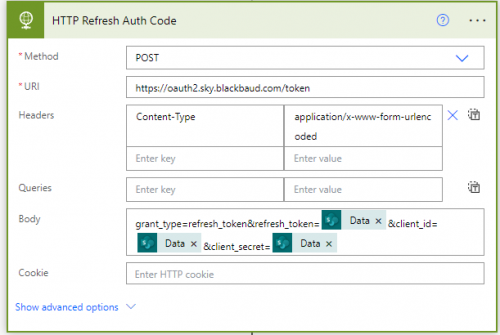
Obviously fill in the 3 “Data” with your own refresh_token, client_id, and client_secret The “scope” is not something you provide to the token API endpoint, “scope” is part of the response property you receive back after a successful call.
0 -
0
-
@Taylor Thornhill
can you provide more details on your actual call to the endpoint and the response (error code etc)0 -
@Taylor Thornhill
This is my full HTTP request info:{
"uri": "https://oauth2.sky.blackbaud.com/token",
"method": "POST",
"headers": {
"Content-Type": "application/x-www-form-urlencoded"
},
"body": "grant_type=refresh_token&refresh_token=00000000000000000000&client_id=00000-00000-00000-0-000000&client_secret=000000000000000000000000000000"
}
this is my HTTP response:
{
"statusCode": 200,
"headers": {
"Cache-Control": "no-store, no-cache",
"Pragma": "no-cache",
"request-context": "appId=cid-v1:007a2cc3-a48c-4a57-ae95-13bf8ddba523",
"X-Content-Type-Options": "nosniff",
"Strict-Transport-Security": "max-age=31536000; includeSubDomains",
"X-Cache": "CONFIG_NOCACHE",
"X-Azure-Ref": "eeeeeeeeeeeeeeeeeeeeeeeeeeeeeeeeeeeeeeeeeeeeee",
"Date": "Thu, 28 Sep 2023 14:54:00 GMT",
"Content-Length": "1559",
"Content-Type": "application/json; charset=utf-8"
},
"body": {
"access_token": "aaaaaaaaaaaaaaaaaaaaaaaaaaaaaaaaaaaaaaaaaaaaa",
"token_type": "Bearer",
"expires_in": 3600,
"refresh_token": "bbbbbbbbbbbbbbbbbbbbbbbbbbbbbbbb",
"environment_id": "p-cccccccccccccccccccccccc",
"environment_name": "XXXXX Production Environment",
"legal_entity_id": "p-ddddddddddddddddddddddd",
"legal_entity_name": "My Org Name",
"user_id": "000000000000-00000000-00000000-00000",
"email": "alex.wong@xxxxxxx.org",
"family_name": "Wong",
"given_name": "Alex",
"refresh_token_expires_in": 31622400,
"mode": "Full"
}
}
0 -
0
-
@Taylor Thornhill
your URL is “Token” instead of “token” try changing that, some system are case-sensitive with URL paththen I see you have grant_type=client_credentials only.
Instead should be
grant_type=refresh_token
refresh_token=the refresh token you got from POSTMAN when you got the token
client_id=the client_id from the BB developer site in Application
client_secret=the client_secret from BB developer site in Applicationthese need to be in the “body” of the request
0 -
@Alex Wong
I went into Postman and it provided me a token…I put the token in and added to the body,,, here is my error

this token was used 5 seconds after being provided
0 -
@Taylor Thornhill
You are now getting a different error than the previous screenshot, please provide the HTTP call's details again.0 -
@Taylor Thornhill
need the HTTP call's details, including what you put in the request bodyYou can mask up your refresh token and client id secret..but I want to confirm you are actually making the call with all the needed pieces
Please also confirm that you are providing the refresh token, NOT the token. POSTMAN will give you both a token and refresh token.. it is the refresh token that is needed to call the API to refresh token.
0 -
@Alex Wong
OHHH… it only gave me a token… probably user error on that.. not that familiar with Postman0













Categories
- All Categories
- New K-12 Community Home (TEST)
- New Higher Education Home Page (Test)
- New Impact Edge Community TEST
- New YourCause Community TEST
- New SKY Community TEST
- New Grantmaking TEST Community
- New Altru Test Community
- New bbcon Community - TEST
- 12 Blackbaud Agents for Good™
- New Raiser's Edge NXT Community
- 8 Blackbaud Community Help
- 222 bbcon®
- 1.4K Blackbaud Altru®
- 410 Blackbaud Award Management™ and Blackbaud Stewardship Management™
- 1.2K Blackbaud CRM™ and Blackbaud Internet Solutions™
- 16 donorCentrics®
- 361 Blackbaud eTapestry®
- 2.7K Blackbaud Financial Edge NXT®
- 687 Blackbaud Grantmaking™
- 604 Blackbaud Education Management Solutions for Higher Education
- 3.3K Blackbaud Education Management Solutions for K-12 Schools
- 954 Blackbaud Luminate Online® and Blackbaud TeamRaiser®
- 85 JustGiving® from Blackbaud®
- 7K Blackbaud Raiser's Edge NXT®
- 4K SKY Developer
- 258 ResearchPoint™
- 123 Blackbaud Tuition Management™
- 165 Organizational Best Practices
- 248 Member Lounge (Just for Fun)
- 40 Blackbaud Community Challenges
- 37 PowerUp Challenges
- 3 (Closed) PowerUp Challenge: Grid View Batch
- 3 (Closed) PowerUp Challenge: Chat for Blackbaud AI
- 3 (Closed) PowerUp Challenge: Data Health
- 3 (Closed) Raiser's Edge NXT PowerUp Challenge: Product Update Briefing
- 3 (Closed) Raiser's Edge NXT PowerUp Challenge: Standard Reports+
- 3 (Closed) Raiser's Edge NXT PowerUp Challenge: Email Marketing
- 3 (Closed) Raiser's Edge NXT PowerUp Challenge: Gift Management
- 4 (Closed) Raiser's Edge NXT PowerUp Challenge: Event Management
- 3 (Closed) Raiser's Edge NXT PowerUp Challenge: Home Page
- 4 (Closed) Raiser's Edge NXT PowerUp Challenge: Standard Reports
- 4 (Closed) Raiser's Edge NXT PowerUp Challenge: Query
- 829 Community News
- 3.1K Jobs Board
- 57 Blackbaud SKY® Reporting Announcements
- 47 Blackbaud CRM Higher Ed Product Advisory Group (HE PAG)
- 19 Blackbaud CRM Product Advisory Group (BBCRM PAG)