How does your school schedule mass communication (either Pushpages) or Messages in Finalsite?





Hi Everyone,
I work in our Tech Dept and have noticed the amount of bounces to our mass emails due to parent's email's being over quota, servers saying they have detected an unusual rate of unsolicited mail originating from our IP address, and/or the message was rejected by organization policy. Each bounce, for parents at least, I track down and try to remedy the situation so parents do not miss anything. I feel like we could consolidate what we are sending out and maybe help the issue a bit.
I'm wondering what your schools do. For example, do your Division Heads, send out one weekly email, do you send out a reminder for every meeting, does our communications office send out a weekly or biweekly email?
What communication plans have you put in place at your school to help minimize the amount of emails you are sending to parents?
Thanks in advance for a look into what you do!!
Comments
-
@Josceline Reardon I am exploring using a merged email in Blackbaud to initially notify our students and parents about important information as they are onboarding. This is crucial and I'm also wondering about how other schools do this? Do they use Blackbaud or another method to convey this information?
Have you gotten any more insight?0 -
Hi @Jennifer Welch,
I haven't heard from anyone else. Our Division Heads send out a monthly overview of events and reminders, but then the Div. Heads and Communications also send out lots reminders and emails about things throughout the week.
1 -
@Jennifer Welch We (Admission Office) send out an initial email about new student email accounts/email addresses and how to login. Plus information about school forms and how to complete them, with the help of the Communication Dept via Mailchimp. Since we are rolling, I will send out individual emails the closer we get to school start date.
Academics sends out an email about class registration/summer reading and, later in the summer Advisors send out introductory emails.
School forms for different departments have contact information for new parents if they need assistance.
This works since we are a small school (300 students).
0 -
@Coco Parham thanks. What I am seeing is that you use Mailchimp for your email communications once Admissions is complete?
0 -
@Jennifer Welch yes. The initial email with new student information is created and pushed out from our office via Mailchimp. Our Commiunication Office does that. I give them the email and the list of parents who need it.
I do receive a lot of follow-up questions and forward them to the office that can help.
0 -
@Josceline Reardon
We did a lot of research and took parent feedback into account and came up with a major communication plan several years ago that has worked out beautifully. We use pushpages and have a distribution group that includes all school constituents (students, parents, and employees) as well as our board of directors. We send out one comprehensive email every week on Thursdays. In the summer and over Christmas we may skip weeks if there isn't enough information to make it worthwhile, but for the most part it's every week. It's been extremely effective.It's four newsletters in one sent under the masthead of the Eagle Beacon. We are a Ps-12 school and the Beacon itself is a newsletter that contains school-wide information that applies to everyone in the school regardless of their grade level. We then have a header at the top of the Beacon with links to four other newsletters: one for athletics, one for elementary (Ps-6), one for junior high (7-8), and one for high school (9-12). The admin assistant at each level writes these newsletters and they contain information that applies only to that school level. So parents will read a minimum of two newsletters, depending on the ages of their children, but they're all consolidated, making information clear and easy to find.
We have a shared google sheet with the contents of each newsletter so we do not duplicate information and we can make sure nothing is forgotten.
We try to keep the information concise and rarely send out other emails. If something is large in content, like Homecoming, major fundraisers like the annual auction, etc., we send a separate email only to the target audience and include a reference to it in the newsletter and link to the original email. I believe the Eagle Valor has this situation with The Great Shake event.
I've inserted a link below to last week's Beacon, which I think should allow you to view it.
The only exception would be the welcome email that is sent from admissions when a new family is accepted to the school. It is basically a how-to-get-started, including a video explanation of the newsletter setup so they are sure to “use” it correctly and not miss any information. Link below for that as well.
Let me know if you have any questions, I'll be happy to help!
0 -
@Josceline Reardon
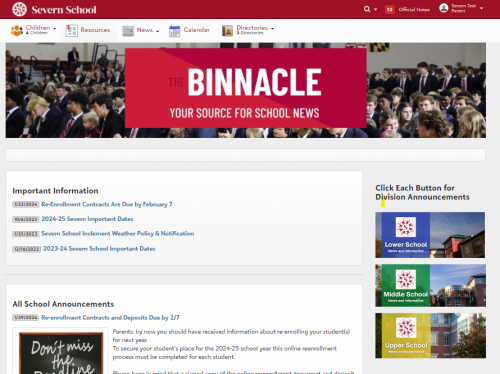
We send a weekly Monday morning pushpage that tells people to log in and check the Binnacle, our secure online newsletter. The pushpage has highlights of “what's inside”, but the details need to be accessed by logging in. Users click the link to the Binnacle (a resource board tile) and, once logged in, they see “All School” information. On the right, they can then click the link to our US, MS, and LS Resource Board tiles for division-specific information. Our US, MS, and LS division assistants, Head's assistant, Communications director, and a staff member from Development add the information to the Resource Board tiles each week.We use News categories for the main articles, announcements, links to other resource board tiles, and pull-in calendars (eg Parent Events, MS Events), etc. We even have an Archive news category that all articles are published to. These articles have no end publish date, so people can search Archived Content and find old articles.
We ask divisions to place all information in the Binnacle to avoid email fatigue issues. We started this online newsletter using Resource board tiles back in 17-18 when we asked parents to log in for the first time…and never looked back.
We try to keep additional pushpages to a minimum for parents. That way if they see one, they will be sure to open it (in theory).
 0
0











Categories
- All Categories
- New YourCause Community TEST
- New SKY Community TEST
- New Grantmaking TEST Community
- New Altru Test Community
- New bbcon Community - TEST
- 12 Blackbaud Agents for Good™
- New Raiser's Edge NXT Community
- 7 Blackbaud Community Help
- 218 bbcon®
- 1.4K Blackbaud Altru®
- 409 Blackbaud Award Management™ and Blackbaud Stewardship Management™
- 1.2K Blackbaud CRM™ and Blackbaud Internet Solutions™
- 16 donorCentrics®
- 361 Blackbaud eTapestry®
- 2.7K Blackbaud Financial Edge NXT®
- 681 Blackbaud Grantmaking™
- 598 Blackbaud Education Management Solutions for Higher Education
- 3.3K Blackbaud Education Management Solutions for K-12 Schools
- 952 Blackbaud Luminate Online® and Blackbaud TeamRaiser®
- 85 JustGiving® from Blackbaud®
- 7K Blackbaud Raiser's Edge NXT®
- 3.9K SKY Developer
- 257 ResearchPoint™
- 123 Blackbaud Tuition Management™
- 165 Organizational Best Practices
- 247 Member Lounge (Just for Fun)
- 40 Blackbaud Community Challenges
- 37 PowerUp Challenges
- 3 (Closed) PowerUp Challenge: Grid View Batch
- 3 (Closed) PowerUp Challenge: Chat for Blackbaud AI
- 3 (Closed) PowerUp Challenge: Data Health
- 3 (Closed) Raiser's Edge NXT PowerUp Challenge: Product Update Briefing
- 3 (Closed) Raiser's Edge NXT PowerUp Challenge: Standard Reports+
- 3 (Closed) Raiser's Edge NXT PowerUp Challenge: Email Marketing
- 3 (Closed) Raiser's Edge NXT PowerUp Challenge: Gift Management
- 4 (Closed) Raiser's Edge NXT PowerUp Challenge: Event Management
- 3 (Closed) Raiser's Edge NXT PowerUp Challenge: Home Page
- 4 (Closed) Raiser's Edge NXT PowerUp Challenge: Standard Reports
- 4 (Closed) Raiser's Edge NXT PowerUp Challenge: Query
- 822 Community News
- 3.1K Jobs Board
- 57 Blackbaud SKY® Reporting Announcements
- 47 Blackbaud CRM Higher Ed Product Advisory Group (HE PAG)
- 19 Blackbaud CRM Product Advisory Group (BBCRM PAG)