Leap Year





Does anyone know if there is a plan to extend February 2024 to 29 days? All my reports are stopping at 2/28/2024. This is especially problematic when using relative field criteria in Financial Edge reporting.
Comments
-
Hi Michael, I'm experiencing the same issue, has Blackbaud given you a solution?
0 -
@Monique Carter
Hey Monique. Nothing yet.0 -
@Michael Morgan and @Monique Carter, Right now your fiscal period is likely starting with 2/29 as the first date of the next period instead of it being the last date of the current fiscal period. You'll just want to go adjust your fiscal period to edit the end date of February from the 28th to the 29th. Here is a Knowledgebase article and it discusses how you'd navigate to the fiscal years in both database view and webview:
Since you're not adding a new one, but instead modifying an existing, you'll open that 2024 fiscal year in database view to just manually edit the end date of the period -OR- in webview, you'd click ‘Edit this fiscal year’ at the top once you've navigated to the appropriate area per the KB article, and edit the end date of February to be 2/29/2024.
0 -
@Nikki Baldwin Ouch, would have been good to know this before 2/29. Will I ( would it even help to) reverse any 2/29 JE's? Seems it would still throw the error.
0 -
@Nikki Baldwin
OMG!!!!! Nikki, you rock! I was able to fix the problem myself with your direction. Thank you kindly!!!! Please tell me why BB customer service aren't aware of this as a fix. Geez…. Now I can continue working. Thanks again1 -
@Nikki Baldwin Nikki, do you know if deleting posted journal entries will resolve the block on changing the month-end date? Thought I would ask before I try.
0 -
@Michael Morgan, once items have been posted, even if reversed, they're still there in that defined period. You'd probably get an error message if you try to edit the period with posted transactions on 2/29. Only way that removing JE's/transactions would've been helpful here is if you had unposted entries/transactions that could be truly deleted and reentered. What you'll likely need to do, if you already have posted transactions, is to ensure when you're running reports to not select to run by the period (this period, last period, etc.) and instead manually put the date range from 2/1 - 2/29 and 3/1 - 3/31 when you pull the reports. As it is, if you didn't edit the month to be 29 days when you/team set up the fiscal year at beginning of year, it thinks 2/29 is part of period 3. So just accounting for those assumed periods vs what you need them to be in reporting will resolve that moving forward.
0 -
@Nikki Baldwin OK, I am just going to create reversing entries and repost on 2/28. Pretend that 2/28 is the period end. Thanks for your help.
1 -
@Michael Morgan That works! I definitely wouldn't have presumed to tell you to move your transaction/post dates, but if that's an easier alternative so you don't have to edit your reporting parameters, that certainly makes sense!
0 -
@Nikki Baldwin I have the same problem, unfortunately I have posted transactions, is it too late for me to fix this myself? Thanks!
0 -
@Julie Haen the posted transactions will prevent you from editing the period end/start dates at this point, yes. However, you can do either what I suggested to Michael on report parameters to ensure you're running for the specific dates rather than the periods as they're defined -OR- if you're comfortable, you can do what Michael did and reverse the entries from 2/29 to put them on 2/28. That won't allow you to change the fiscal periods, but will prevent having to manually select the date range on your reports and you can still use the ‘this period', ‘last period’ settings. Just depends what you think will be easier moving forward with your reporting.
0 -
@Nikki Baldwin I think I may have too many postings to reverse and re-post. I have AP posted and I am too new to know how to fix that.
0 -
@Julie Haen That's certainly understandable, and like I said to Michael, I certainly wouldn't presume to tell you to edit the transaction post dates. So just make sure when you run your reports for February/March that you use the specific date ranges of 2/1--2/29 and 3/1--3/31 instead of those standard ‘this period’, ‘last period’, ‘next period’ drop-downs. That's really the only hinderance you're going to have here – there's nothing wrong with having the 2/29 transactions, just need to ensure your reporting parameters showcase the whole month.
0 -
1
-
@Julie Haen Julie, I had some AP as well but had not posted the subledger. If you have not posted the subledger, the system allows you to change the invoice date. I had a few checks that were processed on 2/29 and had to do a journal entry. Very time consuming.
One thing that helped me make sure I had 2/29 cleared was running a Trial Balance just for the date of 2/29. I kept plugging along until the net change = $0.
1 -
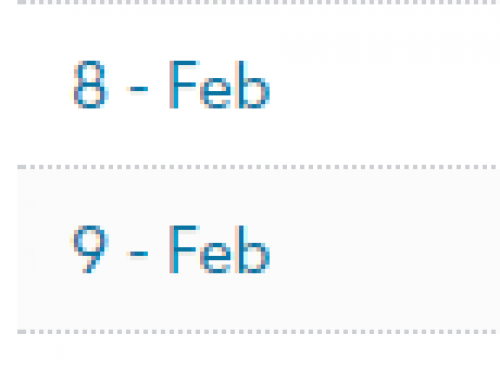
@Julie Haen, I'm not sure I understand – the screenshot is just showing me Feb 8th and 9th dates, not even sure from what screen in FENXT. The system wouldn't eliminate your fiscal period at all. Can you elaborate on what you're seeing here, maybe provide a different screenshot? You may need to contact support to resolve but I'm not sure the exact issue you're experiencing…
0 -
@Nikki Baldwin The reason I did not take this approach was is most of my reports use relative fields. Because of this, I would have to change all my reports to use a specific range and then back to relative fields in March. Also, and more importantly, is when I run February 2025 reports, I would have to do the same thing. Because I am ignoring 2/29, whenever I am using February 2024 (trending, current year and prior year reporting), I don't have to worry about modifying the report.
I also noticed that Raiser's Edge has 2/29 in February.
1 -
@Michael Morgan Yes, I agree if you've got that great setup already with your reporting to pull from relative dates and other default settings, I wouldn't want to always have to take note of the manually edited field dates from now through anytime you show YOY balances next year and beyond. Certainly the most simple option moving forward for you. Thank you for sharing your experience and reasoning on that point.
0 -
@Nikki Baldwin most of our reports are setup with relative field as well, however we also have the start and end date of the fiscal periods in the column headings which will now be inaccurate since March will include 2/29/24. This is such a mess.
0 -
@Julie Haen, I'm not sure I understand – the screenshot is just showing me Feb 8th and 9th dates, not even sure from what screen in FENXT. The system wouldn't eliminate your fiscal period at all. Can you elaborate on what you're seeing here, maybe provide a different screenshot? You may need to contact support to resolve but I'm not sure the exact issue you're experiencing…
This can be seen when looking at an Account from under the General Ledger menu. The period name for March (period 9) is inaccurate and apparently unable to be edited as well…
 1
1 -
@Patricia Sobye thank you for the extended screenshot, I understand now that the issue is it looks like it's skipping March/doubling February on the account record view because of the start date of that period. Do you have the option that Michael has said he went with – to remove any net change by transactions on 2/29 so that it doesn't affect the data and all the February transactions stay in the appropriate period (through reversals)? Essentially indicating that the period ended on 2/28 and while the next period starts on 2/29, there aren't any transactions from that date but only in March, the correct period? You could always modify those date headers on the reports. If not, I do believe that support has an option for a service for the data/code change to force the periods to the dates to accommodate for leap year that wasn't seen/edited when the fiscal year was saved initially. You could discuss that option within your support case (or start one if you don't have one).
0 -
@Patricia Sobye Yes, thank you, this is what I was referring to earlier. Sorry I had a crazy busy day and didn't have time to respond. I received this email yesterday after chatting with support and contacting our rep.
“My team was just informed that Blackbaud is going to be implementing a global fix for this at no cost. I’m not sure exactly when that will happen, but I imagine it will be asap.”
I hope this is for everyone using the product since my organization is not the only one experiencing this issue!
2 -
@Julie Haen Did your rep or support tell you there will be a global fix? The last I heard from a Services Account Executive is that they wanted to charge us a ton of money to unpost our 2/29/24 transactions to be able to fix the fiscal periods. I was considering doing some of the work arounds that are suggested, but they are going to make things super messy and cause extra unnecessary work. We have tight deadlines and this issue is really setting us back and causing unease!
0 -
@Patricia Sobye Sure wouldn't be right if it is truly a Blackbaud issue and they only fix it for me for free! I was told conflicting information on why it happened and how the auto populate works in fiscal years. This is who I received the email from:
Dax Vernon
Services Account Executive, Senior
Information Management
Pronouns: He/Him/His
65 Fairchild Street, Charleston, SC 29492
Direct: 843.654.3532
dax.vernon@blackbaud.com | blackbaud.com1 -
@Julie Haen Thank you! I reached out to the Services Account Executive I had been working with and shared what you posted and he said “Yes, that news broke yesterday, and we’re glad it did. Please follow up your support case for next steps. Support should be up to speed within the next 1-2 business days. ” I just finished following up with my support case, and that person knew nothing about a global fix. I sure hope we receive some communication when the fix is being done.
1 -
@Nikki Baldwin any idea when the global fix is supposed to happen?
0 -
@Patricia Sobye, I checked with my products team and they advised tomorrow, 3/13, the global fix is scheduled. Not sure about exact timing but essentially if you are still seeing the issue when you log in on the 14th, please contact support.
2 -
@Nikki Baldwin Thanks for the update, I appreciate it!
0 -
@Nikki Baldwin
Hi Nikki can you detail what the global fix will do?Thank you!
0 -
@Tara Makas, To my understanding, it will move 2/29 into the previous month and have 3/1 be the correct start date to the following period. This will fix that look on the account records that's been called out here that looks like it's skipping March/duplicating February and ensure that when using relative dates or the ‘this period’, ‘next period’, etc. are correct for the 29 days in February. It won't change any transaction dates from the 28th to the 29th or vis versa, just adjust the period start and end dates to the correct, expected, leap year exception. This way all you reports are correct and run as expected moving forward, without you needing to do a workaround that we've discussed here before the global fix was introduced.
0








Categories
- All Categories
- New K-12 Community Home (TEST)
- New Higher Education Home Page (Test)
- New Impact Edge Community TEST
- New YourCause Community TEST
- New SKY Community TEST
- New Grantmaking TEST Community
- New Altru Test Community
- New bbcon Community - TEST
- 12 Blackbaud Agents for Good™
- New Raiser's Edge NXT Community
- 8 Blackbaud Community Help
- 222 bbcon®
- 1.4K Blackbaud Altru®
- 410 Blackbaud Award Management™ and Blackbaud Stewardship Management™
- 1.2K Blackbaud CRM™ and Blackbaud Internet Solutions™
- 16 donorCentrics®
- 361 Blackbaud eTapestry®
- 2.7K Blackbaud Financial Edge NXT®
- 687 Blackbaud Grantmaking™
- 603 Blackbaud Education Management Solutions for Higher Education
- 3.3K Blackbaud Education Management Solutions for K-12 Schools
- 954 Blackbaud Luminate Online® and Blackbaud TeamRaiser®
- 85 JustGiving® from Blackbaud®
- 7K Blackbaud Raiser's Edge NXT®
- 4K SKY Developer
- 258 ResearchPoint™
- 123 Blackbaud Tuition Management™
- 165 Organizational Best Practices
- 248 Member Lounge (Just for Fun)
- 40 Blackbaud Community Challenges
- 37 PowerUp Challenges
- 3 (Closed) PowerUp Challenge: Grid View Batch
- 3 (Closed) PowerUp Challenge: Chat for Blackbaud AI
- 3 (Closed) PowerUp Challenge: Data Health
- 3 (Closed) Raiser's Edge NXT PowerUp Challenge: Product Update Briefing
- 3 (Closed) Raiser's Edge NXT PowerUp Challenge: Standard Reports+
- 3 (Closed) Raiser's Edge NXT PowerUp Challenge: Email Marketing
- 3 (Closed) Raiser's Edge NXT PowerUp Challenge: Gift Management
- 4 (Closed) Raiser's Edge NXT PowerUp Challenge: Event Management
- 3 (Closed) Raiser's Edge NXT PowerUp Challenge: Home Page
- 4 (Closed) Raiser's Edge NXT PowerUp Challenge: Standard Reports
- 4 (Closed) Raiser's Edge NXT PowerUp Challenge: Query
- 829 Community News
- 3.1K Jobs Board
- 57 Blackbaud SKY® Reporting Announcements
- 47 Blackbaud CRM Higher Ed Product Advisory Group (HE PAG)
- 19 Blackbaud CRM Product Advisory Group (BBCRM PAG)