Adding new constituent corrupt address and name fields





On our test USA website where we eccept donations, for some reason new constituents are failing to be created or when they are the address fields are corrupted. We are using the constituent api.
I've added a screenshot.
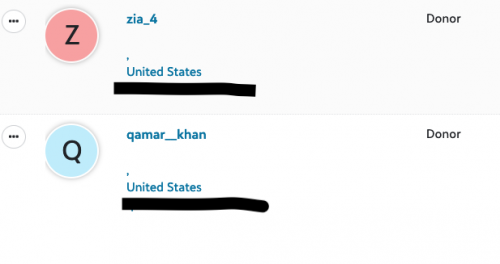
The email seems to go across correctly but the Name and address fields are empty and even though the address we entered was for the UK, the Country field has United States added instead.
This is odd because we are using the same code for our UK website which works fine.
Heres the snippet of code we are using. Thanks in advance 
$body = [
'email' => [
'address' => $email,
'type' => 'Email',
'primary' => true,
'inactive' => false,
'do_not_email' => (bool)$email_marketing_optout,
],
'phone' => [
'number' => $phone,
'type' => 'Mobile',
'primary' => true,
'inactive' => false,
'do_not_call' => (bool)$phone_marketing_optout,
],
'address' => [
'address_lines' => $address,
'city' => $city,
'state' => $state,
'country' => $country,
'postal_code' => $postcode,
'type' => 'Home',
'do_not_mail' => (bool)$address_marketing_optout,
],
'first' => $firstname,
'last' => $lastname,
'title' => $title,
'type' => 'Individual',
];
Comments
-
@Qamar Ramzan
while I'm not sure what language you are writing your application in and making the SKY API calls, so it is hard for me to know if the syntax on the language is correct or not, I will try to make some recommendation on what you can do.Regardless of the language used, when you actually make the SKY API calls, you should still be able to check the actual info that is in the request object itself. You want to make sure the request body is structured correctly per the API reference documentation.
{
"email": {
"address": "Kilgore_Trout64@gmail.com",
"do_not_email": false,
"inactive": false,
"primary": true,
"type": "Email"
},
"phone": {
"do_not_call": false,
"inactive": false,
"number": "843-537-3397",
"primary": true,
"type": "Home"
},
“address”: {
“address_lines”: “123 Main St”,
“city": “Brooklyn”,
“country": “United States”
},
"first": "Kilgore",
"last": "Trout",
"title": "Mr.",
"type": "Individual"
}if you are sure your request body is as above, then you want to make sure some of the values are table values that your database table accepts and that character length is within limits.
0 -
@Alex Wong
Hi Alex,Thank you for you reply.
Its seems we have done everything correctly. I've aded below the log from one failed test. (not real personal info)
["email"]=>
array(5) {
["address"]=>
string(21) "joeblogs@gmail.com"
["type"]=>
string(5) "Email"
["primary"]=>
bool(true)
["inactive"]=>
bool(false)
["do_not_email"]=>
bool(false)
}
["phone"]=>
array(5) {
["number"]=>
string(11) "07953710405"
["type"]=>
string(6) "Mobile"
["primary"]=>
bool(true)
["inactive"]=>
bool(false)
["do_not_call"]=>
bool(false)
}
["address"]=>
array(7) {
["address_lines"]=>
string(13) "233 Sprog St"
["city"]=>
string(8) "New York"
["state"]=>
string(2) "NY"
["country"]=>
string(3) "USA"
["postal_code"]=>
string(5) "10012"
["type"]=>
string(4) "Home"
["do_not_mail"]=>
bool(false)
}
["first"]=>
string(5) "Joe"
["last"]=>
string(6) "Blogs"
["title"]=>
string(2) "Mr"
["type"]=>
string(10) "Individual"
}However, on the the above test, we got this error
Response data: array(1) {
[0]=>
array(5) {
["message"]=>
string(99) "The provided Id value '0' is either not a valid integer, or it is not greater than or equal to '1'."
["error_name"]=>
string(53) "ConstituentSecurityDataAccessRE7InvalidIntegerIdValue"
["error_code"]=>
int(1)
["raw_message"]=>
string(103) "The provided Id value '{0}' is either not a valid integer, or it is not greater than or equal to '{1}'."
["error_args"]=>
array(2) {
[0]=>
string(1) "0"
[1]=>
string(1) "1"
}
}
}Could you describe briefly the correct flow for adding new constituents. We may be ommiting something important.
0 -
@Alex Wong
I got this error too (i've changed a couple of digits in the phone number for anonymity)array(5) {
["message"]=>
string(39) "The phone number 07955710708 is invalid"
["error_name"]=>
string(40) "ContactBusinessLogicPhoneNumberIsInvalid"
["error_code"]=>
int(50013)
["raw_message"]=>
string(31) "The phone number {0} is invalid"
["error_args"]=>
array(1) {
[0]=>
string(11) "07955710708"
}
}0 -
1





Categories
- All Categories
- New K-12 Community Home (TEST)
- New Higher Education Home Page (Test)
- New Impact Edge Community TEST
- New YourCause Community TEST
- New SKY Community TEST
- New Grantmaking TEST Community
- New Altru Test Community
- New bbcon Community - TEST
- 12 Blackbaud Agents for Good™
- New Raiser's Edge NXT Community
- 8 Blackbaud Community Help
- 222 bbcon®
- 1.4K Blackbaud Altru®
- 410 Blackbaud Award Management™ and Blackbaud Stewardship Management™
- 1.2K Blackbaud CRM™ and Blackbaud Internet Solutions™
- 16 donorCentrics®
- 361 Blackbaud eTapestry®
- 2.7K Blackbaud Financial Edge NXT®
- 687 Blackbaud Grantmaking™
- 603 Blackbaud Education Management Solutions for Higher Education
- 3.3K Blackbaud Education Management Solutions for K-12 Schools
- 954 Blackbaud Luminate Online® and Blackbaud TeamRaiser®
- 85 JustGiving® from Blackbaud®
- 7K Blackbaud Raiser's Edge NXT®
- 4K SKY Developer
- 258 ResearchPoint™
- 123 Blackbaud Tuition Management™
- 165 Organizational Best Practices
- 248 Member Lounge (Just for Fun)
- 40 Blackbaud Community Challenges
- 37 PowerUp Challenges
- 3 (Closed) PowerUp Challenge: Grid View Batch
- 3 (Closed) PowerUp Challenge: Chat for Blackbaud AI
- 3 (Closed) PowerUp Challenge: Data Health
- 3 (Closed) Raiser's Edge NXT PowerUp Challenge: Product Update Briefing
- 3 (Closed) Raiser's Edge NXT PowerUp Challenge: Standard Reports+
- 3 (Closed) Raiser's Edge NXT PowerUp Challenge: Email Marketing
- 3 (Closed) Raiser's Edge NXT PowerUp Challenge: Gift Management
- 4 (Closed) Raiser's Edge NXT PowerUp Challenge: Event Management
- 3 (Closed) Raiser's Edge NXT PowerUp Challenge: Home Page
- 4 (Closed) Raiser's Edge NXT PowerUp Challenge: Standard Reports
- 4 (Closed) Raiser's Edge NXT PowerUp Challenge: Query
- 829 Community News
- 3.1K Jobs Board
- 57 Blackbaud SKY® Reporting Announcements
- 47 Blackbaud CRM Higher Ed Product Advisory Group (HE PAG)
- 19 Blackbaud CRM Product Advisory Group (BBCRM PAG)