Easier Customer Support Access



When I have a support issue I can either open a chat where I have to leave it open and am basically held hostage until someone responds or I can call the support number (which is not easy to find) and do the same thing. Why do you not offer an email where I can just send you my issue and you respond when it's my turn instead of staring at the chat box for 45 minutes until someone responds. Also, if I do happen to do something else while I'm waiting and you respond while I'm not there, you close the chat. Please give us an easier way.
Comments
-
@Amy Bridges thanks so much for this feedback, Amy! I've ensured it's been passed along to our Blackbaud Support team leadership!
0 -
Being able to open a ticket for support would be great too. It does take a long time to deal with someone through chat, even once you get them it takes a long time.
1 -
@Amy Bridges You aren't limited to chat to contact Support. If you go into Case Central, there is a button in the upper left to “Create Case”. You can then fill in information about the issue, even add an attachment such as a screenshot, and then specify whether you prefer to be emailed or phoned back. I use this quite often when I don't have time for chatting, or BB Support is closed. (We are located on the West Coast, and BB Support closes at 3pm in our time zone.)
0 -
@Donella Robb
Hi Donella, Can you show a screenshot of this? I don't see a button for “Create Case". I always have had to go through the chat.1 -
@Amy Bridges AMEN to this! So very frustrating. We also do not have the “Create Case” button and have to go thru chat (where they can't see our screen) or phone (long wait). I guess this works for Blackbaud, but not for us as busy customers! I have asked many times for access to the “Create Case” button to no avail - a great frustration for me.
1 -
@Julie Goldsberry @Sylvia Cook
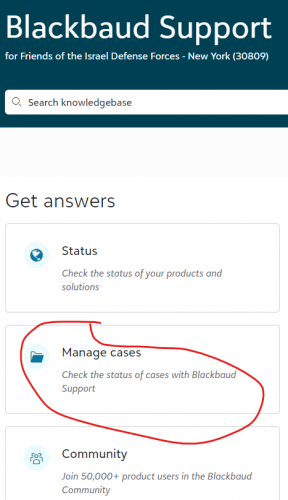
support.blackbaud.com - loginClick on Manage cases
Then click on Create case
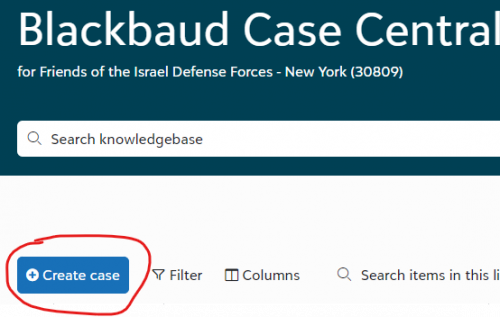
if you don't see this, might want to check with your account manager.
1 -
@Alex Wong As I said originally, I don't have Create Case and have asked my account manager twice to no avail. This is not something they want everyone to have. There appear to be ‘haves’ and ‘have nots’ when it comes to Blackbaud support needs.
1 -
@Alex Wong Here's the response I got from my admin when I asked again about this:
Many years ago, we offered web cases for all Orgs. We found that due to more orgs using phone or chat, it would create a backlog of web cases that sometimes weren’t answered until many hours later or the next day.
With that being the case, we permanently removed the ability to create web cases, apart from a handful of orgs that had legacy agreements that required that option.
0 -
@Amy Bridges After recently attempting to reach our Customer Success Manager, I was told that he is no longer on our account and he had been replaced with a Customer Success Team. I was then povided an email to reach the team. I've noticed that when I use that email, a case is created.
0 -
@Julie Goldsberry Well I am so glad then that we have the button, especially given that we are on the west coast and chat\\phone support closes at 3pm Pacific time, so it is handy to create a case after 3 and have a response waiting when we arrive to work the next morning. It seems that Alex is sadly correct – I found the following KB 45957; (Why don't I see the Create a Case button): https://kb.blackbaud.com/knowledgebase/articles/Article/45957
Our staff started complaining about chat when the bot was added, so I usually tell them to use the Create a Case button if they don't want to talk to the bot or don't have time to wait on chat.
Perhaps add an Idea to the Idea Bank to add the Create Case button for all Blackbaud customers?
0 -
@Amy Bridges
I waited for 2 hours on chat last week. I got the email that saysBlackbaud Customer Support case 019693238 has been created on your behalf. The Support Associate assigned will follow up with you.
The link below will take you to Case Central where you can view your case:https://support.blackbaud.com/support/cases/019693238
The quickest and easiest way to interact with Support is through your case on Case Central https://support.blackbaud.com/cases where you can:- Add notes to your case.
- Add attachments to your case.
- View the status of your case.
- View the history of your case.
The Support Associate assigned to your case will be automatically notified when you add notes or attachments to the case.
I even added notes to that case while I was waiting for the live agent to pickup the chat. When I go to case central today, that case doesn't exist.
0





















Categories
- All Categories
- New K-12 Community Home (TEST)
- New Higher Education Home Page (Test)
- New Impact Edge Community TEST
- New YourCause Community TEST
- New SKY Community TEST
- New Grantmaking TEST Community
- New Altru Test Community
- New bbcon Community - TEST
- 12 Blackbaud Agents for Good™
- New Raiser's Edge NXT Community
- 8 Blackbaud Community Help
- 222 bbcon®
- 1.4K Blackbaud Altru®
- 410 Blackbaud Award Management™ and Blackbaud Stewardship Management™
- 1.2K Blackbaud CRM™ and Blackbaud Internet Solutions™
- 16 donorCentrics®
- 361 Blackbaud eTapestry®
- 2.7K Blackbaud Financial Edge NXT®
- 687 Blackbaud Grantmaking™
- 603 Blackbaud Education Management Solutions for Higher Education
- 3.3K Blackbaud Education Management Solutions for K-12 Schools
- 954 Blackbaud Luminate Online® and Blackbaud TeamRaiser®
- 85 JustGiving® from Blackbaud®
- 7K Blackbaud Raiser's Edge NXT®
- 4K SKY Developer
- 258 ResearchPoint™
- 123 Blackbaud Tuition Management™
- 165 Organizational Best Practices
- 248 Member Lounge (Just for Fun)
- 40 Blackbaud Community Challenges
- 37 PowerUp Challenges
- 3 (Closed) PowerUp Challenge: Grid View Batch
- 3 (Closed) PowerUp Challenge: Chat for Blackbaud AI
- 3 (Closed) PowerUp Challenge: Data Health
- 3 (Closed) Raiser's Edge NXT PowerUp Challenge: Product Update Briefing
- 3 (Closed) Raiser's Edge NXT PowerUp Challenge: Standard Reports+
- 3 (Closed) Raiser's Edge NXT PowerUp Challenge: Email Marketing
- 3 (Closed) Raiser's Edge NXT PowerUp Challenge: Gift Management
- 4 (Closed) Raiser's Edge NXT PowerUp Challenge: Event Management
- 3 (Closed) Raiser's Edge NXT PowerUp Challenge: Home Page
- 4 (Closed) Raiser's Edge NXT PowerUp Challenge: Standard Reports
- 4 (Closed) Raiser's Edge NXT PowerUp Challenge: Query
- 829 Community News
- 3.1K Jobs Board
- 57 Blackbaud SKY® Reporting Announcements
- 47 Blackbaud CRM Higher Ed Product Advisory Group (HE PAG)
- 19 Blackbaud CRM Product Advisory Group (BBCRM PAG)