Pledge Payment Acknowledgement





I need to create a Pledge Payment Acknowledgement letter that includes:
Addressee
Salutation
Address Information
Installment Amount
Installment Number
Pledge Amount
Pledge Balance
Ideally, I would be able to pull this out by batch using our existing Mail Donor Acknowledgment process but when I added the Installment fields, they all come out blank.
I tried using Gift Export, but Installment Number is not available.
Is there a way to pull all of the above information in one step?
Comments
-
@Susan Fioribello
Use Gift Query in database view as all the information you want is there.Though unlike Export in database view, where multiple installments are outputed as columns, and you get ONE pledge per row, Query will give you ONE row per installments. So if you want to have ONE row per pledge, you will need to do some excel manipulation. I created an Excel VBA Script that does this before, so you can try that route if you have that expertise. If not, try googling (or chatgpt) for other methods.
0 -
@Alex Wong
I used a Gift Query to pull a batch that I know has a pledge payment. The Installment fields all came out blank.0 -
@Susan Fioribello
I must have misunderstood your need. What are you trying to do?Installment is on the pledge, one pledge having multiple scheduled installment with date and amount, etc.
if you are trying to get info on which pledge installment the pledge payment is paying, then there is no good way to get this out of RE using what RE provides you.
There are 2 ways you can do this:
- if you have access to the RE database table directly, either b/c you are self-hosted, or using nightly backup Blackbaud can provide you with a fee, you can issue SQL statement to get all the info you want in exactly the column/row you want it
- use SKY API to get all the data (ONE pledge can have multiple installments, ONE installment can have multiple payments on it (payment can mean a pay-cash or can mean a write off), ONE payment can pay multiple pledge's multiple installment). Once you have all the data, either stored in a SQL database (data warehousing) or as csv/excel, you can then create report on this data just like #1 above
0 -
@Alex Wong
When someone makes a pledge payment we want to send an acknowledgement to them that says something to the effect of:Thank you for your pledge payment of {installment amount} on {installment date}. This is your {installment number} (example 5th) payment toward your {pledge amount} leaving a balance of {pledge balance}.
I suspect this is not something that can easily be done if we want to include installment number. Since our letters are run by a volunteer by batch then pulled into a conditional mail merge, I will just have to simplify the letter and leave out the installment number.
0 -
@Susan Fioribello
Good luck on this. I don't remember Gift Export has the data on the original pledge info that the payment is applied to.1 -
Using Mail>Acknowledgement Letters in RE, I tried three tests, the first result I also rec blanks in the installment columns on records I knew had open pledges.
Then I made the following changes:
- filtered by Gift type: pledge
- under include fields added the pledge balance and pledge amount fields, in addition to all the installment fields.
This worked for me once I made these changes, first pulling it by individual record (picked a donor I knew had an open pledge) and then by date range for the last year (since I didn't have a batch to test) and I did get data in the installment fields!
I'm not sure which of these two changes really made the difference. Try rerunning with the gift type filter and additional included fields and see if that makes a difference for you. Best of luck!
0 -
@Rachel Kauer
I tried this suggestion but it doesn't work under my senario because we are pulling by batch. The batch has the pledge payment but not necessarily the pledge, so the installments still came out blank.I tried running the mail function using a query where I could specify the last installment made date but Mail does not allow me to pull only the last installment, I have to specify the number of installments to pull which means that some of the rows will have the data the installment 1 column but another might be in the installment 5 column. This won't work for mail merge and manipulating the export seems like more work then just typing the letter.
It looks like I could ALMOST do this with a gift export; however, the gift export does not include Installment number.0 -
I suspect this is not something that can easily be done if we want to include installment number. Since our letters are run by a volunteer by batch then pulled into a conditional mail merge, I will just have to simplify the letter and leave out the installment number.
I've done a lot of work on pledge reminders in the past, and I think what you're saying here is true. You'll need to simplify the letter and leave out the installment number. I've never been able to extract the fields that we initially wanted and have pledge reminder data export neatly.
That's partially due to what Blackbaud has made available, and partly because people never pay pledges in a way that is clean and on time.0 -
@Susan Fioribello
From my understanding, there is no way to get pledge information (installment date, amount, number, pledge date, pledge amount, pledge balance, etc) from filtering on payment information. So I'm curious that you said you are able to get Pledge Amount and Pledge Balance on Gift Export that is filtering on payment gift record. Can you screenshot the “field” used in Gift Export that gave your pledge balance and amount (from filtering payment gift record).0 -
@Alex Wong
You can't get installment number using a gift export but you can get everything else.
I used this query to pull both below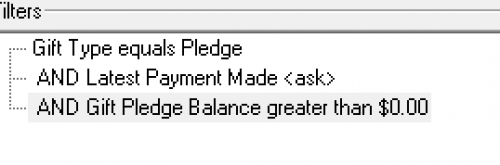
Here is the export I used. I used the filter for gift type to equal Pledge.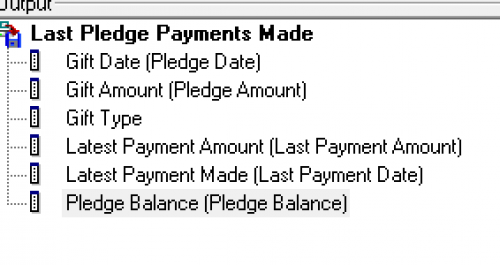
If you want installment number you have to use Mail; however, you can't sort the installment or pull the last installment so you have to figure out how many installments to include to get the last one as it starts a installment 1.
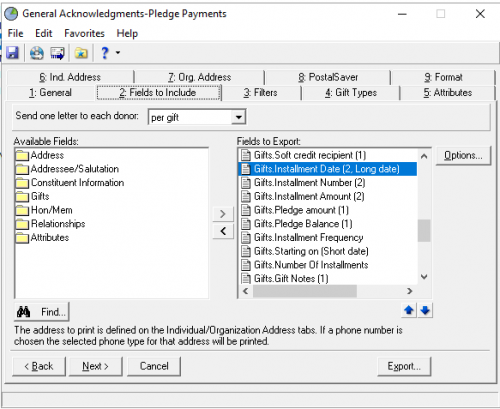 0
0 -
@Susan Fioribello
I see, that's what I thought. You are getting your pledge info b/c you are querying for pledge, not the payment. This also means if donor made more than one payment between timeframe of you sending this acknowledgement you will miss some payment too.Don't have more suggestion over this based on RE's default capability.
0 -
@Alex Wong
Originally, I was pulling the pledge payment because I want to add the pledge payment acknowledgement to my conditional mail merge we run per batch. Unfortunately, this won’t work.I created a separate process to run the pledge payments but because you can’t pull last installment paid, I still can’t include installment number.
This is one of many projects where RE gets me 99% but that missing 1% is important enough to require a complete workaround. Maybe it is one of the things that will get addressed by query in web view.
0 -
@Susan Fioribello
the webview query is simply a “micmic” of the database view query. this isn't going to solve the issue you have.unless Blackbaud create new report that allows payment gift to get original pledge's info, you are out of luck (only other option is for custom report using API)
2 -
@Susan Fioribello I don't think it will be there in web view. While some orgs have many multi-installment pledges, there are others that rarely do.
IMO, for most donors the installment # is an org detail and not something the donor tracks. They are more apt to track amount paid and amount outstanding/balance.
0 -
I saw your reply and decided to look into this more, because it's going to be something I might need in the future as well. I realized I had just done a batch today that had a pledge payment in it, so I tried pulling the Mail>Acknowledgement letters by batch to see if I could get it to give me anything in the installments fields. I did have some success, I did get it to output existing paid installment information. The pledges included in this test, have only had 1 installment paid each, so I wasn't able to test what it would look like with more than 1 installment but I think I got it to do what I wanted:
“Thank you for your pledge payment of (installment amount1) on (receipt date). This is your (installment number_1) payment toward your (receipt amount) leaving a balance of (pledge balance_1).”

1. Pulled by batch
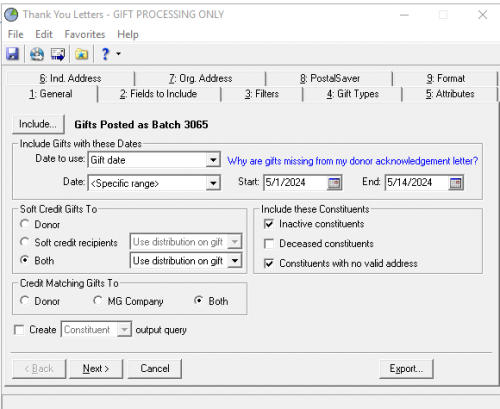
2. Added installment amount, balance, date, frequency, number, and pledge amounts under gifts for fields to export:
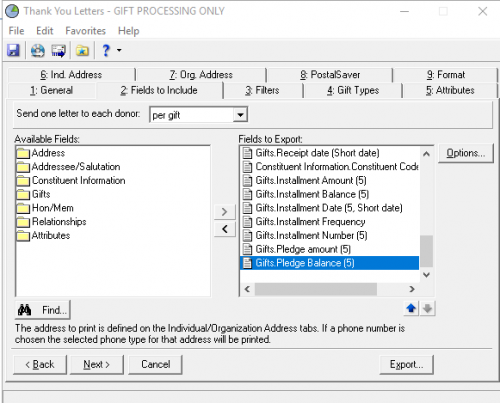
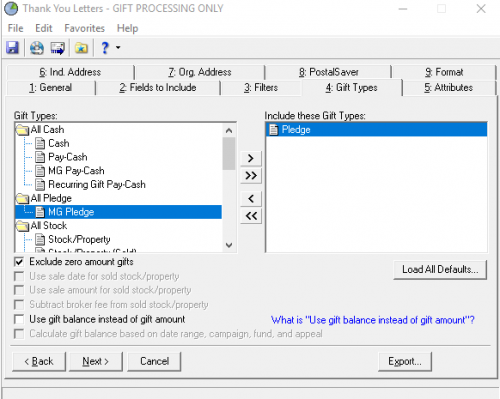
Filter by gift type: Pledge (which made me worry it wouldn't show the pledge payments since I didn't choose pay-cash, but for some reason this actually worked for me and still showed the installments in the export!)
Exported and got the following:

The installment date it is showing is when the installment was expected. So if I were doing a mail merge I would probably use the Receipt date instead. But this looks more like what you were going for from the sounds of things.
“Thank you for your pledge payment of (installment amount1) on (receipt date). This is your (installment number_1) payment toward your (receipt amount) leaving a balance of (pledge balance_1).”
0 -
@Rachel Kauer
I think there's a flaw in the way you are executing this. So I gave it a try too: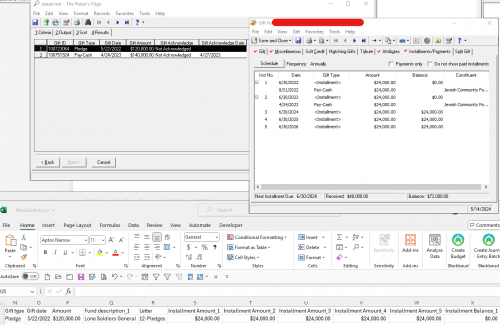
My query is specifically targetting 2 gifts, one is the pledge, one is the payment that was applied to the pledge.
The pledge is 5/22/2022 $120K, having 5 installments of $24K each. Installment 1 and 2 is paid.
The pledge payment is 4/24/2023 $140K, it is split applied to 3 different pledges, only $24K of the $140K is applied to the 5/22/2022 $120K pledge on installment #2's $24K.
Using this query, and the way you configured the mail > acknowledgement letter module, I get an excel file that has the Pledge information, but this is pledge information only. this does not show anything relating to the pledge payment of $140K and that $24K was applied to installment #2 of the pledge. This is due to the acknowledgement letter Gift Type tab where only Pledge is selected. If my query did not have the pledge directly queried on, it would not have any data in the excel file.
So to clarify what I think is happening to your test: the 3 lines output that you have installment information for, they are definitely pledge information, so meaning the gift query you have “Gifts Posted as Batch 3065” has these 3 pledges in the query result, it is not giving you information about the pledge payment that you are trying to acknowledge. You also mentioned “receipt date”, which is the “receipt date” on the pledge record, not relating to the pledge payment. the “receipt amount” is also the pledge's “receipt amount” field, not relating to the pledge payment that was made.
What Susan was trying to do is to get pledge information exported when a pledge payment is received and queried on, which is impossible to do with the current RE capability.
0 -
@Susan Fioribello
I have added this to the Idea Banks for both RE 7 and RE NXT. Please vote. Perhaps they will make this available sometime on our lifetimes ?0













Categories
- All Categories
- New K-12 Community Home (TEST)
- New Higher Education Home Page (Test)
- New Impact Edge Community TEST
- New YourCause Community TEST
- New SKY Community TEST
- New Grantmaking TEST Community
- New Altru Test Community
- New bbcon Community - TEST
- 12 Blackbaud Agents for Good™
- New Raiser's Edge NXT Community
- 8 Blackbaud Community Help
- 224 bbcon®
- 1.4K Blackbaud Altru®
- 411 Blackbaud Award Management™ and Blackbaud Stewardship Management™
- 1.2K Blackbaud CRM™ and Blackbaud Internet Solutions™
- 16 donorCentrics®
- 361 Blackbaud eTapestry®
- 2.7K Blackbaud Financial Edge NXT®
- 688 Blackbaud Grantmaking™
- 604 Blackbaud Education Management Solutions for Higher Education
- 3.3K Blackbaud Education Management Solutions for K-12 Schools
- 954 Blackbaud Luminate Online® and Blackbaud TeamRaiser®
- 85 JustGiving® from Blackbaud®
- 7.1K Blackbaud Raiser's Edge NXT®
- 4K SKY Developer
- 258 ResearchPoint™
- 123 Blackbaud Tuition Management™
- 165 Organizational Best Practices
- 249 Member Lounge (Just for Fun)
- 40 Blackbaud Community Challenges
- 37 PowerUp Challenges
- 3 (Closed) PowerUp Challenge: Grid View Batch
- 3 (Closed) PowerUp Challenge: Chat for Blackbaud AI
- 3 (Closed) PowerUp Challenge: Data Health
- 3 (Closed) Raiser's Edge NXT PowerUp Challenge: Product Update Briefing
- 3 (Closed) Raiser's Edge NXT PowerUp Challenge: Standard Reports+
- 3 (Closed) Raiser's Edge NXT PowerUp Challenge: Email Marketing
- 3 (Closed) Raiser's Edge NXT PowerUp Challenge: Gift Management
- 4 (Closed) Raiser's Edge NXT PowerUp Challenge: Event Management
- 3 (Closed) Raiser's Edge NXT PowerUp Challenge: Home Page
- 4 (Closed) Raiser's Edge NXT PowerUp Challenge: Standard Reports
- 4 (Closed) Raiser's Edge NXT PowerUp Challenge: Query
- 829 Community News
- 3.1K Jobs Board
- 57 Blackbaud SKY® Reporting Announcements
- 47 Blackbaud CRM Higher Ed Product Advisory Group (HE PAG)
- 19 Blackbaud CRM Product Advisory Group (BBCRM PAG)