Sharing my Power Automate flow: Get query results using the new Query connectors!
Comments
-
@Ashley Moose, thank you. I already read one of those but I'll read through the other one.
Also, one other question that I don't believe I have seen an answer to in this thread: when the flow runs successfully, it only creates that file one time--it will error any additional times due to there already being a file of the same name in the same place. I have to go in and delete the previous one created in order to get the flow to work correctly.
Any tips on handling that problem?0 -
@Matthew Burdette
depending on how you plan to use this file saved on the google drive, you can either- create new file with new name (such as adding date/time into the file name), this method will not be good if you have another process that “consume” the data file for other use (power bi or other visualization tool)
- pro - easy to just create new file everytime
- check if file exists, delete if exists, then create the new file using the same name
- pro - maintain file name with new data for other tool to use
1 - create new file with new name (such as adding date/time into the file name), this method will not be good if you have another process that “consume” the data file for other use (power bi or other visualization tool)
-
Hi - I have added this flow and I am wondering if someone can help me with a few modifications.
- I would like to add the current date to the end of the fileName. How would I do that?
- I want to email the file to a group of people once it is delivered to One Drive. Is that a new step after the "Create file" step?
I am a beginner level Power Automate user.
Thank you!
0 -
- this will depends on how you want the current date to format (i.e. 2025-08—19; August 19, 2025;)
- I don't know if there's an action to format date time like they have for formatting number (for currency for example). But you can use expression to achieve this formatDateTime()
- formatDateTime(utcNow(), 'd') will give you 8/19/2025, this will not work as filename through as / (slash) is not a valid file name character
- formatDateTime(utcNow(), 'MMM d, yyyy') will give you Aug 19, 2025
- NOTE: utcNow() will give you the current date/time to format, BUT depending on where you are and when your flow run, this MAY not be your local time's current date, so you may need to look into using the convertFromUtc() expression too to conver from UTC to your local timezone. For example: convertFromUtc(utcNow(), 'Eastern Standard Time', 'MMM d, yyyy')
- I don't know if there's an action to format date time like they have for formatting number (for currency for example). But you can use expression to achieve this formatDateTime()
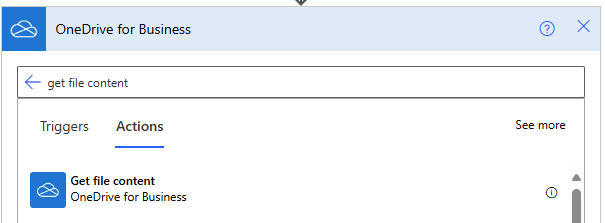
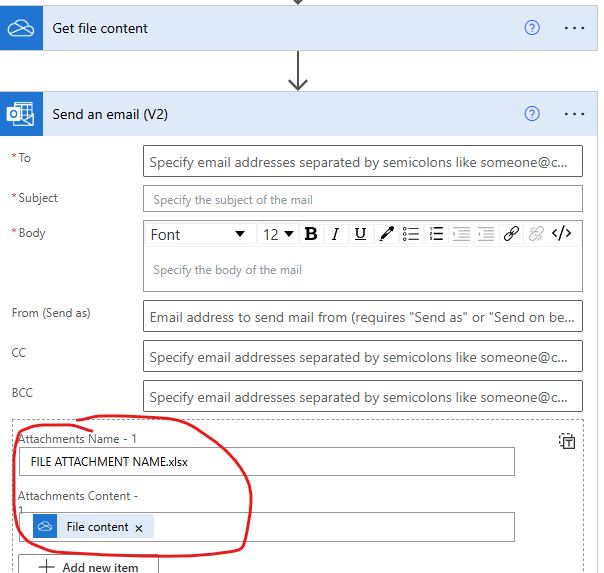
- If you want to send an email with the file as attachment, you will need to use the Get File Content action in the OneDrive connector. Then add the file content into the send email action
0 - this will depends on how you want the current date to format (i.e. 2025-08—19; August 19, 2025;)
-
get file content action
 0
0 -
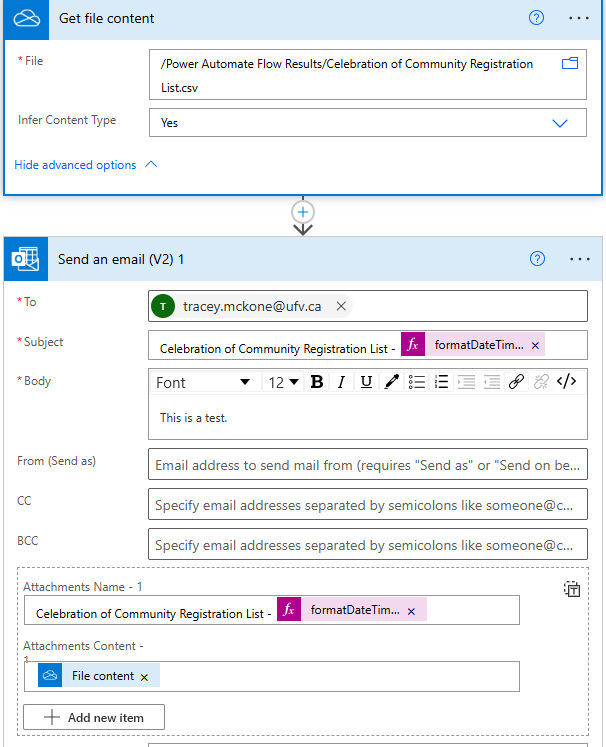
@Alex Wong Thank you! I think I am close, but when I receive the test email, the attachment is not the file from the folder. It looks like this.

Also, sometimes after I test it, the name of the Dynamic Content "File content" changes to read as "Body".
0 -
the Attachments Name need to end with the same file extension, in your case, you need to end with .csv
1 -
@Alex Wong Thanks! That worked.
0 -
I just want to shout that this is a GAME CHANGER!! What is awesome to me is that the fields in the query output are the fields in the file. Am I losing it, or is this not the same for RE NXT Lists? List API Endpoints have a default set of output fields, and we need to create additional steps if we want to pull custom fields outside of the defaults, yeah?
Is there a resource to know when new connectors are added to Power Automate?Is it normal to not understand how every step works? 😅
Thank you all for your hard work and contributing to this conversation!1 -
@Lawrence Kinkopf We announce new connectors in the SKY Developer Announcements portion of this community. You can subscribe to announcements by using the "Follow" button on the right hand side of that page.
0 -
0
-
@Ashley Moose I've successfully been able to get your flow to work. Thank you! Is there a way to have one flow process 10 queries through query API and place the output in .csv files on SharePoint? If so, what's the best way to go about that?
0 -
you can have one flow process 10 queries, sequentially or with some concurrency.
it will just be multiple action to execute each query, multiple actions to iterate and check/wait for query completion, multiple actions to download the csv and save each to sharepoint
0 -
@Ashley Moose
I have got the the flow to work with Google Drive to my "My Drive" at least. @Matthew Burdette does not say if he figured out how get is to go to a Shared Drive but I can't from below.0 -
@Ashley Moose
@Alex Wong how would we do the second bit? Is this just a Google problem as being able to replace the file is key for connecting to Power BI etc.? And is what happens with RE:Queue. I have tried adding a delete file step, but again it only works once as it looks for the file id rather that the name.0 -
Hi @Andrew Thompson - I see two options that could work with Google Drive.
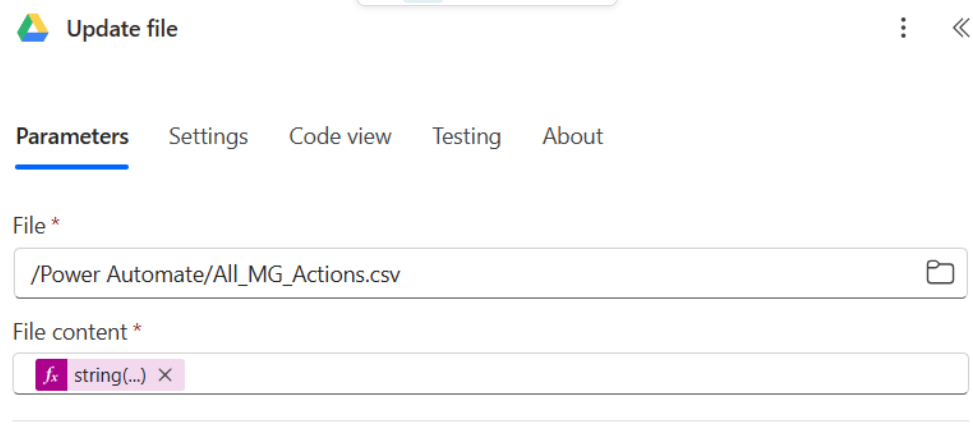
- Google Drive has an Update file action. That may (I don't have experience using Google Drive myself) be able to update the same file over and over each time without the need to delete.
- If you need the file ID to delete, you can first use a List files in folder action, then a Filter array action to find the file based on the file name. Then you can take the ID of that file and delete.
1 -
@Ashley Moose Thanks for that - I had not seen the replace file action, figured out I needed to select "See More" 🤦♂️And it has worked! Was not sure re File content but just copied and pasted in the "String" from the original Create file. I think for the Google template Update File would be a better default.
 0
0 -
Love this flow - and recently tweaked it to work for FE NXT Query, too!
I am running into a challenge with the Create a file SharePoint action.
How is it that this flow allows the Create a file (SharePoint action) to "overwrite" an existing file with the same name?
In other flows I use, I am unable to use the Create a file action, as it says a file with the same name exists in my directory… but this query output flow is saving over existing files each time it runs?0 -
Hi @Lawrence Kinkopf Looks like your file "/Power Automate/All_MG_Actions.csv" is static in nature - that is, it uses the same file name for each run and the action is "update file".
To create a unique name, you might consider adding a dynamic day/time stamp to the file name.
Here's one approach. First create a base time: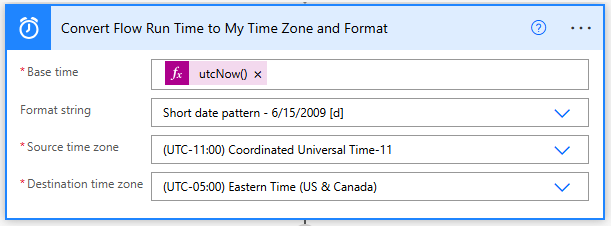
Then in your file name add the date with dynamic content:
 0
0 -
Thanks Erik! That is a really smart solution.
I ended up using a "try/catch" method, where a SharePoint action checks to see if the filename/path exists. If so, it uses the Update file action. If the check fails, it creates a new file (same filename for either step).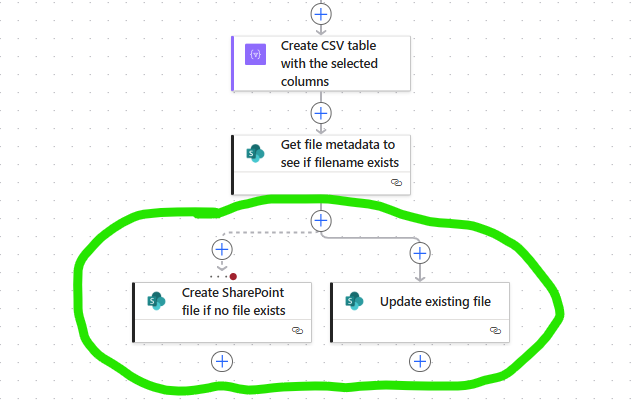 1
1 -
@Ashley Moose Hi I have tried to download a large qry with over 250k records and get this error:
Action 'HTTP_-_Get_query_results' failed: Http request failed as there is an error: 'Cannot write more bytes to the buffer than the configured maximum buffer size: 104857600.'.
So I guess there is a limit to the qry size? It work fine with an over 20k record qry.
0 -
@Andrew Thompson This is a limitation of Power Automate - not the query itself. You can either chunk the query into smaller groups or try eliminating uncessary columns from the output. Both will help to reduce the overall size.
Also, if you look back at comments from November 2024 or so you'll see some additional feedback from others on how to resolve.
0 -
@Ashley Moose thanks I am hoping the scheduled exports Blackbaud plan to replace REQ will cover this and can continue with REQ till then for the larger queries. But this template has been fantastic for creating email alerts from queries that could not be done with NXT lists.
1 -
Hello, thank you for this, it is super helpful! Unfortunately, one of my queries returns a file too big and when I clicked the link to download the old template (Send an HTTP action), the page reads that I don't have permission to access that page. I am fairly new to Power Automate so templates are the only way I can figure it out! :)
0 -
Hi @Tania van de Kamp - I'm not sure what is causing the permission issue but the Send an HTTP action would have returned the same results. This is a limitation of Power Automate - not the query itself. You can either chunk the query into smaller groups or try eliminating uncessary columns from the output. Both will help to reduce the overall size.
Also, if you look back at comments from November 2024 or so you'll see some additional feedback from others on how to resolve.
1



























Categories
- All Categories
- New K-12 Community Home (TEST)
- New Higher Education Home Page (Test)
- New Impact Edge Community TEST
- New YourCause Community TEST
- New SKY Community TEST
- New Grantmaking TEST Community
- New Altru Test Community
- New bbcon Community - TEST
- 12 Blackbaud Agents for Good™
- New Raiser's Edge NXT Community
- 8 Blackbaud Community Help
- 222 bbcon®
- 1.4K Blackbaud Altru®
- 410 Blackbaud Award Management™ and Blackbaud Stewardship Management™
- 1.2K Blackbaud CRM™ and Blackbaud Internet Solutions™
- 16 donorCentrics®
- 361 Blackbaud eTapestry®
- 2.7K Blackbaud Financial Edge NXT®
- 687 Blackbaud Grantmaking™
- 603 Blackbaud Education Management Solutions for Higher Education
- 3.3K Blackbaud Education Management Solutions for K-12 Schools
- 954 Blackbaud Luminate Online® and Blackbaud TeamRaiser®
- 85 JustGiving® from Blackbaud®
- 7K Blackbaud Raiser's Edge NXT®
- 4K SKY Developer
- 258 ResearchPoint™
- 123 Blackbaud Tuition Management™
- 165 Organizational Best Practices
- 248 Member Lounge (Just for Fun)
- 40 Blackbaud Community Challenges
- 37 PowerUp Challenges
- 3 (Closed) PowerUp Challenge: Grid View Batch
- 3 (Closed) PowerUp Challenge: Chat for Blackbaud AI
- 3 (Closed) PowerUp Challenge: Data Health
- 3 (Closed) Raiser's Edge NXT PowerUp Challenge: Product Update Briefing
- 3 (Closed) Raiser's Edge NXT PowerUp Challenge: Standard Reports+
- 3 (Closed) Raiser's Edge NXT PowerUp Challenge: Email Marketing
- 3 (Closed) Raiser's Edge NXT PowerUp Challenge: Gift Management
- 4 (Closed) Raiser's Edge NXT PowerUp Challenge: Event Management
- 3 (Closed) Raiser's Edge NXT PowerUp Challenge: Home Page
- 4 (Closed) Raiser's Edge NXT PowerUp Challenge: Standard Reports
- 4 (Closed) Raiser's Edge NXT PowerUp Challenge: Query
- 829 Community News
- 3.1K Jobs Board
- 57 Blackbaud SKY® Reporting Announcements
- 47 Blackbaud CRM Higher Ed Product Advisory Group (HE PAG)
- 19 Blackbaud CRM Product Advisory Group (BBCRM PAG)