Merging queries saying 0





So, I did this last month. Built a query of people who had donated a certain amount to a fund or appeal (about 7000).
Then used a query of people who have DO NOT SOLICIT to merge (sub) with the first to make sure none showed up on the final list of anyone who was not supposed to be mailed to.
Worked fine (about 6000)
This month, new query of people (different fund, about 10000) and then told it to merge (sub) with that DNS query and it's saying 0 results. Can't be.
What am I doing wrong?
Comments
-
@Ryan Moore Why not create just one query with people who donated to Fund X (also make sure you use the gift types that you use (Cash, pledge, etc) and Solicitation code does not equal DO NOT SOLICIT (or where ever you have that code). No reason to merge queries.
0 -
@Ryan Moore Don't you just hate it when it doesn't work a second time.
Just trying to think of possible issues:
- Obviously, double-check that you selected “Sub” and donors is primary query.
- Run your DNS query alone - does it pull expected results? Did someone else change your criteria?
Will keep thinking about it…
0 -
@Ryan Moore
use constituent query (1 is all that you need)- criteria
- summary of gift amount > certain amount
- sub criteria for gift type and gift date (maybe) and (fund is X OR appeal is Y)
- Solicitor code not equals to DO NOT SOLICIT
- summary of gift amount > certain amount
use of summary of gift amount will avoid dup rows in your query.
0 - criteria
-
I used to do it like that
[give to this or that] OR [gave because of this or that]
AND DO NOT SOLICIT
but a few somehow trickled into it so i was always told to run a separate merge query after to make sure nothing squeaked through
0 -
@Ryan Moore
query condition needs to be exact logic, and will work properly.A or B and C is not the same as (A or
 and C.
so your logic would work if you do
( [give to this or that]
OR [gave because of this or that] )
AND DO NOT SOLICIT
without the proper paranthesis, your logic is more like: [gave because of this or that] AND DO NOT SOLICIT
or all who [give to this or that] (which does not take into consideration of DO NOT SOLICIT)0 -
@Ryan Moore
NVM everybody… someone had changed the DNS query to be “NOT ONE OF” the list, vs. it should have been ONE OF…ugh
0 -
@Ryan Moore ? It happens.
Because we have ‘do not solicit/email/mail’ coding in a variety of places after 20+ years of using RE, I also have master exclusion (actually inclusion) queries that pulls out all those we can't solicit/email/mail/etc. and I based my donor/mail/email pulls on those queries. Saves lots of time entering the exclusion criteria or even merging. Seems to be working for us.
1 -
@Alex Wong
but we can't use those nested/layered brackets from what I can tell (and still I've tried to do them other places and the DNS folks still one or 2 will trickle their way in).I did once and it seemed to work (minus an aberrant record or 2 for unknown reasons)
( CON_ID = notblank
AND ( gave to appeal & gift > $ )
OR ( gave to fund & gift > $ )
AND address_line1 = notblank )
0 -
@Ryan Moore
you cannot “nest” paranthesis in RE Query, that is true, that's why “workaround” exists, but sometime these workaround is not neccessary, it really depends on the complexity of your criteria.looking at your post:
( CON_ID = notblank
AND ( gave to appeal & gift > $ )
OR ( gave to fund & gift > $ )
AND address_line1 = notblank )
red color is not needed. but to be exact:
if your intent is to get a list of gift (gift query) where the gift is $1K+ to a certain appeal OR a certain fund and that their address line 1 is not blank.
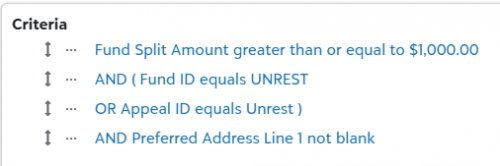
this ensure the “Split” is $1K+ AND (fund is something OR appeal is something) AND address line 1 is not blank if you are trying to do a constituent query of those who HAS a single gift of $1k+ to a certain appeal or fund and that their address line 1 is not blank, you would basically use the same as above using the “Gift” Section in the constituent query.
keep in mind you are criteria-ing on a 1-to-many relationship (single gift has many split), you may get dup rows, how to handle dup is important in Querying.
double paranthesis situation cannot happen in RE Query so this situation would need “special handling”:
((A or
and D) or Esay for example:
A = pledged $1000 in 2025 (use summary of gift)
B = pledged $1000 in 2024 (use summary of gift)
D = Preferred Address State in New York
E = Constituent Code = National Board Memberin English:
I want to get constituent who pledged $1000 in 2025 or pledged $1000 in 2024 that lives in New York state. Add to the list all who are coded as National Board Member in Constituent Code (regardless of they live in NY or gave anything in 2024 / 2025).Since you cannot do double paranthesis, you will have to do something like:
(X and (A or and D) or E
where X is always TRUE, so it doesn't affect the overall logic within the “outter” paranthesis, since it is using a AND condition. (sometime you need X to be always FALSE if the outter paranthesis is using OR.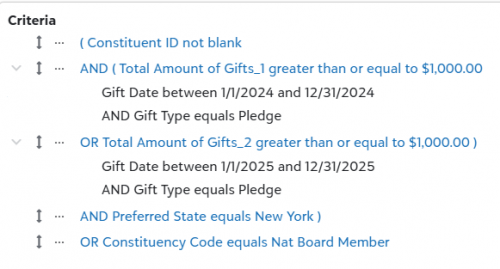 0
0 -
@JoAnn Strommen I do the same then run everything through Query List. It refreshes both my INCLUSION and EXCLUSION queries so I don't get hit with all of those “special” constituent situations!
0















Categories
- All Categories
- New K-12 Community Home (TEST)
- New Higher Education Home Page (Test)
- New Impact Edge Community TEST
- New YourCause Community TEST
- New SKY Community TEST
- New Grantmaking TEST Community
- New Altru Test Community
- New bbcon Community - TEST
- 12 Blackbaud Agents for Good™
- New Raiser's Edge NXT Community
- 8 Blackbaud Community Help
- 222 bbcon®
- 1.4K Blackbaud Altru®
- 410 Blackbaud Award Management™ and Blackbaud Stewardship Management™
- 1.2K Blackbaud CRM™ and Blackbaud Internet Solutions™
- 16 donorCentrics®
- 361 Blackbaud eTapestry®
- 2.7K Blackbaud Financial Edge NXT®
- 687 Blackbaud Grantmaking™
- 603 Blackbaud Education Management Solutions for Higher Education
- 3.3K Blackbaud Education Management Solutions for K-12 Schools
- 954 Blackbaud Luminate Online® and Blackbaud TeamRaiser®
- 85 JustGiving® from Blackbaud®
- 7K Blackbaud Raiser's Edge NXT®
- 4K SKY Developer
- 258 ResearchPoint™
- 123 Blackbaud Tuition Management™
- 165 Organizational Best Practices
- 248 Member Lounge (Just for Fun)
- 40 Blackbaud Community Challenges
- 37 PowerUp Challenges
- 3 (Closed) PowerUp Challenge: Grid View Batch
- 3 (Closed) PowerUp Challenge: Chat for Blackbaud AI
- 3 (Closed) PowerUp Challenge: Data Health
- 3 (Closed) Raiser's Edge NXT PowerUp Challenge: Product Update Briefing
- 3 (Closed) Raiser's Edge NXT PowerUp Challenge: Standard Reports+
- 3 (Closed) Raiser's Edge NXT PowerUp Challenge: Email Marketing
- 3 (Closed) Raiser's Edge NXT PowerUp Challenge: Gift Management
- 4 (Closed) Raiser's Edge NXT PowerUp Challenge: Event Management
- 3 (Closed) Raiser's Edge NXT PowerUp Challenge: Home Page
- 4 (Closed) Raiser's Edge NXT PowerUp Challenge: Standard Reports
- 4 (Closed) Raiser's Edge NXT PowerUp Challenge: Query
- 829 Community News
- 3.1K Jobs Board
- 57 Blackbaud SKY® Reporting Announcements
- 47 Blackbaud CRM Higher Ed Product Advisory Group (HE PAG)
- 19 Blackbaud CRM Product Advisory Group (BBCRM PAG)