TeamRaiser Tips And Tricks: Using Reusables Is Smart!

Andy Socrates
Blackbaud Employee




The following post is from Andrea Fleisher, an account manager with Cathexis Partners, a Blackbaud Partner.
As the organizer of your digital peer-to-peer campaign, do you find yourself frequently re-writing and editing the content of pages in your TeamRaiser event site — such as the Greeting page, FAQs, or Event Information page — as details of your campaign evolve? If so, you might find that at the end of the event season, you wish you could remember what your pages contained at the beginning of the season.
There’s a solution to this common dilemma.
PageBuilder reusable content
TeamRaiser has a custom pages feature that your site might already be using. If you edit your pages by going to TeamRaiser > Edit > Step 12 or 13 Customize Pages, then you are using custom pages.
If you are using custom pages, then you can convert your content to be version-controlled by switching to PageBuilder reusable content. This allows you to see the various revisions of your pages without messing up your navigation links.
Why use PageBuilder reusable pages
Using PageBuilder reusable pages in this way offers multiple benefits, including:
If your content is currently in a TeamRaiser custom page and you want to convert it to PageBuilder, you need a 1:1 relationship between each TeamRaiser custom page and each PageBuilder page. Here’s what to do:
You have just embedded a PageBuilder reusable page into a TeamRaiser custom page. If your custom page already included content, switch to the Plain Text Editor, highlight all, cut, and then paste that content into version one of the corresponding PageBuilder page.
From this point forward, you can edit your page in PageBuilder.
When you do, be sure to click “Manage,” and always copy the Active version, so you keep the version control. Also, when you create a new version, it’s helpful to add a short note indicating why you made the version.
Eventually, you’ll have a paper trail of edits to your page — for which your future self, or your colleagues, will thank you.
Learn more
Discover more TeamRaiser tips and tricks in this on-demand webinar from Cathexis Partners.
As the organizer of your digital peer-to-peer campaign, do you find yourself frequently re-writing and editing the content of pages in your TeamRaiser event site — such as the Greeting page, FAQs, or Event Information page — as details of your campaign evolve? If so, you might find that at the end of the event season, you wish you could remember what your pages contained at the beginning of the season.
There’s a solution to this common dilemma.
PageBuilder reusable content
TeamRaiser has a custom pages feature that your site might already be using. If you edit your pages by going to TeamRaiser > Edit > Step 12 or 13 Customize Pages, then you are using custom pages.
If you are using custom pages, then you can convert your content to be version-controlled by switching to PageBuilder reusable content. This allows you to see the various revisions of your pages without messing up your navigation links.
Why use PageBuilder reusable pages
Using PageBuilder reusable pages in this way offers multiple benefits, including:
- It offers version control, so if you make an error, you can easily revert to an older version.
- Since it preserves past versions of your content, you can refer to those versions as you develop content for future events. This saves you time if you want to re-use content from past events and helps you stay consistent from event to event.
- It is less likely than the TeamRaiser visual editor to break any sensitive code or styling (for example, using CSS or JavaScript) you might be using.
If your content is currently in a TeamRaiser custom page and you want to convert it to PageBuilder, you need a 1:1 relationship between each TeamRaiser custom page and each PageBuilder page. Here’s what to do:
- Create a PageBuilder reusable page for each page you need. Name your pages with logic and consistency. For example, “reus_event_information_page”.
- Go to Fundraising > TeamRaiser.
- Edit your event and go to Step 12 or 13: Customize Pages.
- Click on the Custom Pages tab near the middle of the screen.
- If your page doesn’t already exist here, create it.
- Edit your TeamRaiser custom page.
- Click on the cogwheel icon of the editing toolbar.
- Choose Content > Reusable Page, then look for and select your page name, for example “reus_event_information_page”.
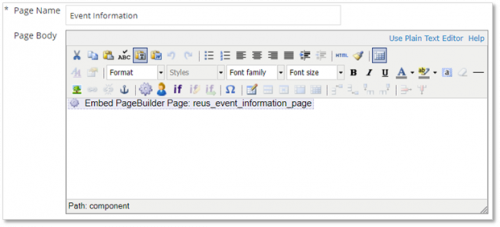
- Click Insert. Now your page will look like this:

You have just embedded a PageBuilder reusable page into a TeamRaiser custom page. If your custom page already included content, switch to the Plain Text Editor, highlight all, cut, and then paste that content into version one of the corresponding PageBuilder page.
From this point forward, you can edit your page in PageBuilder.
When you do, be sure to click “Manage,” and always copy the Active version, so you keep the version control. Also, when you create a new version, it’s helpful to add a short note indicating why you made the version.
Eventually, you’ll have a paper trail of edits to your page — for which your future self, or your colleagues, will thank you.
Learn more
Discover more TeamRaiser tips and tricks in this on-demand webinar from Cathexis Partners.
1
Categories
- All Categories
- New eTapestry Home Community
- New K-12 Community Home (TEST)
- New Higher Education Home Page (Test)
- New Impact Edge Community TEST
- New YourCause Community TEST
- New SKY Community TEST
- New Grantmaking TEST Community
- New Altru Test Community
- New bbcon Community - TEST
- 12 Blackbaud Agents for Good™
- New Raiser's Edge NXT Community
- 8 Blackbaud Community Help
- 223 bbcon®
- 1.4K Blackbaud Altru®
- 411 Blackbaud Award Management™ and Blackbaud Stewardship Management™
- 1.2K Blackbaud CRM™ and Blackbaud Internet Solutions™
- 16 donorCentrics®
- 361 Blackbaud eTapestry®
- 2.7K Blackbaud Financial Edge NXT®
- 688 Blackbaud Grantmaking™
- 604 Blackbaud Education Management Solutions for Higher Education
- 3.3K Blackbaud Education Management Solutions for K-12 Schools
- 954 Blackbaud Luminate Online® and Blackbaud TeamRaiser®
- 85 JustGiving® from Blackbaud®
- 7.1K Blackbaud Raiser's Edge NXT®
- 4K SKY Developer
- 258 ResearchPoint™
- 124 Blackbaud Tuition Management™
- 165 Organizational Best Practices
- 249 Member Lounge (Just for Fun)
- 40 Blackbaud Community Challenges
- 37 PowerUp Challenges
- 3 (Closed) PowerUp Challenge: Grid View Batch
- 3 (Closed) PowerUp Challenge: Chat for Blackbaud AI
- 3 (Closed) PowerUp Challenge: Data Health
- 3 (Closed) Raiser's Edge NXT PowerUp Challenge: Product Update Briefing
- 3 (Closed) Raiser's Edge NXT PowerUp Challenge: Standard Reports+
- 3 (Closed) Raiser's Edge NXT PowerUp Challenge: Email Marketing
- 3 (Closed) Raiser's Edge NXT PowerUp Challenge: Gift Management
- 4 (Closed) Raiser's Edge NXT PowerUp Challenge: Event Management
- 3 (Closed) Raiser's Edge NXT PowerUp Challenge: Home Page
- 4 (Closed) Raiser's Edge NXT PowerUp Challenge: Standard Reports
- 4 (Closed) Raiser's Edge NXT PowerUp Challenge: Query
- 829 Community News
- 3.1K Jobs Board
- 57 Blackbaud SKY® Reporting Announcements
- 47 Blackbaud CRM Higher Ed Product Advisory Group (HE PAG)
- 19 Blackbaud CRM Product Advisory Group (BBCRM PAG)