Set Up Work Center: The One-Stop Shop For Fundraisers





In Fundraising, Work, fundraisers can easily view and access all the records and tasks they need to cultivate relationships and secure major gift opportunities with constituents. To enable fundraisers to access this one-stop shop for their daily activities, set up Work Center for them.
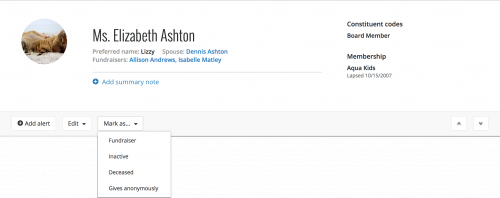 Mark constituents as fundraisers. In Fundraising, Work Center runs on fundraiser assignments and relationships. If you haven't already done so, determine who at your organization manages constituent relationships and related activities — including volunteers who contact donors — and mark their constituent records as fundraisers. To make a constituent a fundraiser, select Mark as, Fundraiser on their record, choose their user name, and select Save. For more information, see the Fundraisers Help.
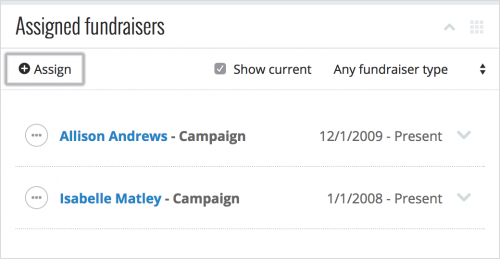 Give your fundraisers assignments. If you don't currently assign fundraisers to cultivate relationships, determine who manages which constituents and add assignments. To assign a constituent to someone, select Assign under Assigned fundraisers on the constituent's record. For more information, check out Fundraiser Assignments Help.
Additionally, assign fundraisers to actions and opportunities required to track and cultivate relationships and secure gift opportunities. Similarly, to help recognize their efforts, track which gifts your fundraisers should receive credit for.
In Work Center, these assignments appear on the Portfolio, Gifts, Actions, and Opportunities tabs and fuel statistics on the Overview tab.
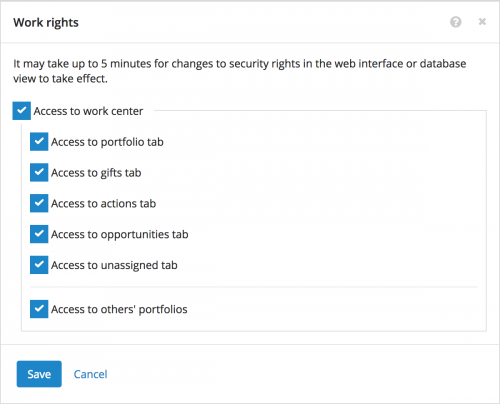 Give fundraisers access to Work Center. Admins! In Control Panel, you can give your fundraisers' security groups access to Work Center and choose which of its tabs they can use. You can also choose whether a group's members can view other fundraisers' work centers, such as for fundraising managers. For more information, see the Fundraising Work Center Rights Help.
If you have access to others' portfolios as a fundraising manager or other supervisor, select Change fundraiser in Work Center to choose whose portfolio to view. To view everyone's portfolios, choose All fundraisers. (To view the portfolio of a fundraiser who doesn't have access to Work Center for some reason, they'll still need a user record in the web or database view.)
For more information about Fundraising, Work, check out the Work Center Help!
 Mark constituents as fundraisers. In Fundraising, Work Center runs on fundraiser assignments and relationships. If you haven't already done so, determine who at your organization manages constituent relationships and related activities — including volunteers who contact donors — and mark their constituent records as fundraisers. To make a constituent a fundraiser, select Mark as, Fundraiser on their record, choose their user name, and select Save. For more information, see the Fundraisers Help.
 Give your fundraisers assignments. If you don't currently assign fundraisers to cultivate relationships, determine who manages which constituents and add assignments. To assign a constituent to someone, select Assign under Assigned fundraisers on the constituent's record. For more information, check out Fundraiser Assignments Help.
Additionally, assign fundraisers to actions and opportunities required to track and cultivate relationships and secure gift opportunities. Similarly, to help recognize their efforts, track which gifts your fundraisers should receive credit for.
- When you add or edit an action for a constituent or opportunity, select who should perform the task or interaction. For more information, see the Actions Help.
- With Prospect Research Management, you can track opportunities to cultivate major donors or acquire major gifts. When you add or edit an opportunity for a constituent, select who should manage the effort. For more information, see the Opportunities Help.
- When you add or edit a gift in the database view, search for the responsible fundraisers on the Gift tab of its record so they receive credit.
In Work Center, these assignments appear on the Portfolio, Gifts, Actions, and Opportunities tabs and fuel statistics on the Overview tab.
 Give fundraisers access to Work Center. Admins! In Control Panel, you can give your fundraisers' security groups access to Work Center and choose which of its tabs they can use. You can also choose whether a group's members can view other fundraisers' work centers, such as for fundraising managers. For more information, see the Fundraising Work Center Rights Help.
If you have access to others' portfolios as a fundraising manager or other supervisor, select Change fundraiser in Work Center to choose whose portfolio to view. To view everyone's portfolios, choose All fundraisers. (To view the portfolio of a fundraiser who doesn't have access to Work Center for some reason, they'll still need a user record in the web or database view.)
For more information about Fundraising, Work, check out the Work Center Help!
0
Comments
-
Thanks for creating this!
Could you also explain a bit more the additional permissions you may want to set in the classic RE view? I had to go into that part of the database (Security) to make it so the only editing of records gift officers could do in the NXT view were adding notes & actions, but I had to do that in the classic view.0 -
Hey Anitra, I just posted a follow-up to the blog (https://community.blackbaud.com/blogs/13/3556) to discuss the additional security settings available in the database view, sparked by your comment here. Thanks!0



Categories
- All Categories
- New K-12 Community Home (TEST)
- New Higher Education Home Page (Test)
- New Impact Edge Community TEST
- New YourCause Community TEST
- New SKY Community TEST
- New Grantmaking TEST Community
- New Altru Test Community
- New bbcon Community - TEST
- 12 Blackbaud Agents for Good™
- New Raiser's Edge NXT Community
- 8 Blackbaud Community Help
- 222 bbcon®
- 1.4K Blackbaud Altru®
- 411 Blackbaud Award Management™ and Blackbaud Stewardship Management™
- 1.2K Blackbaud CRM™ and Blackbaud Internet Solutions™
- 16 donorCentrics®
- 361 Blackbaud eTapestry®
- 2.7K Blackbaud Financial Edge NXT®
- 688 Blackbaud Grantmaking™
- 604 Blackbaud Education Management Solutions for Higher Education
- 3.3K Blackbaud Education Management Solutions for K-12 Schools
- 954 Blackbaud Luminate Online® and Blackbaud TeamRaiser®
- 85 JustGiving® from Blackbaud®
- 7.1K Blackbaud Raiser's Edge NXT®
- 4K SKY Developer
- 258 ResearchPoint™
- 123 Blackbaud Tuition Management™
- 165 Organizational Best Practices
- 249 Member Lounge (Just for Fun)
- 40 Blackbaud Community Challenges
- 37 PowerUp Challenges
- 3 (Closed) PowerUp Challenge: Grid View Batch
- 3 (Closed) PowerUp Challenge: Chat for Blackbaud AI
- 3 (Closed) PowerUp Challenge: Data Health
- 3 (Closed) Raiser's Edge NXT PowerUp Challenge: Product Update Briefing
- 3 (Closed) Raiser's Edge NXT PowerUp Challenge: Standard Reports+
- 3 (Closed) Raiser's Edge NXT PowerUp Challenge: Email Marketing
- 3 (Closed) Raiser's Edge NXT PowerUp Challenge: Gift Management
- 4 (Closed) Raiser's Edge NXT PowerUp Challenge: Event Management
- 3 (Closed) Raiser's Edge NXT PowerUp Challenge: Home Page
- 4 (Closed) Raiser's Edge NXT PowerUp Challenge: Standard Reports
- 4 (Closed) Raiser's Edge NXT PowerUp Challenge: Query
- 829 Community News
- 3.1K Jobs Board
- 57 Blackbaud SKY® Reporting Announcements
- 47 Blackbaud CRM Higher Ed Product Advisory Group (HE PAG)
- 19 Blackbaud CRM Product Advisory Group (BBCRM PAG)