How To Export Netclassroom Usernames And Passwords

Susan Sloan
Blackbaud Employee


When the time comes to provide usernames and passwords to your students and parents, export is our best tool. Today we’re going to talk about exporting usernames and passwords using both a Student export and an Individual export.
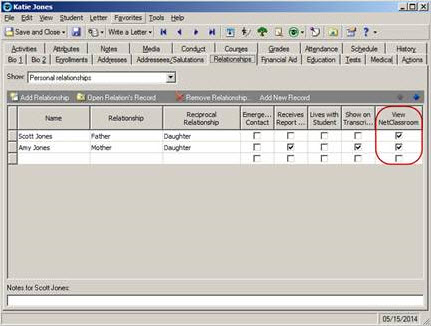
A few things to keep in mind:
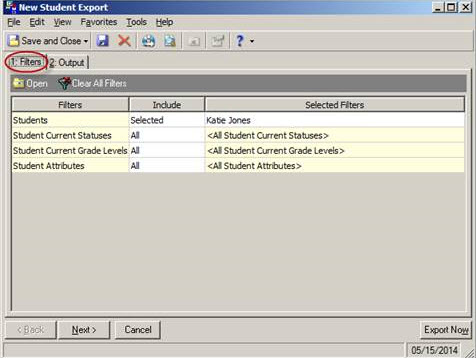
In the student export, I have filtered on Katie Jones. You may choose to filter by query, by status (such as “Current Student”), or by Grade Level(s).
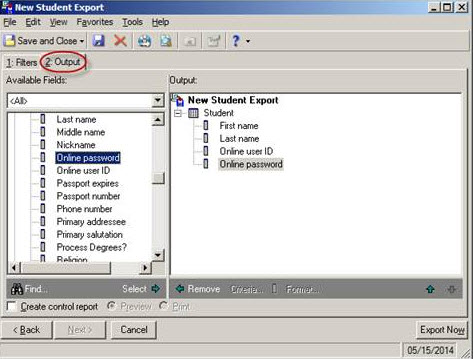
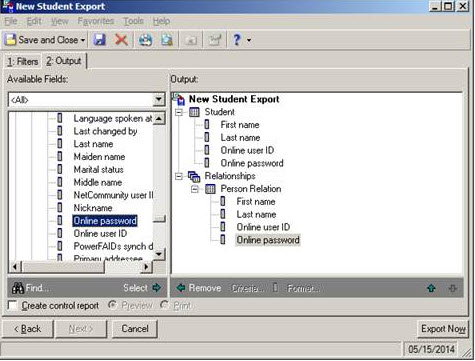
To see the student’s information, I chose the following fields on the output tab:
Student -> First name
Student -> Last name
Student -> Online user ID
Student -> Online password
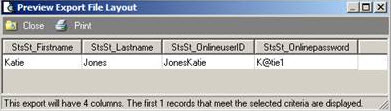
Here is the preview:
You may also want to include the parent information in the export. To include the relationship information I chose the following fields:
Relationships -> Person Relation -> First name
Relationships -> Person Relation -> Last name
Relationships -> Person Relation -> Online user ID
Relationships -> Person Relation -> Online password
In this example I chose to export 2 relationships (Father, Mother), but you may modify this as needed.
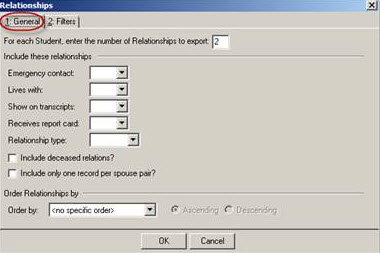
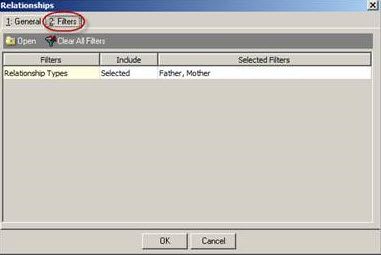
Here is the preview with the additional output:

Scroll to the right…

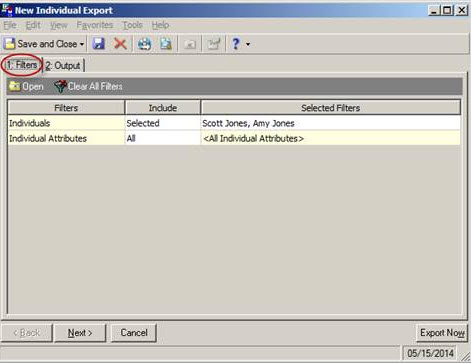
You can see the same information using an Individual export. You may choose to use an Individual export if you are sending the usernames and passwords to parents using NetMail. In this export I filtered on Scott Jones (Father) and Amy Jones (Mother). You may choose to filter using a query of current parents (See How to query on parents of current students).
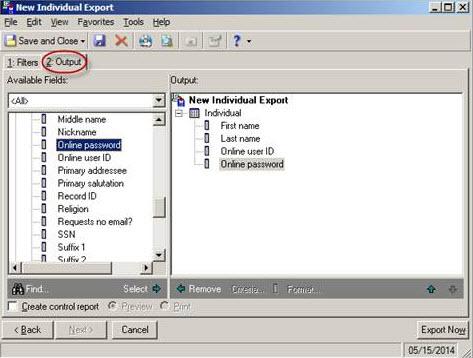
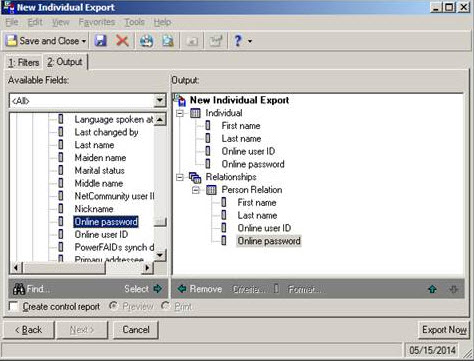
To see the parent’s information, I chose the following fields on the output tab:
Individual -> First name
Individual -> Last name
Individual -> Online user ID
Individual -> Online password
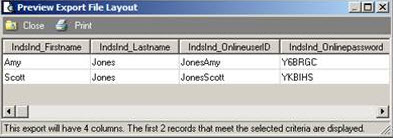
Here is the preview:
You may also want to include the student information in the export. To include the relationship information I chose the following fields:
Relationships -> Person Relation -> First name
Relationships -> Person Relation -> Last name
Relationships -> Person Relation -> Online user ID
Relationships -> Person Relation -> Online password
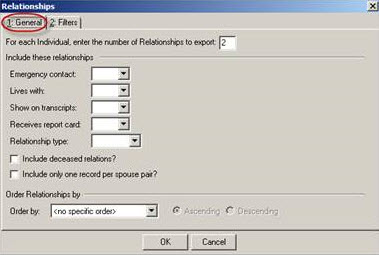
In this example I chose to export 2 relationships (Son, Daughter), but you may modify this as needed.
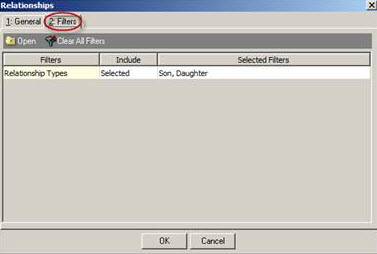
Here is the preview with the additional output:
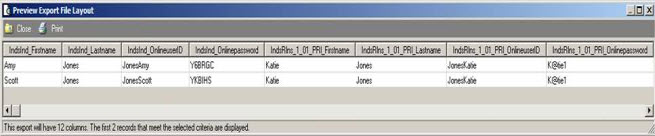
You can also bookmark How to export relations' NetClassroom user IDs and passwords for reference regarding this process.
For a chance to win a $25 Staples® gift card comment below with your Name, Email and Site ID or email backtoschoolcontest@blackbaud.com with the name of the blog in the subject line, your name, and Site ID in the body of the email. Participants must submit their entry by 11:59 pm Eastern on August 31, 2014.
A few things to keep in mind:
- Export is used because Student and Individual Passwords are encrypted in query. (See Faculty Access for the Web user names and passwords are encrypted in Query and Export for more information)
- Faculty passwords will be encrypted from both Query and Export for security (Faculty passwords can be changed in Administration -> Setup System Security. See How to change a user’s password for more information)
- Netmail can be used in conjunction with the export to email passwords to Students or Individuals. (See How to send NetClassroom online user IDs and passwords to students and individuals through NetMail for more information)
- If you need to generate passwords see How to automatically generate NetClassroom User IDs and Passwords.

In the student export, I have filtered on Katie Jones. You may choose to filter by query, by status (such as “Current Student”), or by Grade Level(s).

To see the student’s information, I chose the following fields on the output tab:
Student -> First name
Student -> Last name
Student -> Online user ID
Student -> Online password

Here is the preview:

You may also want to include the parent information in the export. To include the relationship information I chose the following fields:
Relationships -> Person Relation -> First name
Relationships -> Person Relation -> Last name
Relationships -> Person Relation -> Online user ID
Relationships -> Person Relation -> Online password
In this example I chose to export 2 relationships (Father, Mother), but you may modify this as needed.


Here is the preview with the additional output:

Scroll to the right…

You can see the same information using an Individual export. You may choose to use an Individual export if you are sending the usernames and passwords to parents using NetMail. In this export I filtered on Scott Jones (Father) and Amy Jones (Mother). You may choose to filter using a query of current parents (See How to query on parents of current students).

To see the parent’s information, I chose the following fields on the output tab:
Individual -> First name
Individual -> Last name
Individual -> Online user ID
Individual -> Online password

Here is the preview:

You may also want to include the student information in the export. To include the relationship information I chose the following fields:
Relationships -> Person Relation -> First name
Relationships -> Person Relation -> Last name
Relationships -> Person Relation -> Online user ID
Relationships -> Person Relation -> Online password
In this example I chose to export 2 relationships (Son, Daughter), but you may modify this as needed.


Here is the preview with the additional output:

You can also bookmark How to export relations' NetClassroom user IDs and passwords for reference regarding this process.
For a chance to win a $25 Staples® gift card comment below with your Name, Email and Site ID or email backtoschoolcontest@blackbaud.com with the name of the blog in the subject line, your name, and Site ID in the body of the email. Participants must submit their entry by 11:59 pm Eastern on August 31, 2014.
0
Categories
- All Categories
- New K-12 Community Home (TEST)
- New Higher Education Home Page (Test)
- New Impact Edge Community TEST
- New YourCause Community TEST
- New SKY Community TEST
- New Grantmaking TEST Community
- New Altru Test Community
- New bbcon Community - TEST
- 12 Blackbaud Agents for Good™
- New Raiser's Edge NXT Community
- 8 Blackbaud Community Help
- 224 bbcon®
- 1.4K Blackbaud Altru®
- 411 Blackbaud Award Management™ and Blackbaud Stewardship Management™
- 1.2K Blackbaud CRM™ and Blackbaud Internet Solutions™
- 16 donorCentrics®
- 361 Blackbaud eTapestry®
- 2.7K Blackbaud Financial Edge NXT®
- 688 Blackbaud Grantmaking™
- 604 Blackbaud Education Management Solutions for Higher Education
- 3.3K Blackbaud Education Management Solutions for K-12 Schools
- 954 Blackbaud Luminate Online® and Blackbaud TeamRaiser®
- 85 JustGiving® from Blackbaud®
- 7.1K Blackbaud Raiser's Edge NXT®
- 4K SKY Developer
- 258 ResearchPoint™
- 123 Blackbaud Tuition Management™
- 165 Organizational Best Practices
- 249 Member Lounge (Just for Fun)
- 40 Blackbaud Community Challenges
- 37 PowerUp Challenges
- 3 (Closed) PowerUp Challenge: Grid View Batch
- 3 (Closed) PowerUp Challenge: Chat for Blackbaud AI
- 3 (Closed) PowerUp Challenge: Data Health
- 3 (Closed) Raiser's Edge NXT PowerUp Challenge: Product Update Briefing
- 3 (Closed) Raiser's Edge NXT PowerUp Challenge: Standard Reports+
- 3 (Closed) Raiser's Edge NXT PowerUp Challenge: Email Marketing
- 3 (Closed) Raiser's Edge NXT PowerUp Challenge: Gift Management
- 4 (Closed) Raiser's Edge NXT PowerUp Challenge: Event Management
- 3 (Closed) Raiser's Edge NXT PowerUp Challenge: Home Page
- 4 (Closed) Raiser's Edge NXT PowerUp Challenge: Standard Reports
- 4 (Closed) Raiser's Edge NXT PowerUp Challenge: Query
- 829 Community News
- 3.1K Jobs Board
- 57 Blackbaud SKY® Reporting Announcements
- 47 Blackbaud CRM Higher Ed Product Advisory Group (HE PAG)
- 19 Blackbaud CRM Product Advisory Group (BBCRM PAG)