A Couple of Quick Tips for End-of-Year Reporting

Geoff Arbuckle
Blackbaud Employee




Welcome to December, fellow Blackbaud eTapestry® users! Not only is the holiday season already making its presence known to all of us, but it's also the time of year to think about getting your year-end report created. This blog will give you some of my favorite tips to make it a little easier for you to review how you did in 2024.Let's talk about year-end reporting, shall we?
While there are virtually a million ways you could build a report for any purpose, one thing remains common across all database users. That one thing is that organizations always like to know the money they are bringing in during particular time frames. Some organizations run weekly reports. Some like to set up a monthly report. Almost everyone, though, needs an annual report.
So, January presents itself as a potentially busy month for all organizations. You'll need to catch up on donations sent in during any days or periods over the holidays that you were closed. Speaking of closing, that also means that you might need to spend the first week or two of January "closing" out the previous year and making sure everything that should be entered and needs to be entered is. The second half of January is often filled with creating tax letters for your donors.
But one more consideration during this time is the need to report on the total year's giving. I have two main tips that I want to share with you that you can do right now to get ahead of this report. After all, who doesn't like to have at least one item scratched off their to-do list as early as possible?
My first tip is to THINK AHEAD! Yes, you can set this query and report up right now so it's ready to be completed as soon as you need it. Naturally, creating a report is something you can do at any point in time. Reports are simply shells for a query to populate. You can set up any report at any time. What most people don't realize is that you can do the same thing for queries rather easily. So, that's my first tip.
My second tip is LEARN HOW you can work in advance. I know it's relatively simple and it's something many might consider already, but in queries, there are ways to work with "variable" dates that allow you to practically set the query and forget it. There are two places where these variable dates can be set in conjunction with Individual Transaction Received to find donations within a time frame that will always update and reset itself without needing to go in and edit the query's criteria. The first place that you find this is in the criteria for Journal Entry Date itself. When you select those criteria, you will typically always see "Custom Range" selected, but in the drop-down menu, you have several variable dates like "Last Month" or "This Month" or "This Year" or "Last Year" and on and on.
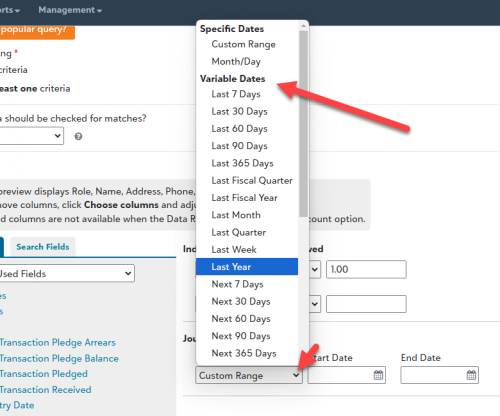
These always reset to meet whatever option is selected. For example, Last Week will always be the previous Sunday through Saturday. This Month will always look from the first of the current month to the present date that you run the query. Last Year is always January 1 to December 31 of the previous year. When you select these options, it will always look for the journal entries that meet those variable dates.
You might see where I'm going with this. If you were to set up a query that uses the Commonly Used Fields criteria of "Individual Transaction Received" set to "Greater Than or Equal to $1" and "Journal Entry Date" with the Range Type set to the Variable Date of "Last Year," as of January 1, it will look at everything dated from the previous year. As each year flips over to the next, that query is already set to provide you information on the previous year! In addition to that, each and every entry backdated to fit that variable range will show up after it's saved to the system!
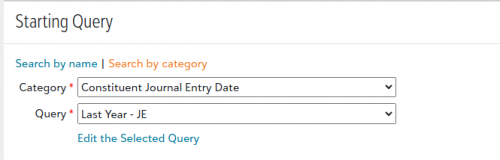
The same thing goes for the second place you can find a variable date range: the Starting Query. Now, typically, when you create a new query, you will find the Base category selected along with the query set to All Constituents. In fact, most of the time you receive steps from support or in a Knowledgebase article, it will suggest that as the typical starting query. However, you can also change the category to Constituent Journal Entry Date and the query to Last Year. This does the same thing as the Journal Entry Date criteria when using one of the Variable Dates (NOTE: If you choose the Last Year Starting Query as suggested in this paragraph, you will not choose Journal Entry Date as criteria at the bottom of the query page).
Hopefully either of these two small tips can help save you time during the busy start-of-the-new-year period when you will have lots of catching up to do after the holidays. I hope you have a great, happy, and safe holiday season and I look forward to sharing more tips with you as we enter 2025. Be on the lookout for more blogs and live webinars coming soon!
While there are virtually a million ways you could build a report for any purpose, one thing remains common across all database users. That one thing is that organizations always like to know the money they are bringing in during particular time frames. Some organizations run weekly reports. Some like to set up a monthly report. Almost everyone, though, needs an annual report.
So, January presents itself as a potentially busy month for all organizations. You'll need to catch up on donations sent in during any days or periods over the holidays that you were closed. Speaking of closing, that also means that you might need to spend the first week or two of January "closing" out the previous year and making sure everything that should be entered and needs to be entered is. The second half of January is often filled with creating tax letters for your donors.
But one more consideration during this time is the need to report on the total year's giving. I have two main tips that I want to share with you that you can do right now to get ahead of this report. After all, who doesn't like to have at least one item scratched off their to-do list as early as possible?
My first tip is to THINK AHEAD! Yes, you can set this query and report up right now so it's ready to be completed as soon as you need it. Naturally, creating a report is something you can do at any point in time. Reports are simply shells for a query to populate. You can set up any report at any time. What most people don't realize is that you can do the same thing for queries rather easily. So, that's my first tip.
My second tip is LEARN HOW you can work in advance. I know it's relatively simple and it's something many might consider already, but in queries, there are ways to work with "variable" dates that allow you to practically set the query and forget it. There are two places where these variable dates can be set in conjunction with Individual Transaction Received to find donations within a time frame that will always update and reset itself without needing to go in and edit the query's criteria. The first place that you find this is in the criteria for Journal Entry Date itself. When you select those criteria, you will typically always see "Custom Range" selected, but in the drop-down menu, you have several variable dates like "Last Month" or "This Month" or "This Year" or "Last Year" and on and on.

These always reset to meet whatever option is selected. For example, Last Week will always be the previous Sunday through Saturday. This Month will always look from the first of the current month to the present date that you run the query. Last Year is always January 1 to December 31 of the previous year. When you select these options, it will always look for the journal entries that meet those variable dates.
You might see where I'm going with this. If you were to set up a query that uses the Commonly Used Fields criteria of "Individual Transaction Received" set to "Greater Than or Equal to $1" and "Journal Entry Date" with the Range Type set to the Variable Date of "Last Year," as of January 1, it will look at everything dated from the previous year. As each year flips over to the next, that query is already set to provide you information on the previous year! In addition to that, each and every entry backdated to fit that variable range will show up after it's saved to the system!
The same thing goes for the second place you can find a variable date range: the Starting Query. Now, typically, when you create a new query, you will find the Base category selected along with the query set to All Constituents. In fact, most of the time you receive steps from support or in a Knowledgebase article, it will suggest that as the typical starting query. However, you can also change the category to Constituent Journal Entry Date and the query to Last Year. This does the same thing as the Journal Entry Date criteria when using one of the Variable Dates (NOTE: If you choose the Last Year Starting Query as suggested in this paragraph, you will not choose Journal Entry Date as criteria at the bottom of the query page).

Hopefully either of these two small tips can help save you time during the busy start-of-the-new-year period when you will have lots of catching up to do after the holidays. I hope you have a great, happy, and safe holiday season and I look forward to sharing more tips with you as we enter 2025. Be on the lookout for more blogs and live webinars coming soon!
1
Comments
-
My organization is looking into emailing our 2025 tax receipts in early 2026. We have done a lot of researching and find it can be done by creating a PDF and mailing the receipts but we haven't figured out how to email them to our supporters. Normally we outsource the project but this year we are hoping to complete the task in-house. Any tips on this would be appreciated.
0



Categories
- All Categories
- New YourCause Community TEST
- New SKY Community TEST
- New Grantmaking TEST Community
- New Altru Test Community
- New bbcon Community - TEST
- 12 Blackbaud Agents for Good™
- New Raiser's Edge NXT Community
- 7 Blackbaud Community Help
- 218 bbcon®
- 1.4K Blackbaud Altru®
- 409 Blackbaud Award Management™ and Blackbaud Stewardship Management™
- 1.2K Blackbaud CRM™ and Blackbaud Internet Solutions™
- 16 donorCentrics®
- 361 Blackbaud eTapestry®
- 2.7K Blackbaud Financial Edge NXT®
- 680 Blackbaud Grantmaking™
- 598 Blackbaud Education Management Solutions for Higher Education
- 3.3K Blackbaud Education Management Solutions for K-12 Schools
- 952 Blackbaud Luminate Online® and Blackbaud TeamRaiser®
- 85 JustGiving® from Blackbaud®
- 7K Blackbaud Raiser's Edge NXT®
- 3.9K SKY Developer
- 257 ResearchPoint™
- 123 Blackbaud Tuition Management™
- 165 Organizational Best Practices
- 247 Member Lounge (Just for Fun)
- 40 Blackbaud Community Challenges
- 37 PowerUp Challenges
- 3 (Closed) PowerUp Challenge: Grid View Batch
- 3 (Closed) PowerUp Challenge: Chat for Blackbaud AI
- 3 (Closed) PowerUp Challenge: Data Health
- 3 (Closed) Raiser's Edge NXT PowerUp Challenge: Product Update Briefing
- 3 (Closed) Raiser's Edge NXT PowerUp Challenge: Standard Reports+
- 3 (Closed) Raiser's Edge NXT PowerUp Challenge: Email Marketing
- 3 (Closed) Raiser's Edge NXT PowerUp Challenge: Gift Management
- 4 (Closed) Raiser's Edge NXT PowerUp Challenge: Event Management
- 3 (Closed) Raiser's Edge NXT PowerUp Challenge: Home Page
- 4 (Closed) Raiser's Edge NXT PowerUp Challenge: Standard Reports
- 4 (Closed) Raiser's Edge NXT PowerUp Challenge: Query
- 822 Community News
- 3.1K Jobs Board
- 57 Blackbaud SKY® Reporting Announcements
- 47 Blackbaud CRM Higher Ed Product Advisory Group (HE PAG)
- 19 Blackbaud CRM Product Advisory Group (BBCRM PAG)