Syncing Affluence Insight Prospects with Negative Net Worth Amounts from ResearchPoint to Raiser’s Edge

Carol Belair
Blackbaud Employee




This is a blog post to help provide specific next steps for Raiser's Edge clients who have Target Analytics Affluence Insight negative Net Worth scores that are preventing those affected records from importing results for all analytics that sync from ResearchPoint into Raiser's Edge via the integration.Your Affluence Insight data is very helpful for our Target Analytics clients who wish to identify prospects for specific types of gifts and those with potential wealth with this predictive modeling solution. Better yet, this data is embedded into your ResearchPoint and Altru software subscriptions, so any record added into ResearchPoint or Altru automatically receives this data within 24 hours!
If you have Raiser’s Edge or Raiser’s Edge NXT, the logical next step is to synchronize these prospects so that the Affluence Insight scores can exist within your database of record and be utilized within RE to review on the Ratings tile/tab of constituent records. For our purposes today, we will use RE and RE NXT interchangeably as there are no differences in the integration settings between the versions. Once the ratings are in RE, you can use the Affluence Insight scores to segment and report on prospects using queries, lists, and your Work Center.
You may have noticed that some records do not successfully synchronize with Raiser’s Edge and possibly you’ve seen this error pop up in an exception report when trying to sync your Target Analytics Affluence Insight scores. The error message reads as follows:
Why do you get this exception? This error happens because some records have predicted negative Net Worth amounts, and thus the full record will except out of the syncing process, so no model scores and WealthPoint data will sync to RE. In ResearchPoint, these Net Worth amounts are surrounded by a left and right parathesis such as ($3,500.00) for those with a negative Net Worth predicted amount of $3,500. In Raiser’s Edge, currency data type ratings cannot have a negative value, therefore the exception occurs.
What if you see negative Net Worth values in ResearchPoint, but you do not receive the exception error when syncing the record? This means that your Target Analytics Net Worth rating is formatted with a text data type, thereby allowing the negative value to read as text rather than currency. We will address how update your ratings data type to currency for easier reporting on these Affluence Insight scores in a future blog post.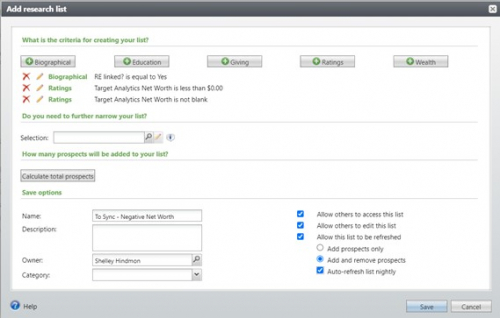
If you have Raiser’s Edge or Raiser’s Edge NXT, the logical next step is to synchronize these prospects so that the Affluence Insight scores can exist within your database of record and be utilized within RE to review on the Ratings tile/tab of constituent records. For our purposes today, we will use RE and RE NXT interchangeably as there are no differences in the integration settings between the versions. Once the ratings are in RE, you can use the Affluence Insight scores to segment and report on prospects using queries, lists, and your Work Center.
You may have noticed that some records do not successfully synchronize with Raiser’s Edge and possibly you’ve seen this error pop up in an exception report when trying to sync your Target Analytics Affluence Insight scores. The error message reads as follows:
Issue 1: Error message when syncing ResearchPoint and RE 7 or RE NXT: “Invalid Amount: This record contains a negative currency which cannot be synced to RE
Why do you get this exception? This error happens because some records have predicted negative Net Worth amounts, and thus the full record will except out of the syncing process, so no model scores and WealthPoint data will sync to RE. In ResearchPoint, these Net Worth amounts are surrounded by a left and right parathesis such as ($3,500.00) for those with a negative Net Worth predicted amount of $3,500. In Raiser’s Edge, currency data type ratings cannot have a negative value, therefore the exception occurs.
What if you see negative Net Worth values in ResearchPoint, but you do not receive the exception error when syncing the record? This means that your Target Analytics Net Worth rating is formatted with a text data type, thereby allowing the negative value to read as text rather than currency. We will address how update your ratings data type to currency for easier reporting on these Affluence Insight scores in a future blog post.
For these negative Net Worth records, with the help of my wonderful colleague Shelley Weifenbach, we have put together the following next steps to help you successfully synchronize the other Target Analytics scores you wish to push to RE and only exclude the negative Net Worth scores:
- First create a Research List in ResearchPoint by going to the Prosects tab Þ Add button near the top to isolate these records with the following criteria (also in the screenshot below):
- ‘RE Linked’ = ‘Yes’ plus Target Analytics Net Worth >= ‘$0.00’ plus ‘Target Analytics Net Worth’ Is ‘Not Blank’
- Be sure to Save your research list via the button in the lower right-hand corner

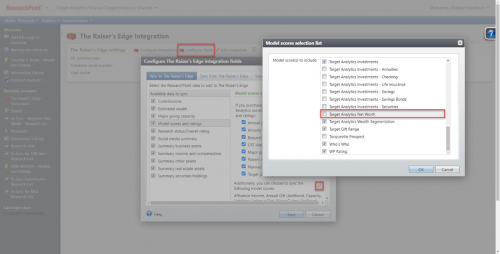
- Next you will want to uncheck the ‘Target Analytics Net Worth’ scores via the Home tab Þ The Raiser’s Edge Integration button Þ Configure Fields button Þ under the Sync to The Raiser’s Edge tab, highlight Model Scores and Ratings Þ click on diagonal pencil in lower right corner Þ deselect the check next to the checkbox for ‘Target Analytics Net Worth’ – See screenshot below:

- Go back to your research list mentioned above by going to Prospects tab Þ View All Lists button at the top Þ find the research list you just created based on those with negative net worth amounts Þ open the list by clicking on the name of your list Þ click on Sync with RE button near the top of this list
IMPORTANT NOTE
After you are done syncing the research list, you will want to go back to your Configure Fields section under The Raiser’s Edge Integration area of ResearchPoint and recheck the checkbox next to the ‘Target Analytics Net Worth’ score if you wish to continue synchronizing other records with Raiser’s Edge, as most of your Net Worth scores will have positive values.- Syncing Tip: It is recommend that you first sync these negative net worth records first, and then sync your remaining prospects with the ‘Target Analytics Net Worth’ checkbox rechecked as suggested above
If you continue to have questions on this, please feel free to contact our Blackbaud Analytics support team. Hope this post is helpful!
2
Comments
-
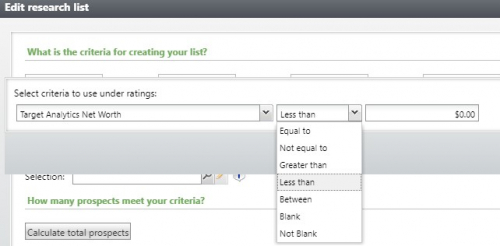
Please note that I have a typo in this blog. The research list criteria should state “less than” < $0.00 instead of “less than or equal to” ≤ $0.00. Zero dollar net worth amounts are integrating with Raiser's Edge just fine. See screenshot below sent by Elizabeth Campi - Thank you Elizabeth!
 0
0
Categories
- All Categories
- New K-12 Community Home (TEST)
- New Higher Education Home Page (Test)
- New Impact Edge Community TEST
- New YourCause Community TEST
- New SKY Community TEST
- New Grantmaking TEST Community
- New Altru Test Community
- New bbcon Community - TEST
- 12 Blackbaud Agents for Good™
- New Raiser's Edge NXT Community
- 8 Blackbaud Community Help
- 222 bbcon®
- 1.4K Blackbaud Altru®
- 411 Blackbaud Award Management™ and Blackbaud Stewardship Management™
- 1.2K Blackbaud CRM™ and Blackbaud Internet Solutions™
- 16 donorCentrics®
- 361 Blackbaud eTapestry®
- 2.7K Blackbaud Financial Edge NXT®
- 688 Blackbaud Grantmaking™
- 604 Blackbaud Education Management Solutions for Higher Education
- 3.3K Blackbaud Education Management Solutions for K-12 Schools
- 954 Blackbaud Luminate Online® and Blackbaud TeamRaiser®
- 85 JustGiving® from Blackbaud®
- 7.1K Blackbaud Raiser's Edge NXT®
- 4K SKY Developer
- 258 ResearchPoint™
- 123 Blackbaud Tuition Management™
- 165 Organizational Best Practices
- 249 Member Lounge (Just for Fun)
- 40 Blackbaud Community Challenges
- 37 PowerUp Challenges
- 3 (Closed) PowerUp Challenge: Grid View Batch
- 3 (Closed) PowerUp Challenge: Chat for Blackbaud AI
- 3 (Closed) PowerUp Challenge: Data Health
- 3 (Closed) Raiser's Edge NXT PowerUp Challenge: Product Update Briefing
- 3 (Closed) Raiser's Edge NXT PowerUp Challenge: Standard Reports+
- 3 (Closed) Raiser's Edge NXT PowerUp Challenge: Email Marketing
- 3 (Closed) Raiser's Edge NXT PowerUp Challenge: Gift Management
- 4 (Closed) Raiser's Edge NXT PowerUp Challenge: Event Management
- 3 (Closed) Raiser's Edge NXT PowerUp Challenge: Home Page
- 4 (Closed) Raiser's Edge NXT PowerUp Challenge: Standard Reports
- 4 (Closed) Raiser's Edge NXT PowerUp Challenge: Query
- 829 Community News
- 3.1K Jobs Board
- 57 Blackbaud SKY® Reporting Announcements
- 47 Blackbaud CRM Higher Ed Product Advisory Group (HE PAG)
- 19 Blackbaud CRM Product Advisory Group (BBCRM PAG)