Taking Your HTML Email to the Next Level



Thanks so much to everyone who attended our August Luminate Community webinar last week. Another huge thanks to our very own Shiloh Daniel, who gave some amazing tips and best practices for taking your HTML email to the next level. Since this was such a popular topic, we decided to post a follow-up blog with the Q&A as well as a number of helpful resource links.
Before we dig into the Resoures and Q&A, here is a quick snapshot of the highlights:
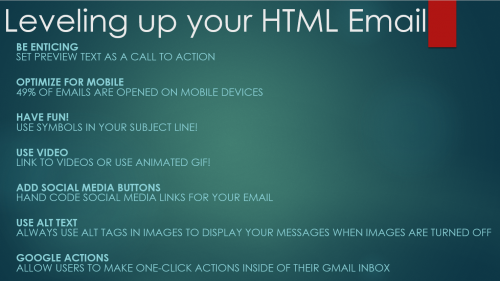
Check the "Miss our August Webinar?" section to Download the Recording and Slides here!
Q&A:
1. Do all email websites (e.g., gmail, yahoo, outlook, etc.) support CSS3? A: Yes, they do.
2. Is it bad to only use an image as your body copy in an email? (i.e., champagne example) A. Yes, you should not use an image to show text in general, and definitely not the main text of your email. Also, you should be using alt tags to give the message.
3. Does Convio/Luminate have any mobile-ready templates we can use and modify as a starting point? A: Yes, the Responsive Pagewrapper Starter Kit is available.
4. We typically use an image at the header or beginning of our email. Will the alt text show as the preview line? A: It will for some browsers, but not all, so it is better to use regular text in a span or div tag.
5. Does the symbol in the subject affect your spam score at all? It will not affect the Luminate spam score model. A recent study by Campaign Manager found that it did not trigger spam filters-- https://www.campaignmonitor.com/dev-resources/will-it-work/symbols/
6. Will the instructions for using the icons be shared following the presentation?
• Step One: Find the symbol you want to use
- https://en.wikipedia.org/wiki/Miscellaneous_Symbols_and_Pictographs
• Step Two: Copy the symbol into the encoding tool at
base64encode.org.
• Step Three: Use the following format to code your icon:
• =?utf-8?B?{insert symbol code here}?=
• The ☀ symbol encoded as 4piA, so you would use =?utf-8?B?4piA?=
• Step Four:
Add symbol code to your subject line
• Step Five:
Send a review email
7. Are the symbols there to attract attention or do they link to anything? A: They are there to attract attention and do not link to anything.
8. Can we get the code snip for placing the symbol in the subject line? A. See above
9. We use photoshop to prep our images. What's the best way to optimize images for emails--especially images with text?
A. Try looking at in different formats before you export from Photoshop. Photographs look better in JPG or PNG-24. This article has information about the different formats: http://blog.thinkful.com/post/103650638583/optimizing-your-images-make-your-website-load
Another idea is to cut he image in two parts- optimizing the text in one part and the photo in the other.
10. Where is a good place to find consultants/companies who can help with email design? A: Blackbaud email design services Or a Blackbaud partner
11. Do you have any links where we can find free symbols to use in our HTML emails? A: http://fsymbols.com/ & https://en.wikipedia.org/wiki/Miscellaneous_Symbols_and_Pictographs
Before we dig into the Resoures and Q&A, here is a quick snapshot of the highlights:

Check the "Miss our August Webinar?" section to Download the Recording and Slides here!
Q&A:
1. Do all email websites (e.g., gmail, yahoo, outlook, etc.) support CSS3? A: Yes, they do.
2. Is it bad to only use an image as your body copy in an email? (i.e., champagne example) A. Yes, you should not use an image to show text in general, and definitely not the main text of your email. Also, you should be using alt tags to give the message.
3. Does Convio/Luminate have any mobile-ready templates we can use and modify as a starting point? A: Yes, the Responsive Pagewrapper Starter Kit is available.
4. We typically use an image at the header or beginning of our email. Will the alt text show as the preview line? A: It will for some browsers, but not all, so it is better to use regular text in a span or div tag.
5. Does the symbol in the subject affect your spam score at all? It will not affect the Luminate spam score model. A recent study by Campaign Manager found that it did not trigger spam filters-- https://www.campaignmonitor.com/dev-resources/will-it-work/symbols/
6. Will the instructions for using the icons be shared following the presentation?
• Step One: Find the symbol you want to use
- https://en.wikipedia.org/wiki/Miscellaneous_Symbols_and_Pictographs
• Step Two: Copy the symbol into the encoding tool at
base64encode.org.
• Step Three: Use the following format to code your icon:
• =?utf-8?B?{insert symbol code here}?=
• The ☀ symbol encoded as 4piA, so you would use =?utf-8?B?4piA?=
• Step Four:
Add symbol code to your subject line
• Step Five:
Send a review email
7. Are the symbols there to attract attention or do they link to anything? A: They are there to attract attention and do not link to anything.
8. Can we get the code snip for placing the symbol in the subject line? A. See above
9. We use photoshop to prep our images. What's the best way to optimize images for emails--especially images with text?
A. Try looking at in different formats before you export from Photoshop. Photographs look better in JPG or PNG-24. This article has information about the different formats: http://blog.thinkful.com/post/103650638583/optimizing-your-images-make-your-website-load
Another idea is to cut he image in two parts- optimizing the text in one part and the photo in the other.
10. Where is a good place to find consultants/companies who can help with email design? A: Blackbaud email design services Or a Blackbaud partner
11. Do you have any links where we can find free symbols to use in our HTML emails? A: http://fsymbols.com/ & https://en.wikipedia.org/wiki/Miscellaneous_Symbols_and_Pictographs
0
Comments
-
For point 1, I would clarify to say that they support some CSS3 properties but not all and there are some exceptions.
CampaignMonitor has the best CSS guide around:
https://www.campaignmonitor.com/css/
You can see how some CSS3 properties are not supported/work differently than expected in e-mail.0 -
Has anyone been approved for Google Actions? I've tried but denied because the mailed-by and signed-by domains were different.0






Categories
- All Categories
- New K-12 Community Home (TEST)
- New Higher Education Home Page (Test)
- New Impact Edge Community TEST
- New YourCause Community TEST
- New SKY Community TEST
- New Grantmaking TEST Community
- New Altru Test Community
- New bbcon Community - TEST
- 12 Blackbaud Agents for Good™
- New Raiser's Edge NXT Community
- 8 Blackbaud Community Help
- 223 bbcon®
- 1.4K Blackbaud Altru®
- 411 Blackbaud Award Management™ and Blackbaud Stewardship Management™
- 1.2K Blackbaud CRM™ and Blackbaud Internet Solutions™
- 16 donorCentrics®
- 361 Blackbaud eTapestry®
- 2.7K Blackbaud Financial Edge NXT®
- 688 Blackbaud Grantmaking™
- 604 Blackbaud Education Management Solutions for Higher Education
- 3.3K Blackbaud Education Management Solutions for K-12 Schools
- 954 Blackbaud Luminate Online® and Blackbaud TeamRaiser®
- 85 JustGiving® from Blackbaud®
- 7.1K Blackbaud Raiser's Edge NXT®
- 4K SKY Developer
- 258 ResearchPoint™
- 123 Blackbaud Tuition Management™
- 165 Organizational Best Practices
- 249 Member Lounge (Just for Fun)
- 40 Blackbaud Community Challenges
- 37 PowerUp Challenges
- 3 (Closed) PowerUp Challenge: Grid View Batch
- 3 (Closed) PowerUp Challenge: Chat for Blackbaud AI
- 3 (Closed) PowerUp Challenge: Data Health
- 3 (Closed) Raiser's Edge NXT PowerUp Challenge: Product Update Briefing
- 3 (Closed) Raiser's Edge NXT PowerUp Challenge: Standard Reports+
- 3 (Closed) Raiser's Edge NXT PowerUp Challenge: Email Marketing
- 3 (Closed) Raiser's Edge NXT PowerUp Challenge: Gift Management
- 4 (Closed) Raiser's Edge NXT PowerUp Challenge: Event Management
- 3 (Closed) Raiser's Edge NXT PowerUp Challenge: Home Page
- 4 (Closed) Raiser's Edge NXT PowerUp Challenge: Standard Reports
- 4 (Closed) Raiser's Edge NXT PowerUp Challenge: Query
- 829 Community News
- 3.1K Jobs Board
- 57 Blackbaud SKY® Reporting Announcements
- 47 Blackbaud CRM Higher Ed Product Advisory Group (HE PAG)
- 19 Blackbaud CRM Product Advisory Group (BBCRM PAG)