Dear Ben/Benjamin/Friend,





When it comes to email salutations in Luminate Online, there's a common conundrum involving nicknames and the Nickname field. The challenge goes something like this: we want to display someone's nickname, but if the nickname field is empty then display the first name, and if the first name field is empty then display "Friend."
Nickname, if blank then First Name, if blank then Friend, is what is referred to as a nested conditional. There are two ways to create this nested conditional in Luminate Online: using the Content (WYSIWYG) Editor or using S-Tag code.
In either case, first make sure your organization is using the nickname field. If the field is not currently in use, either a staff member with super administrator privileges at your organization or a Blackbaud Support Analyst can turn on this option for you.
To create the nested conditional in the Content Editor, place your cursor where you want the personalization to go and click the Personalization icon. Under the Biographical group, select Nickname and in the Text to display when empty field, place a space. This will create the first conditional.
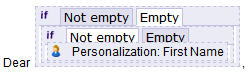 In the Content Editor, switch to the Empty tab, delete the space and with your cursor still in that tab, click the Personalization icon again. This time, under the Biographical group, select First Name and in the field Text to display when empty, enter Friend—or whatever text your organization displays when the field is blank.
If you feel comfortable using S-Tag code, the code for this nested conditional is:
[[?xx::x[[S1:nickname]]x::[[?xx::x[[S1:first_name]]x::Friend::[[S1:first_name]]]]::[[S1:nickname]]]]
The S-Tag code works backwards from how we built the nested conditional in the Content Editor, first checking whether the field is empty, and then displaying the field if it is not empty.
For an introduction to creating emails and using the Content Editor in Luminate Online, take Luminate Online: Fundamentals—Email. To learn about S-Tags, register for Luminate Online: Tailoring Content with S-Tags. For more details on how to write nested greeting conditionals, Search the Blackbaud Community for "Complex Salutation stags."
Comments
-
test0



Categories
- All Categories
- New K-12 Community Home (TEST)
- New Higher Education Home Page (Test)
- New Impact Edge Community TEST
- New YourCause Community TEST
- New SKY Community TEST
- New Grantmaking TEST Community
- New Altru Test Community
- New bbcon Community - TEST
- 12 Blackbaud Agents for Good™
- New Raiser's Edge NXT Community
- 8 Blackbaud Community Help
- 222 bbcon®
- 1.4K Blackbaud Altru®
- 411 Blackbaud Award Management™ and Blackbaud Stewardship Management™
- 1.2K Blackbaud CRM™ and Blackbaud Internet Solutions™
- 16 donorCentrics®
- 361 Blackbaud eTapestry®
- 2.7K Blackbaud Financial Edge NXT®
- 688 Blackbaud Grantmaking™
- 604 Blackbaud Education Management Solutions for Higher Education
- 3.3K Blackbaud Education Management Solutions for K-12 Schools
- 954 Blackbaud Luminate Online® and Blackbaud TeamRaiser®
- 85 JustGiving® from Blackbaud®
- 7.1K Blackbaud Raiser's Edge NXT®
- 4K SKY Developer
- 258 ResearchPoint™
- 123 Blackbaud Tuition Management™
- 165 Organizational Best Practices
- 249 Member Lounge (Just for Fun)
- 40 Blackbaud Community Challenges
- 37 PowerUp Challenges
- 3 (Closed) PowerUp Challenge: Grid View Batch
- 3 (Closed) PowerUp Challenge: Chat for Blackbaud AI
- 3 (Closed) PowerUp Challenge: Data Health
- 3 (Closed) Raiser's Edge NXT PowerUp Challenge: Product Update Briefing
- 3 (Closed) Raiser's Edge NXT PowerUp Challenge: Standard Reports+
- 3 (Closed) Raiser's Edge NXT PowerUp Challenge: Email Marketing
- 3 (Closed) Raiser's Edge NXT PowerUp Challenge: Gift Management
- 4 (Closed) Raiser's Edge NXT PowerUp Challenge: Event Management
- 3 (Closed) Raiser's Edge NXT PowerUp Challenge: Home Page
- 4 (Closed) Raiser's Edge NXT PowerUp Challenge: Standard Reports
- 4 (Closed) Raiser's Edge NXT PowerUp Challenge: Query
- 829 Community News
- 3.1K Jobs Board
- 57 Blackbaud SKY® Reporting Announcements
- 47 Blackbaud CRM Higher Ed Product Advisory Group (HE PAG)
- 19 Blackbaud CRM Product Advisory Group (BBCRM PAG)