What's New in Raiser's Edge NXT the Week of February 23





This week, Raiser's Edge NXT updates with several new features and enhancements, ranging from constituents and gifts to proposals and attachments. There's a little something for everyone. Enjoy!
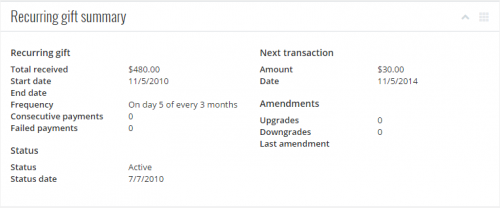 View recurring gift details. Recurring gifts are commitments to donate at regular intervals for an indefinite period of time, such as automatic monthly gifts of $50. On the record of a recurring gift, you can now view pertinent details — such as how much the donor already paid and how much to expect in the next payment — under Recurring gift summary. (In the future, you'll be able to quickly view the history of a recurring gift and details about each of its payments.) For more information, see Recurring Gift Summary Help.
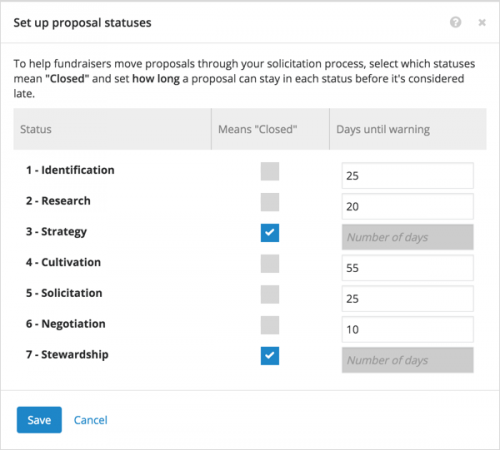 Set up proposal statuses. With Prospect Research Management, you can use proposals to plan and track efforts to build relationships with prospects and secure major gift opportunities. To better track your solicitation process, system admins can now set how long a proposal can have a status and whether to consider it closed. If your organization sets how long a proposal can have each status, you can view how long a proposal's had its staus — and whether it's overdue or closed — under Proposal status or in the summary on its record, under Proposals on its constituent's record, or under Proposal status on a list of proposals. (Inactive proposals and those with statuses set in the database view don't track how long they have a status.)
Admins! To alert fundraisers when proposals are overdue, select Settings under Proposals on a constituent's record and set how long a proposal should have each status of your solicitation process.
For more information, check out Proposal Status Help.
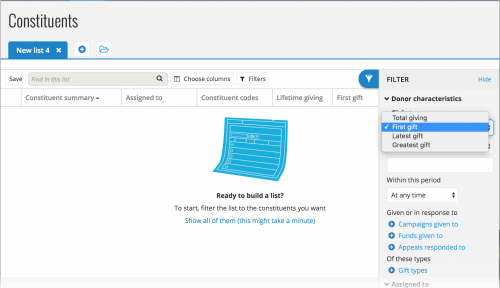 Filter constituents by their milestone gifts. You can now filter lists of constituents by how much they gave your organization in their first, latest, or greatest gifts. To include constituents based on this detail, select Filters and, under Giving, choose the type and amount of their gift, such as Latest gift greater than or equal to $1,000. To further define the giving, you can also include gifts within a specific period of time, toward specific fundraising efforts, or of specific types. For more information, see Constituent Filters Help.
Preview image attachments. When you attach a photo or picture to a constituent, you can now preview its thumbnail image on the attachment. Previously, you had to open an attachment to view its image.
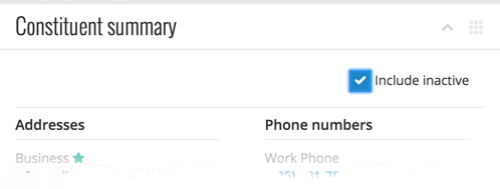 View inactive contact information. To help reduce clutter on constituent records, inactive contact information — such as address, phone numbers, and email addresses — is now hidden by default under Constituent summary. To view inactive contact information, select Include inactive.
For more information about these new features, or to catch up on previous updates, check out the What's New Help and What's Recent Help!
 View recurring gift details. Recurring gifts are commitments to donate at regular intervals for an indefinite period of time, such as automatic monthly gifts of $50. On the record of a recurring gift, you can now view pertinent details — such as how much the donor already paid and how much to expect in the next payment — under Recurring gift summary. (In the future, you'll be able to quickly view the history of a recurring gift and details about each of its payments.) For more information, see Recurring Gift Summary Help.
 Set up proposal statuses. With Prospect Research Management, you can use proposals to plan and track efforts to build relationships with prospects and secure major gift opportunities. To better track your solicitation process, system admins can now set how long a proposal can have a status and whether to consider it closed. If your organization sets how long a proposal can have each status, you can view how long a proposal's had its staus — and whether it's overdue or closed — under Proposal status or in the summary on its record, under Proposals on its constituent's record, or under Proposal status on a list of proposals. (Inactive proposals and those with statuses set in the database view don't track how long they have a status.)
Admins! To alert fundraisers when proposals are overdue, select Settings under Proposals on a constituent's record and set how long a proposal should have each status of your solicitation process.
For more information, check out Proposal Status Help.
 Filter constituents by their milestone gifts. You can now filter lists of constituents by how much they gave your organization in their first, latest, or greatest gifts. To include constituents based on this detail, select Filters and, under Giving, choose the type and amount of their gift, such as Latest gift greater than or equal to $1,000. To further define the giving, you can also include gifts within a specific period of time, toward specific fundraising efforts, or of specific types. For more information, see Constituent Filters Help.
Preview image attachments. When you attach a photo or picture to a constituent, you can now preview its thumbnail image on the attachment. Previously, you had to open an attachment to view its image.
 View inactive contact information. To help reduce clutter on constituent records, inactive contact information — such as address, phone numbers, and email addresses — is now hidden by default under Constituent summary. To view inactive contact information, select Include inactive.
For more information about these new features, or to catch up on previous updates, check out the What's New Help and What's Recent Help!
0
Categories
- All Categories
- New K-12 Community Home (TEST)
- New Higher Education Home Page (Test)
- New Impact Edge Community TEST
- New YourCause Community TEST
- New SKY Community TEST
- New Grantmaking TEST Community
- New Altru Test Community
- New bbcon Community - TEST
- 12 Blackbaud Agents for Good™
- New Raiser's Edge NXT Community
- 8 Blackbaud Community Help
- 222 bbcon®
- 1.4K Blackbaud Altru®
- 411 Blackbaud Award Management™ and Blackbaud Stewardship Management™
- 1.2K Blackbaud CRM™ and Blackbaud Internet Solutions™
- 16 donorCentrics®
- 361 Blackbaud eTapestry®
- 2.7K Blackbaud Financial Edge NXT®
- 688 Blackbaud Grantmaking™
- 604 Blackbaud Education Management Solutions for Higher Education
- 3.3K Blackbaud Education Management Solutions for K-12 Schools
- 954 Blackbaud Luminate Online® and Blackbaud TeamRaiser®
- 85 JustGiving® from Blackbaud®
- 7.1K Blackbaud Raiser's Edge NXT®
- 4K SKY Developer
- 258 ResearchPoint™
- 123 Blackbaud Tuition Management™
- 165 Organizational Best Practices
- 249 Member Lounge (Just for Fun)
- 40 Blackbaud Community Challenges
- 37 PowerUp Challenges
- 3 (Closed) PowerUp Challenge: Grid View Batch
- 3 (Closed) PowerUp Challenge: Chat for Blackbaud AI
- 3 (Closed) PowerUp Challenge: Data Health
- 3 (Closed) Raiser's Edge NXT PowerUp Challenge: Product Update Briefing
- 3 (Closed) Raiser's Edge NXT PowerUp Challenge: Standard Reports+
- 3 (Closed) Raiser's Edge NXT PowerUp Challenge: Email Marketing
- 3 (Closed) Raiser's Edge NXT PowerUp Challenge: Gift Management
- 4 (Closed) Raiser's Edge NXT PowerUp Challenge: Event Management
- 3 (Closed) Raiser's Edge NXT PowerUp Challenge: Home Page
- 4 (Closed) Raiser's Edge NXT PowerUp Challenge: Standard Reports
- 4 (Closed) Raiser's Edge NXT PowerUp Challenge: Query
- 829 Community News
- 3.1K Jobs Board
- 57 Blackbaud SKY® Reporting Announcements
- 47 Blackbaud CRM Higher Ed Product Advisory Group (HE PAG)
- 19 Blackbaud CRM Product Advisory Group (BBCRM PAG)