What's New in Raiser's Edge NXT the Week of April 19





This week, Raiser's Edge NXT updates with a handful of features, including enhanced management of a constituent's notes, additional details about constituents in lists, and — for those of you outside the US — more gift information.
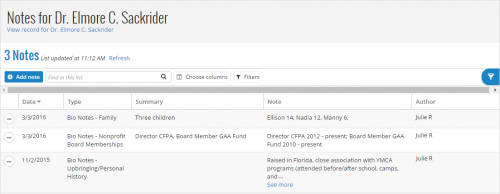 Manage a constituent's notes. Under Notes and actions on a constituent's record, you can now select the Notes total to open a full list of their notes. From this list, you can add, edit, and search for notes; choose which columns to view; and refresh to include new or edited information. You can also filter the list to view only notes that share characteristics such as type or date. For more information, see the Notes Help.
View when constituents in lists are inactive or deceased. Raiser's Edge NXT recently updated with the ability to mark a constituent as inactive or deceased. To help set priorities and prevent awkward interactions, you can now view when a constituent in a list is marked as such. In a list of constituents, actions, or proposals, just include the Constituent summary column, which now displays Inactive or Deceased when applicable. For more information, see the Inactive Constituents Help or Deceased Constituents Help.
View constituents' initials or profile pictures in lists. To help quickly identify and personalize constituents in lists, you can now include a Profile picture column to view the initials or picture — such as a headshot, logo, or other image — of each individual or organization. For more information, see the Profile Pictures Help.
 View a gift receipt's stack and history. In Canada, Australia, and New Zealand, you can now view additional details about the receipt issued for a gift under Acknowledgements on its record.
For more information about these features, or to catch up on previous updates, check out the What's New Help and What's Recent Help. Enjoy!
 Manage a constituent's notes. Under Notes and actions on a constituent's record, you can now select the Notes total to open a full list of their notes. From this list, you can add, edit, and search for notes; choose which columns to view; and refresh to include new or edited information. You can also filter the list to view only notes that share characteristics such as type or date. For more information, see the Notes Help.
View when constituents in lists are inactive or deceased. Raiser's Edge NXT recently updated with the ability to mark a constituent as inactive or deceased. To help set priorities and prevent awkward interactions, you can now view when a constituent in a list is marked as such. In a list of constituents, actions, or proposals, just include the Constituent summary column, which now displays Inactive or Deceased when applicable. For more information, see the Inactive Constituents Help or Deceased Constituents Help.
View constituents' initials or profile pictures in lists. To help quickly identify and personalize constituents in lists, you can now include a Profile picture column to view the initials or picture — such as a headshot, logo, or other image — of each individual or organization. For more information, see the Profile Pictures Help.
 View a gift receipt's stack and history. In Canada, Australia, and New Zealand, you can now view additional details about the receipt issued for a gift under Acknowledgements on its record.
- For tracking or accounting purposes, your organization may issue receipts from different groups — with or without duplicate numbers — based on gift type or various departments or chapters. To help track this information, you can now view which group a receipt was issued from in the Receipt stack field.
- To help comply with government guidelines, you can now also view details about previously issued or reprinted receipts for a gift. If you created multiple copies of a receipt — such as if the printer jammed or the donor misplaced the original — you can select View receipt history in the Receipt history field to view pertinent details about the different versions.
For more information about these features, or to catch up on previous updates, check out the What's New Help and What's Recent Help. Enjoy!
0
Categories
- All Categories
- New K-12 Community Home (TEST)
- New Higher Education Home Page (Test)
- New Impact Edge Community TEST
- New YourCause Community TEST
- New SKY Community TEST
- New Grantmaking TEST Community
- New Altru Test Community
- New bbcon Community - TEST
- 12 Blackbaud Agents for Good™
- New Raiser's Edge NXT Community
- 8 Blackbaud Community Help
- 222 bbcon®
- 1.4K Blackbaud Altru®
- 411 Blackbaud Award Management™ and Blackbaud Stewardship Management™
- 1.2K Blackbaud CRM™ and Blackbaud Internet Solutions™
- 16 donorCentrics®
- 361 Blackbaud eTapestry®
- 2.7K Blackbaud Financial Edge NXT®
- 688 Blackbaud Grantmaking™
- 604 Blackbaud Education Management Solutions for Higher Education
- 3.3K Blackbaud Education Management Solutions for K-12 Schools
- 954 Blackbaud Luminate Online® and Blackbaud TeamRaiser®
- 85 JustGiving® from Blackbaud®
- 7.1K Blackbaud Raiser's Edge NXT®
- 4K SKY Developer
- 258 ResearchPoint™
- 123 Blackbaud Tuition Management™
- 165 Organizational Best Practices
- 249 Member Lounge (Just for Fun)
- 40 Blackbaud Community Challenges
- 37 PowerUp Challenges
- 3 (Closed) PowerUp Challenge: Grid View Batch
- 3 (Closed) PowerUp Challenge: Chat for Blackbaud AI
- 3 (Closed) PowerUp Challenge: Data Health
- 3 (Closed) Raiser's Edge NXT PowerUp Challenge: Product Update Briefing
- 3 (Closed) Raiser's Edge NXT PowerUp Challenge: Standard Reports+
- 3 (Closed) Raiser's Edge NXT PowerUp Challenge: Email Marketing
- 3 (Closed) Raiser's Edge NXT PowerUp Challenge: Gift Management
- 4 (Closed) Raiser's Edge NXT PowerUp Challenge: Event Management
- 3 (Closed) Raiser's Edge NXT PowerUp Challenge: Home Page
- 4 (Closed) Raiser's Edge NXT PowerUp Challenge: Standard Reports
- 4 (Closed) Raiser's Edge NXT PowerUp Challenge: Query
- 829 Community News
- 3.1K Jobs Board
- 57 Blackbaud SKY® Reporting Announcements
- 47 Blackbaud CRM Higher Ed Product Advisory Group (HE PAG)
- 19 Blackbaud CRM Product Advisory Group (BBCRM PAG)