What's Newer: Editable And Customizable Name Formats!





This #GivingTuesday, hopefully you'll acquire new donors who discover your organization in their quest to support a mission close to their heart. To help ensure personal and receptive interactions as you cultivate these new relationships, Raiser's Edge NXT recently introduced the ability to manage and customize name formats in the web view!
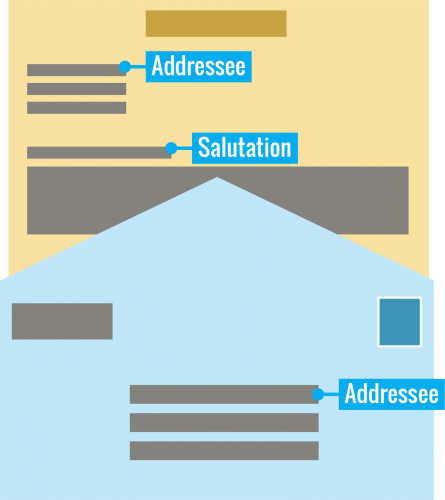 Name formats—aka addressess and salutations—define how an individual's name appears in communications.
Of course, an individual may request or show preference toward an addressee or salutation that doesn't match a standard pattern. To help respect these wishes and ensure you address someone how they prefer, you can now save custom name formats!
 Name formats—aka addressess and salutations—define how an individual's name appears in communications.
- Addressees determine how their name appears with a mailing address, such as in an address block or on a mailing label. Traditionally, addressees are formal, complete with titles and any suffixes.
- Salutations determine how their name appears as a greeting in a letter or email. Depending on your relationship with the individual and the context of the communication, the salutation may be formal or informal.
Of course, an individual may request or show preference toward an addressee or salutation that doesn't match a standard pattern. To help respect these wishes and ensure you address someone how they prefer, you can now save custom name formats!
- To enter a personal addressee or salutation when you add the individual's record, you can now select Custom next to its field under Primary name formats, and enter the special name format to use. For more information, see the Constituents Help or Related Individuals and Organizations Help.
- To manage an individual's name formats, you can now select Edit, Name formats under Constituent summary or Summary.
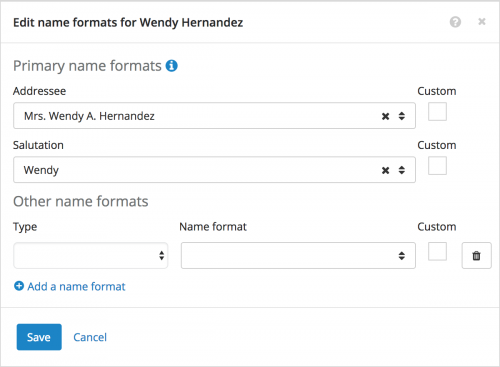 Under Primary name formats, choose the individual's preferred addressee or salutation to use by default. To define a unique addressee or salutation, select Custom next to its field, and enter the name format to use.
- Under Other name formats, choose any additional addressees or salutations to use, such as for specific types or tones of communication. To define a unique addressee or salutation for a specific type of communciation, select Custom next to its field, and enter the name format to use. To include an additional format, select Add a name format.

2
Comments
-
How do I get to the "configuration" settings to set up standard formats? I have searched the knowledgebase and help articles. I also looked through all of the settings within NXT that would seem to be the likely places for configuration of these features. I have admin rights, so there should not be any settings that I can't view. Thanks!0
-
Hey Stephen- The name format configuration settings appear in the database view. To view and manage the standard patterns, select 'Addressees/Salutations' in 'Config'. To add a new name format, select 'New Addr/Sal', and choose which fields and formatting options it includes. For more information, check out the Raiser's Edge Configuration & Security Guide at https://www.blackbaud.com/files/support/guides/re7/config.pdf. I hope that helps. Thanks!0
-
Yay! This sure makes life easier. Hi Stephen Kubasek, you set up configurations for addressees and salutations in the database view in Config (Configuration), Addressees/Salutations. You don't change or add to those settings in NXT.0
-
Very Happy! Thank you!0
-
Is the [Custom] checkbox the NXT equivalent of 7's [Editable] checkbox? Another terminology difference or an actual functionality difference?0
-
Good eye, Jen! The intent of the Editable and Custom checkboxes is indeed the same, so, yes, it’s safe to say that custom name formats in the web view are the same as ‘editable’ addressees and salutations in the database view. Thanks!0










Categories
- All Categories
- New eTapestry Home Community
- New K-12 Community Home (TEST)
- New Higher Education Home Page (Test)
- New Impact Edge Community TEST
- New YourCause Community TEST
- New SKY Community TEST
- New Grantmaking TEST Community
- New Altru Test Community
- New bbcon Community - TEST
- 12 Blackbaud Agents for Good™
- New Raiser's Edge NXT Community
- 8 Blackbaud Community Help
- 223 bbcon®
- 1.4K Blackbaud Altru®
- 411 Blackbaud Award Management™ and Blackbaud Stewardship Management™
- 1.2K Blackbaud CRM™ and Blackbaud Internet Solutions™
- 16 donorCentrics®
- 361 Blackbaud eTapestry®
- 2.7K Blackbaud Financial Edge NXT®
- 688 Blackbaud Grantmaking™
- 604 Blackbaud Education Management Solutions for Higher Education
- 3.3K Blackbaud Education Management Solutions for K-12 Schools
- 954 Blackbaud Luminate Online® and Blackbaud TeamRaiser®
- 85 JustGiving® from Blackbaud®
- 7.1K Blackbaud Raiser's Edge NXT®
- 4K SKY Developer
- 258 ResearchPoint™
- 124 Blackbaud Tuition Management™
- 165 Organizational Best Practices
- 249 Member Lounge (Just for Fun)
- 40 Blackbaud Community Challenges
- 37 PowerUp Challenges
- 3 (Closed) PowerUp Challenge: Grid View Batch
- 3 (Closed) PowerUp Challenge: Chat for Blackbaud AI
- 3 (Closed) PowerUp Challenge: Data Health
- 3 (Closed) Raiser's Edge NXT PowerUp Challenge: Product Update Briefing
- 3 (Closed) Raiser's Edge NXT PowerUp Challenge: Standard Reports+
- 3 (Closed) Raiser's Edge NXT PowerUp Challenge: Email Marketing
- 3 (Closed) Raiser's Edge NXT PowerUp Challenge: Gift Management
- 4 (Closed) Raiser's Edge NXT PowerUp Challenge: Event Management
- 3 (Closed) Raiser's Edge NXT PowerUp Challenge: Home Page
- 4 (Closed) Raiser's Edge NXT PowerUp Challenge: Standard Reports
- 4 (Closed) Raiser's Edge NXT PowerUp Challenge: Query
- 829 Community News
- 3.1K Jobs Board
- 57 Blackbaud SKY® Reporting Announcements
- 47 Blackbaud CRM Higher Ed Product Advisory Group (HE PAG)
- 19 Blackbaud CRM Product Advisory Group (BBCRM PAG)