What's New In Raiser's Edge NXT The Week Of July 16





For those with Gift management, Raiser's Edge NXT introduces the ability to automate recurring gifts and move gifts to different batches. For those with Events, it also includes options to manage additional details from the participant list. Add and automate recurring gifts (for those with Gift management). From Fundraising, Gift management, you can now add recurring gifts in the web view to automatically generate payments based on a schedule, such as when a constituent signs up to donate the same amount each month. Recurring gift payments are placed in unapproved batches and you must approve them to create their gift records. For more information, see Recurring Gifts.
If your organization has existing recurring gifts, you can convert them to automatic recurring gifts in the web view — saving time and eliminating the need to manually process payments. For more information, see Automate Manual Recurring Gifts.
Note: Don't see this feature? No need to worry. If all goes well based on feedback and usage, expect its wider release in a future update.
Move gifts to a different batch (for those with Gift management). You can now move gifts from one batch to another when both batches are unapproved. From Fundraising, Gift management, open the gift batch record. Select the checkbox of each gift to move and then select Move to different batch. For more information, see Gift Batch Records.
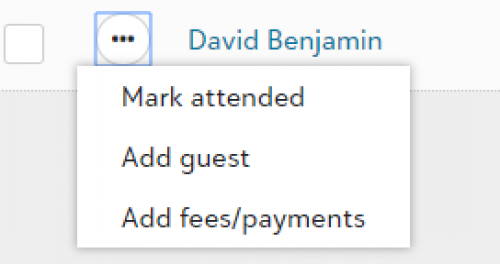 Manage additional details from the participant list (for those with Events). To help speed data entry, such as on the day of an event, you can add guest, fee, and payment information from the list of participants rather than each participant’s record. On an event record, under Participants, select Work with participants, and then Add guest or Add fees/payments from the participant’s menu. For more information, see Participants.
For more information, or to catch up on previous releases, check out the What's New Help and What's Recent Help. Enjoy!
If your organization has existing recurring gifts, you can convert them to automatic recurring gifts in the web view — saving time and eliminating the need to manually process payments. For more information, see Automate Manual Recurring Gifts.
Note: Don't see this feature? No need to worry. If all goes well based on feedback and usage, expect its wider release in a future update.
Move gifts to a different batch (for those with Gift management). You can now move gifts from one batch to another when both batches are unapproved. From Fundraising, Gift management, open the gift batch record. Select the checkbox of each gift to move and then select Move to different batch. For more information, see Gift Batch Records.
 Manage additional details from the participant list (for those with Events). To help speed data entry, such as on the day of an event, you can add guest, fee, and payment information from the list of participants rather than each participant’s record. On an event record, under Participants, select Work with participants, and then Add guest or Add fees/payments from the participant’s menu. For more information, see Participants.
For more information, or to catch up on previous releases, check out the What's New Help and What's Recent Help. Enjoy!
4
Comments
-
Hi Kriste Buck! If you don't see Gift management yet, don't worry. We're releasing the functionality in waved roll outs so you might not be in this first wave. To learn more about how we deploy features, check out this blog post: https://community.blackbaud.com/blogs/13/4854.0
-
When is the Donation Form Component going to roll out to general users? I see its in the early adopter phase at the moment.0
-
Hi Molly McColgan - According to the Product Manager for Donation Forms, the current release target for US clients is the second half of 2019 as we are gathering feedback from the EAP and responding to it. The next roadmap call will have more specifics on the timeline for the rollout. The rollout for international organizations will follow, but the timeline isn't set yet set as more development is required for international needs.0




Categories
- All Categories
- New K-12 Community Home (TEST)
- New Higher Education Home Page (Test)
- New Impact Edge Community TEST
- New YourCause Community TEST
- New SKY Community TEST
- New Grantmaking TEST Community
- New Altru Test Community
- New bbcon Community - TEST
- 12 Blackbaud Agents for Good™
- New Raiser's Edge NXT Community
- 8 Blackbaud Community Help
- 222 bbcon®
- 1.4K Blackbaud Altru®
- 410 Blackbaud Award Management™ and Blackbaud Stewardship Management™
- 1.2K Blackbaud CRM™ and Blackbaud Internet Solutions™
- 16 donorCentrics®
- 361 Blackbaud eTapestry®
- 2.7K Blackbaud Financial Edge NXT®
- 687 Blackbaud Grantmaking™
- 604 Blackbaud Education Management Solutions for Higher Education
- 3.3K Blackbaud Education Management Solutions for K-12 Schools
- 954 Blackbaud Luminate Online® and Blackbaud TeamRaiser®
- 85 JustGiving® from Blackbaud®
- 7K Blackbaud Raiser's Edge NXT®
- 4K SKY Developer
- 258 ResearchPoint™
- 123 Blackbaud Tuition Management™
- 165 Organizational Best Practices
- 248 Member Lounge (Just for Fun)
- 40 Blackbaud Community Challenges
- 37 PowerUp Challenges
- 3 (Closed) PowerUp Challenge: Grid View Batch
- 3 (Closed) PowerUp Challenge: Chat for Blackbaud AI
- 3 (Closed) PowerUp Challenge: Data Health
- 3 (Closed) Raiser's Edge NXT PowerUp Challenge: Product Update Briefing
- 3 (Closed) Raiser's Edge NXT PowerUp Challenge: Standard Reports+
- 3 (Closed) Raiser's Edge NXT PowerUp Challenge: Email Marketing
- 3 (Closed) Raiser's Edge NXT PowerUp Challenge: Gift Management
- 4 (Closed) Raiser's Edge NXT PowerUp Challenge: Event Management
- 3 (Closed) Raiser's Edge NXT PowerUp Challenge: Home Page
- 4 (Closed) Raiser's Edge NXT PowerUp Challenge: Standard Reports
- 4 (Closed) Raiser's Edge NXT PowerUp Challenge: Query
- 829 Community News
- 3.1K Jobs Board
- 57 Blackbaud SKY® Reporting Announcements
- 47 Blackbaud CRM Higher Ed Product Advisory Group (HE PAG)
- 19 Blackbaud CRM Product Advisory Group (BBCRM PAG)